Picking a model for a coding agent used to be a chore you did once and then regretted for months. You chose a strong model and paid strong model prices for trivial edits. Or you chose a cheap model and watched it fail the hard tasks in slow loops. New models landed every week and your choice aged fast.
Auto Code is OpenRouter trying to remove that choice. Released on November 5, 2026, it is not a model at all. It is a router slug, openrouter/auto-code, that you put in the model field of a request. OpenRouter then picks the model and the reasoning effort for that request, and the response tells you which model actually answered.
OpenRouter Auto Code
Official siteA model router tuned for coding agents and harnesses. Primary use case: letting a coding tool pick a fitting model and effort for each turn instead of forcing one model to do every job in a session.
Key features: a decision model rates eleven factors about each request in one call; live prices, provider health, and cache status feed the final pick; session signals such as repeated errors and failing tests can trigger a switch; allowed and excluded model lists, guardrails, and zero data retention rules limit the pool; and a routing insights panel in the chatroom shows why a model was picked.
Advantages: one slug tracks new model releases for you, costs follow the work instead of a single flagship rate, and your own limits still apply. Limitations: you give up exact control of which model answers, costs vary by request, and the router is available only in the global data region.
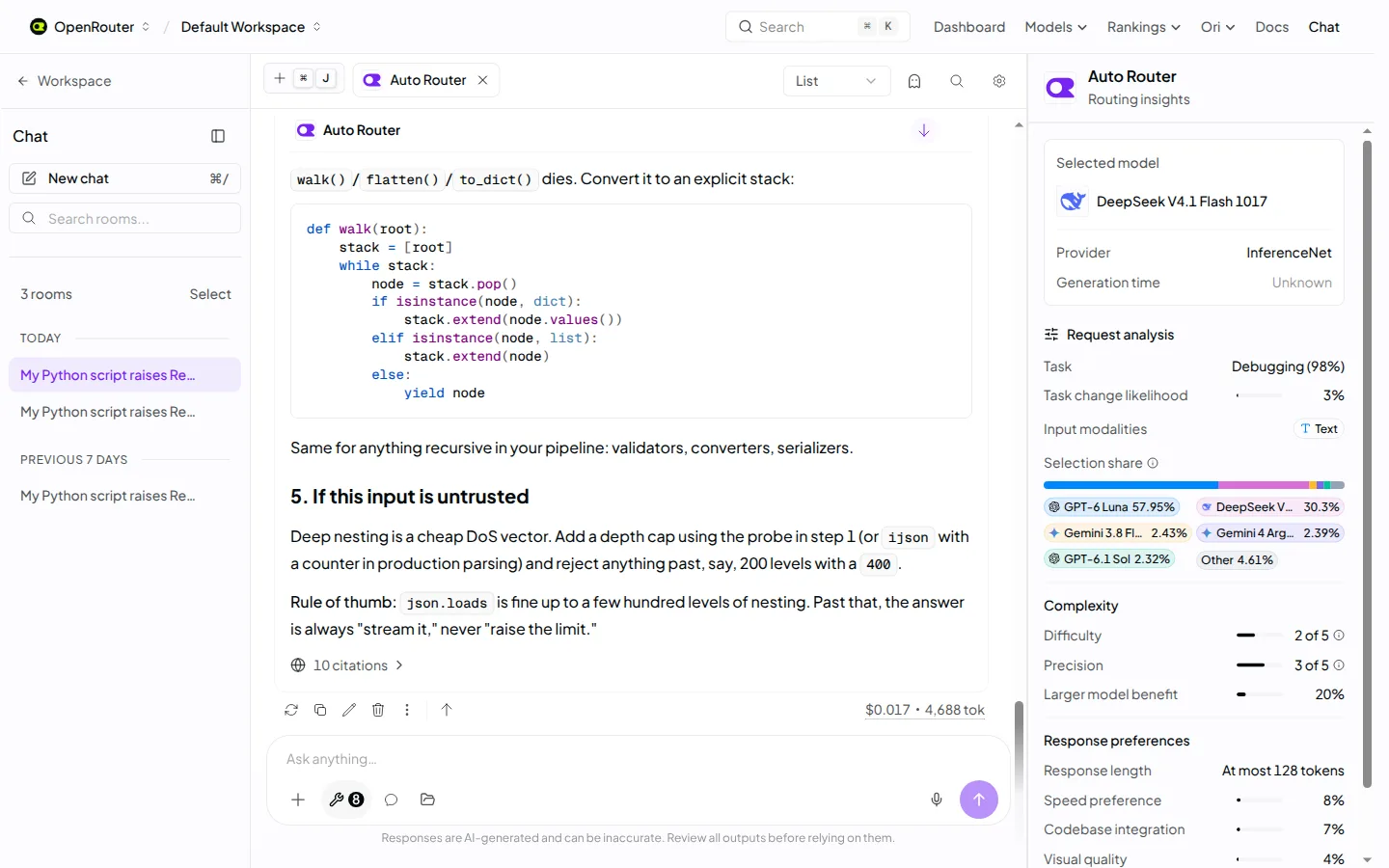 Routing you can inspect: the chatroom panel shows the task, the pick, and the share across candidate models. Screenshot: OpenRouter
How a request gets routed
OpenRouter describes a five step path, and the order matters. First the router narrows the pool. Guardrails, zero data retention needs, model abilities, provider limits, bring your own key rules, and any allowed or excluded lists you set decide which models can be considered at all. Your rules come first. The router only chooses inside them.
Next a fast decision model rates the request. Per the docs, it rates eleven things in one call, such as what kind of task this is, whether the task just changed, how hard it is, whether speed matters, and whether a bigger model or more thinking would help. Then the routing policy weighs that rating against live prices, cache status, and benchmark results to pick both the model and the effort.
After that, normal provider routing takes over. That second system picks which provider serves the chosen model, using your provider choices, uptime, latency, price, and cache state. Last, signals from each turn feed the next one, so the router knows if the current model is struggling or if a large cache is worth keeping.
Built for harnesses, not for chat
The general Auto Router and Auto Code share one engine. The split exists because a coding harness, the software that runs an agent through edits, tool calls, and test runs, behaves unlike a chat window. A session lasts many turns. Success and failure are visible. A wrong model choice early can waste an hour.
So Auto Code starts in a higher cost tier and favours models whose strengths match coding work. Per OpenRouter, its choices are guided by coding task pass rate, completion time, and cost per solved task. It weighs speed more heavily than the general router, because a slow agent breaks your flow while you build. It also penalizes failures more harshly, so it corrects course faster when work goes wrong.
Two habits show the tuning. The router is restrained about switching models, because a switch forces the new model to rebuild the input token cache and that costs money. In its beta period, OpenRouter says, it stayed on the same model for nearly nine of every ten agent turns, and it prefers to change reasoning effort first when that is enough. But when signals point at the model itself, such as the same error returning or tests failing after an edit, the odds of a switch rise.
This is the same problem we covered in Kilo Desktop, where routing by benchmark was the pitch, and in WordPress Studio, where the harness mattered more than the chat box. Auto Code pushes that logic one level down, into the model string itself.
What OpenRouter claims, and what is not proven
OpenRouter says Auto Code scores in line with Claude Opus 5.5 across five benchmarks while costing 74 percent less per task. The five are named Deep SWE, SWE Atlas QA, Terminal Bench 4.0, a banking bench, and MMMU Pro Vision. It also says the new routing step runs at 0.65 seconds at the p90 mark, against 1.96 seconds for the old router, that invalid tool calls were four times lower in beta, and that agent responses were cut off half as often.
The company is candid about one limit, and it deserves credit for printing it. Its launch post states plainly that no router beats the single best frontier model at every point on the cost and quality curve, and that choosing a router trades a little peak performance for steady and cost efficient performance over time. That is the honest shape of this product. If you already know the one model that nails your work, OpenRouter itself tells you to keep using it.
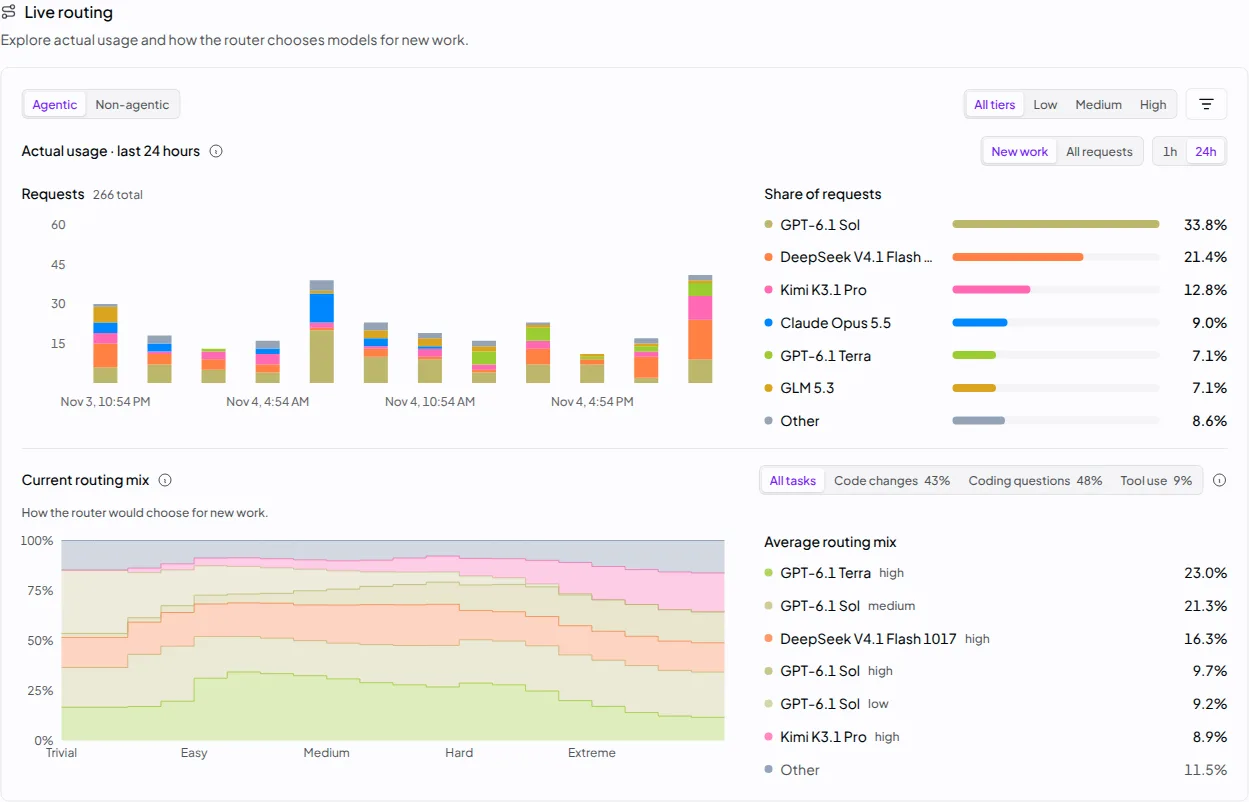 The model pages show the live routing mix and how it shifts as difficulty rises. Screenshot: OpenRouter
Auto Code or the general Auto Router
| Question | Auto Router | Auto Code |
|---|---|---|
| Model slug | openrouter/auto | openrouter/auto-code |
| Built for | Apps, chat, and general agents | Coding agents and harnesses |
| Starting tier | A cost efficient tier of models | A higher tier of coding models |
| Guided by | Task fit, live price, and benchmark results | Pass rate, completion time, and cost per solved task |
| Session view | Each request rated on its own merits and session signals | Every request treated as part of an agent session |
| Price | Standard rate of the model that serves the request | Same rule, no routing fee on either router |
Both routers respect the same controls. You can set a cost tier of low, medium, or high on a request, with low sitting closest to the old router in cost. You can allow or exclude models with patterns such as anthropic/*, and exclusions win over allowances. If your limits leave no model that fits, the request fails and the error names the field to change. Account level defaults can be saved as well, and a saved cost choice applies to the general router only, per the docs.
Pricing and platforms
There is no fixed price, and that is by design. Each request is billed at the standard rate of the model that serves it, so a trivial edit routed to a small model costs small model money and a hard task routed upward costs more. There is no extra fee for the routing itself. To see what you paid, read the model field in each response or check the Activity view.
Use is simple by router standards. Auto Code works anywhere you would put a model string, through the OpenRouter API or in the chatroom, and it needs conversational input, meaning a message list rather than the legacy prompt field. The model page lists a route ceiling of up to 2,000,000 tokens of context, but the real limit for any request is the limit of the model that serves it, so plan for variance rather than for a promise. The router is available only in the global data region, and the model page notes it is not currently available through EU in region routing.
What Works
- No routing fee, and costs track the difficulty of each task
- Session aware routing that protects the prompt cache and reacts to failing tests
- Your guardrails, data rules, provider limits, and key choices bound every pick
- New models enter the pool as they ship, with no code change on your side
- Routing reasons are visible in the chatroom and through router metadata
What Does Not
- No fixed price, so budgets rest on averages rather than on a rate card
- You cannot know in advance which model will answer a given turn
- Peak quality sits below the best single model, by OpenRouter's own account
- Global data region only, with no EU in region route at launch
- All quality and cost figures so far are OpenRouter claims, not outside tests
Which should you choose
Choose Auto Code if your coding agent does varied work and you are tired of model shopping. A session that mixes small edits, test runs, and a few genuinely hard problems is the shape this router was built for. It spends more only when the task earns it, and it can move on when a model starts failing in visible ways.
Choose the general Auto Router if your traffic is mixed. Chat, support, writing, and general agent work belong on openrouter/auto, which starts from a cheaper tier and was not tuned around code at all.
Keep a named model if your work is narrow and you have already found its best tool. Teams that run one known workload, or that must give the same model to every user for support or legal reasons, gain little here. Our guide to running several coding agents side by side makes the same point from the other direction: control is a feature, and giving it up should buy you something clear.
Wait if region rules decide for you. If your requests must stay inside the EU under an in region route, this router cannot serve you yet, no matter how good the numbers look.
Final thoughts
Auto Code is a small slug with a large admission inside it: model choice has become a job of its own, and most builders would rather hand that job to a system that watches prices, benchmarks, and failures all day. OpenRouter has the scale to run that system, with over 2.5 trillion tokens a month moving through the general router, per the company. The trade is plain and, for once, stated plainly by the seller. You lose the peak and the certainty of a named model. You gain a session that adjusts as the work changes. Run it on a side project first, watch the routing panel, compare the bill with your old single model month, and let your own numbers settle it.
Sources
- Launch, routing design, benchmark claims, and beta figures: Introducing the New Auto and Auto Code Routers, OpenRouter, November 6, 2026
- How it works, cost tiers, allowed and excluded models, pricing, and limits: Auto Router docs, OpenRouter
- Release date, context, inputs, and pricing rule: Auto Code model page, OpenRouter
- Screenshots: OpenRouter, from the launch post
END OF TRANSMISSION
Stay curious. Question everything.