Corgi is a terminal multiplexer built for coding agents. This tutorial installs Claude Code, Codex and OpenCode, brings all three up inside one Corgi workspace, and uses its agent states, token tracking and change scroll to run them side by side without losing track of which one needs you.
Three coding agents means three terminal windows, three places to check, and one agent always stuck on a question you have not seen. Corgi attacks that attention problem instead of the model problem. It is a terminal multiplexer built for humans and agents, first shown on Hacker News in October 2026 and listed on Product Hunt days later. Every pane carries a live state, every workspace tracks token use and resource use, and the agents keep running in the background when you step away, the way sessions do in tmux. This tutorial sets it up with the three agents in the headline.
What You Will Build or Learn
You will end with one Corgi workspace holding Claude Code, Codex and OpenCode in separate panes on the same project. You will give each agent its own task, read the state markers to see which one is working and which one is blocked on you, jump to the next unread agent with one key, and review every file an agent touched in a single scroll.
Corgi does not replace the agents and it does not sell you model access. The maker is explicit on that point: it reuses the accounts you already have. The unified launcher covers Codex, Claude Code and Pi, and the official site also lists OpenCode and omp among its agents. Usage tracking covers Claude Code, Codex, Pi and OpenCode, per the Product Hunt listing.
Before You Begin
Install and test each agent on its own before you put it inside Corgi. A multiplexer cannot fix a broken sign in, and an agent that fails in a plain terminal will fail in a pane for the same reason. Prove each command outside Corgi first, in the project folder you plan to use.
Step 1: Install the Agents and Prove Each One Runs
Action: install the agents you plan to use, using the command each project publishes for macOS and Linux. Skip any agent you do not use; two agents are enough to learn the workflow.
# Claude Code, native installer from Anthropic
curl -fsSL https://claude.ai/install.sh | bash

# Codex, standalone installer from OpenAI, or: npm install -g @openai/codex
curl -fsSL https://chatgpt.com/codex/install.sh | sh

# OpenCode, install script from the OpenCode project
curl -fsSL https://opencode.ai/install | bash
Expected result: three new commands on your path. Open a fresh terminal so the shell picks up the changes, move into your project folder, and start each agent once on its own:
claude --version
codex --version
opencode --version
claude
codex
opencode
Each first run asks you to sign in or connect a provider. Claude Code needs a paid Claude plan or a Console account, and the free Claude plan does not include it. Codex signs in with a ChatGPT plan or an OpenAI API key. OpenCode connects a provider inside its interface with the /connect command. Finish every sign in now, then exit each agent. If a command is missing, fix that install before you move on.
Step 2: Install Corgi and Start It in Your Project
Action: install Corgi with the single curl command the project publishes on its official site at corgi.computer. The same command sits in the header of the install script itself, and the Product Hunt listing prices the tool at zero dollars.
curl -fsSL https://corgi.computer/install.sh | bash
Then move into the project folder and start Corgi:
cd /path/to/your/project
corgi
Expected result: Corgi opens its workspace in your terminal. The official site sums this step up in four words: corgi and you are in. You should see a workspace ready for terminals and agents, with room for a dev server alongside them.
Step 3: Open the Three Agents Side by Side
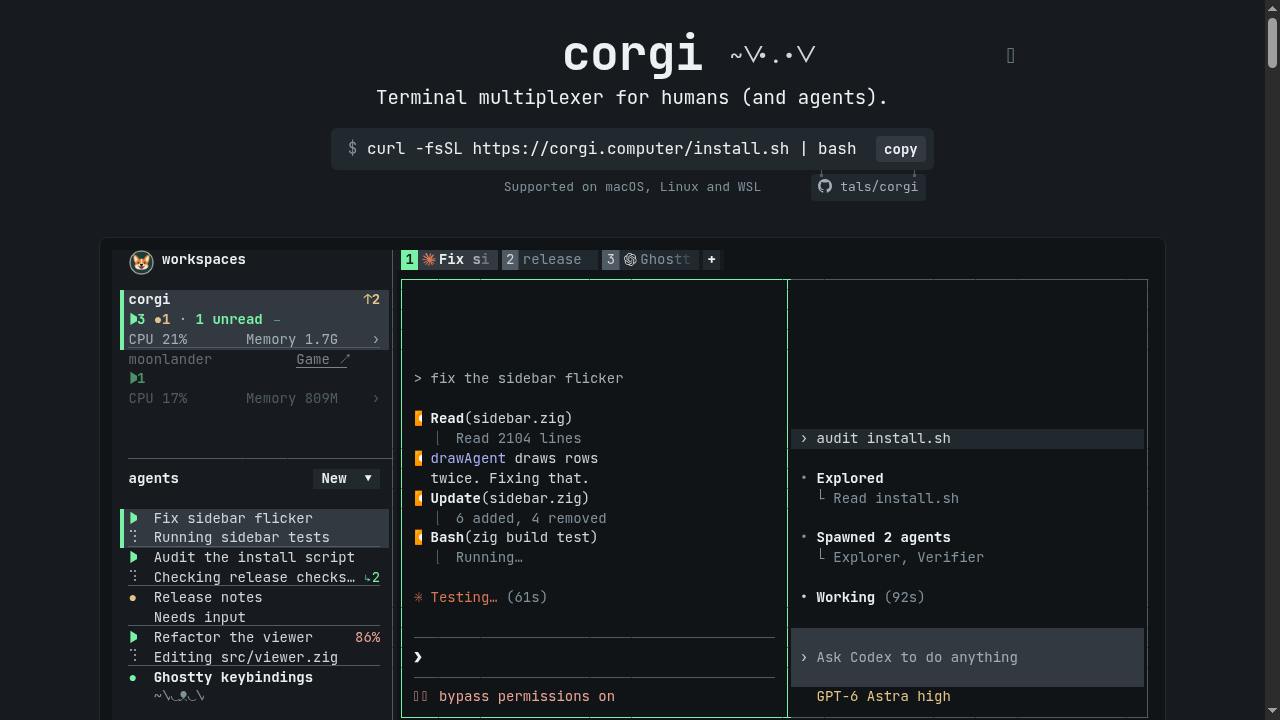
Action: press Ctrl-T to jump into work, new or old, and use the unified launcher to start Claude Code. Repeat for Codex and OpenCode. To see them side by side rather than as stacked tabs, split the view: Corgi uses Ctrl-B as its prefix key, so press Ctrl-B and then v to split right, or Ctrl-B and then - to split down, and place one agent in each pane.
Expected result: three agents on one screen, whether you keep them as tabs or split them into panes. Each pane shows a live state from the set Corgi uses: working, needs you, unread, or clear. Because Corgi reuses your existing accounts and you signed in during Step 1, the agents should start work without a second round of sign ins. If a pane lands on needs you at once, it is almost always a sign in or an approval that Step 1 left unfinished.
Step 4: Give Each Agent Its Own Task and Its Own Ground
Action: hand out tasks the way you would to three people sharing one office. One agent drafts a change, one reviews a diff or writes tests, one handles a small and separate fix. Where the work could collide, use Corgi and its worktree support to keep tasks apart, since the project organises workspaces into worktrees for exactly this reason.
Claude Code: Draft the change in the feature file and explain your plan first.
Codex: Write tests for the current behaviour before anything changes.
OpenCode: Fix the small bug in the utility file and touch nothing else.
Expected result: all three agents move to the working state and stay there in parallel. The rule that makes this safe is boring and total: no two agents edit the same file at the same time. When two agents must touch related code, run them in sequence, or split the work by worktree, and merge with your eyes open.
Step 5: Work the Attention Queue With F1
Action: stop watching panes and start watching states. Work on your own task, and when an agent finishes or blocks, its pane turns unread or needs you. Press F1 to catch up: Corgi takes you to the next unread agent. Hover an agent to see what it did, per the activity tracking on the official site.
Expected result: your review loop becomes a queue instead of a patrol. The states tell you where a human is required, F1 takes you there, and the token view shows where the tokens went, with context and rate limit tracking for Claude Code, Codex, Pi and OpenCode. Per workspace resource usage runs live as well, so a runaway agent shows up as CPU and memory before it shows up as a surprise.
Step 6: Leave, Come Back, and Review Every Change
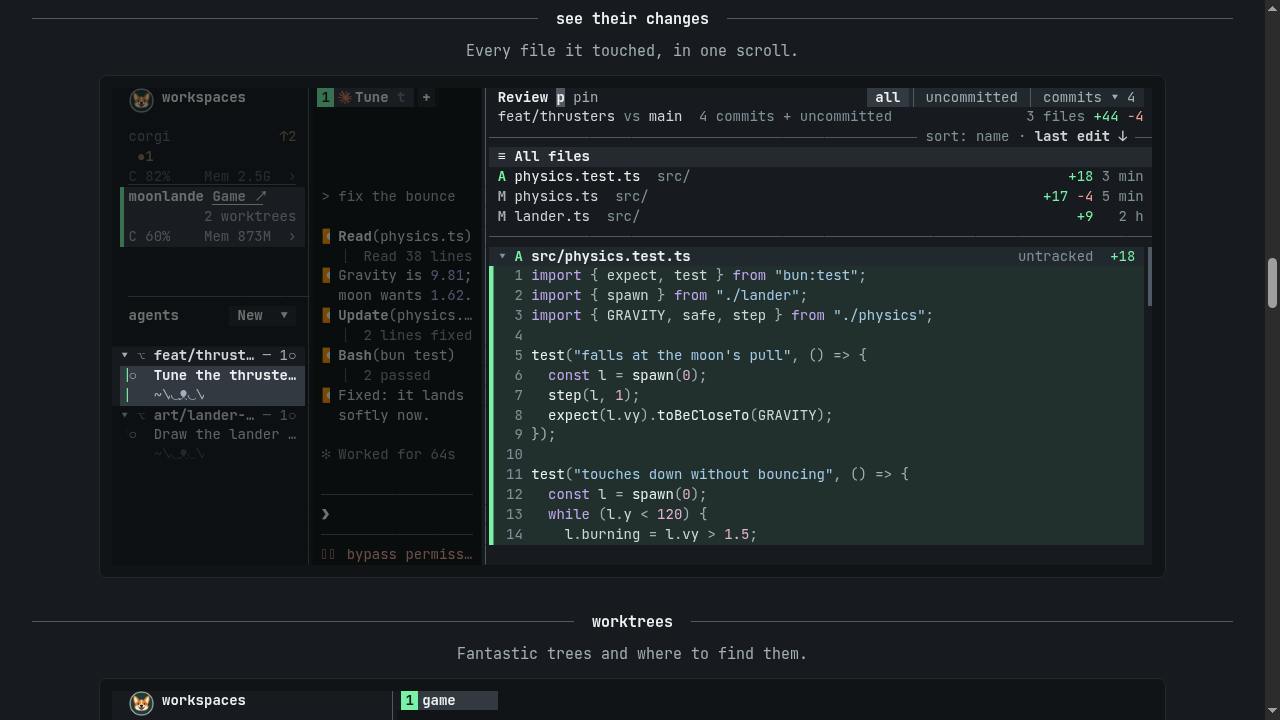
Action: step away without shutting the workspace down. Detach with Ctrl-B and then q. Like tmux, Corgi keeps your agents and processes running in the background, dev servers included. Return later, run corgi again in a terminal, and press e to review changes for an agent.
Expected result: the work kept moving while you were gone, and the change scroll lists every file each agent touched in one scroll. Read that list before you read any agent summary. It is the fastest honest record of what actually changed on disk, and it is where a task that wandered off brief shows itself first.
Two more touches from the official site are worth building into habit. Ctrl-Shift-T undoes a tab close, which rescues the pane you closed by reflex. And corgi --skill teaches your agents about Corgi itself, so an agent can drive the multiplexer from any terminal once you want that level of delegation.
Verification
Run this short checklist inside the workspace:
- All three panes exist, and each one runs a different agent on the same project.
- Each pane shows a state, and the states change as agents start, block and finish.
F1moves you to an agent marked unread after it completes a task.- The token view shows usage for the session, and the resource view shows live use per workspace.
- The change scroll for one agent lists the files that agent touched, and the list matches what you see with
git statusin a plain terminal.
git status --short
If the files in the change scroll and the files in that output agree, the setup works end to end: three agents, one workspace, one review queue, and a disk record you can trust.
Troubleshooting
| Problem | Likely cause | Fix |
|---|---|---|
| An agent is missing from the launcher | That agent is not installed, or its command is not on your path | Install it with the Step 1 command, open a fresh terminal, and prove it runs on its own before you start Corgi again |
| A pane sits on needs you right away | A sign in or approval from the first run was left unfinished | Select the pane, finish the sign in with your existing account, and give the task again |
| Two agents fight over one file | Both agents got tasks that edit the same ground in the same worktree | Stop one agent, split the tasks, and use separate worktrees for parallel work on related code |
| Pasting an image over SSH does nothing | The official site ties image paste on SSH to a specific terminal setup | Check the note on corgi.computer: that route requires Ghostty Nightly; otherwise paste from a local session |
| You closed a tab by mistake | Reflex, usually while switching panes | Press Ctrl-Shift-T to undo the tab close |
| A pane runs but shows no token detail | Usage tracking is listed for Claude Code, Codex, Pi and OpenCode | Confirm the agent is one of those four; other agents can run in panes without the same usage detail |
Next Steps
Add Pi as a fourth pane once the three agent rhythm feels normal, since the launcher and the usage tracking already cover it. Keep a dev server running in its own pane in the same workspace, so tests and previews live beside the agents that change the code. When the workflow earns your trust, try corgi --skill and let an agent open and organise panes for a small task while you watch the states.
Keep the discipline from Step 4 as the setup grows. More agents in parallel only pays when each one owns separate ground and your review queue stays short. Corgi solves the watching problem. The assigning problem stays yours, and that is the right division of labour.
Agent states, keyboard shortcuts, the install command and the Ghostty note checked against the official Corgi site and its published install script. Platform, price and usage tracking coverage checked against the Corgi Product Hunt listing and the maker launch post on Hacker News. Agent install commands checked against the Anthropic, OpenAI and OpenCode project documentation, October 2026. This procedure was verified against those documents; it was not run end to end on a test machine for this article.
Sources
- Screenshots: Corgi
END OF TRANSMISSION
Stay curious. Question everything.