Dirty Static // The Verdict
The clearest take yet on running a small team of agents on your own machine. Bring your own subscriptions, let one boss split the work, and keep every worker in its own copy. Best for builders who do not code. Coders who live in the terminal, and anyone on Linux, should look elsewhere for now.
Best forBuilders, founders and creators who want several agents from different makers working on one project in one visual workspace, without learning a terminal first
What works
- Any session can become a boss that creates workers, gives each one a self contained task, reads their reports and merges their work back
- Each worker runs in its own git copy of the project by default, so parallel work does not overwrite your main copy or another worker
- It runs the agents you already pay for, including Claude Code, Codex and Gemini, plus API keys and local models, with no markup on that usage per Granular
- A visual workspace with live preview, a canvas, files, a project brain and a roadmap, built for people who do not code
What does not
- Free is a taste, not a team: 2 projects, 4 sessions per project and 2 workers per boss, and workers share the limits of the one AI account behind them
- No Linux version yet and Windows is in beta, and there are no cloud agents, so work stops with your machine
- The boss is still an agent: merge conflicts, step limits and stuck workers land back with you, and parallel runs burn through plan limits faster
Research review: based on published testing, specifications, and documentation, not hands on testing.
Granular starts from a simple frustration. The tools that run AI agents well, such as VS Code, Cursor and the raw terminal, were built for people who write code. Everyone else gets a chat box in a browser tab and a pile of files they have to move by hand. Granular is a desktop app that tries to close that gap, and its sharpest idea is the one in the headline: one agent in charge, several agents working at once, all on your own machine.
This is a research review. Dirty Static has not run Granular, and nothing here is presented as our own hands on work. The account below draws on Granular own documentation, its homepage and its published comparison pages against Warp and Google Antigravity, all checked on November 26, 2026. Where a claim comes from Granular itself, the text says so.
What It Is
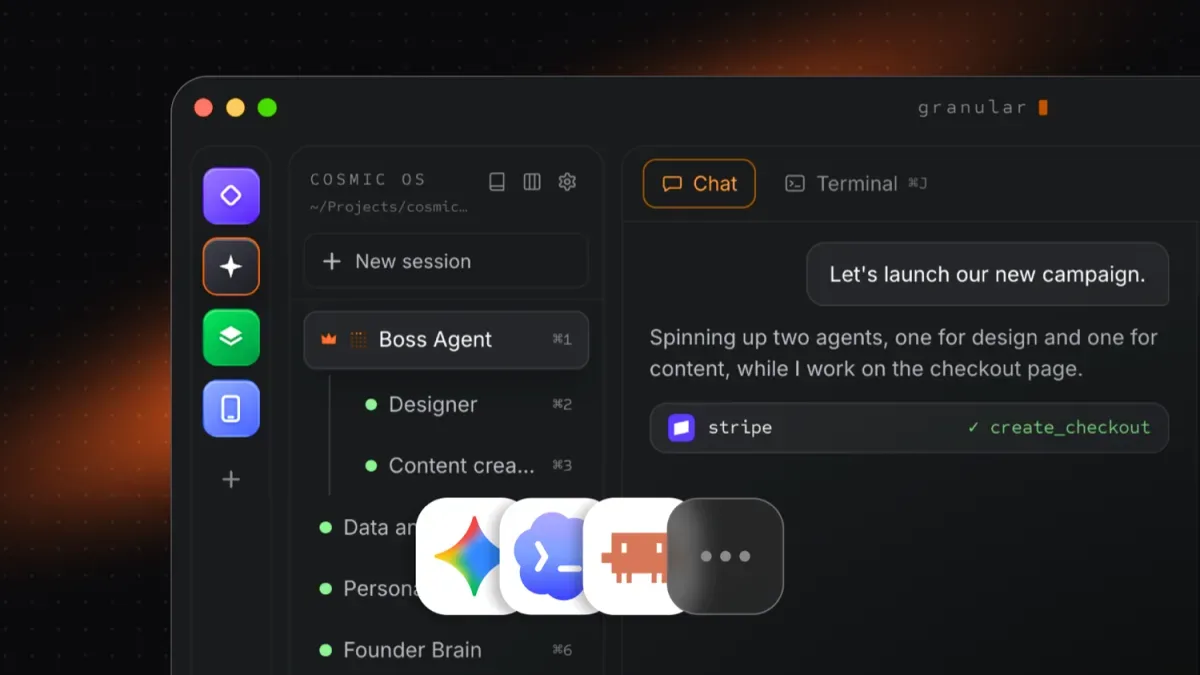
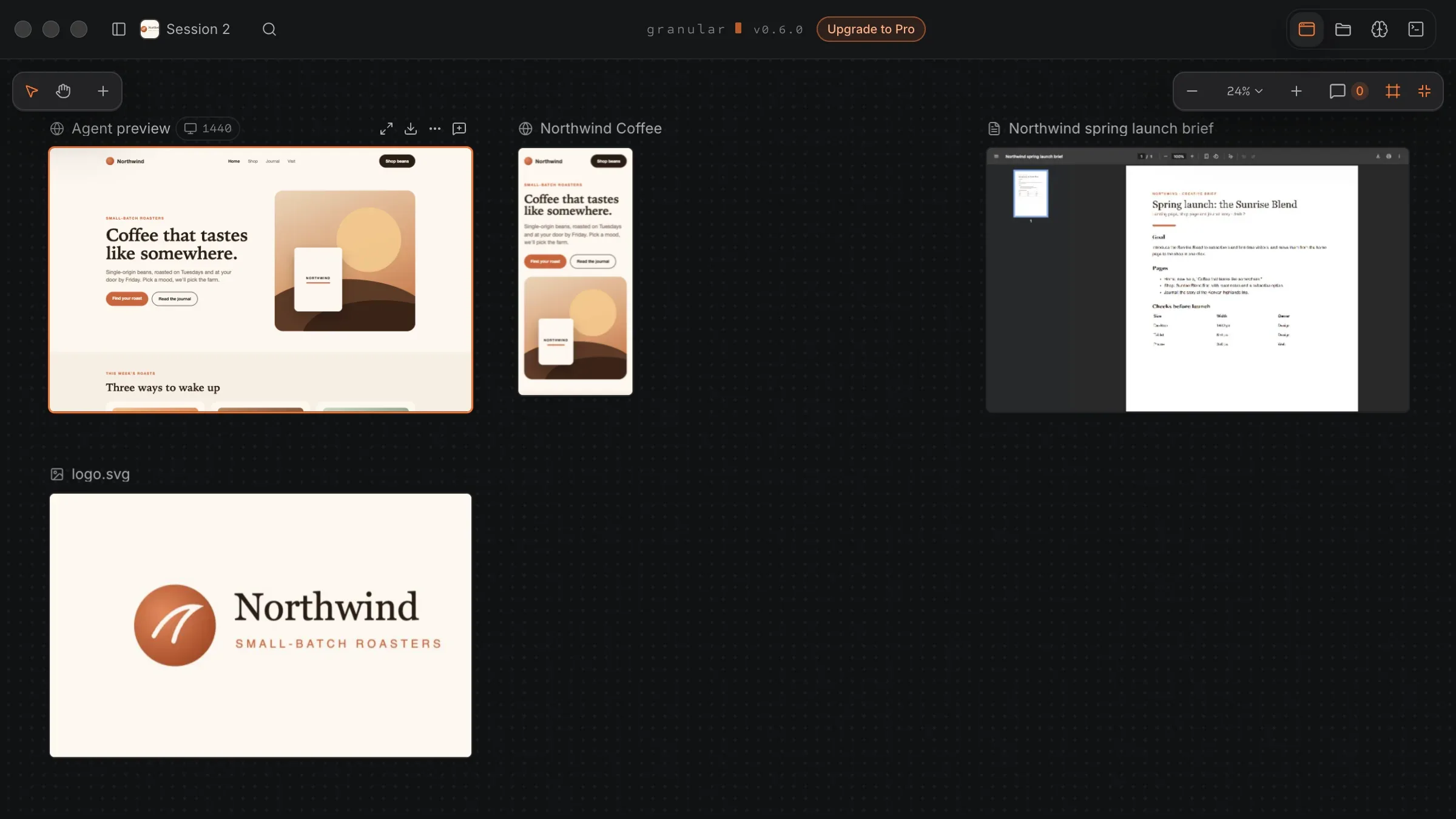
Granular describes itself as an AI workspace for builders. A project is a folder on your computer. A session is one agent conversation working in that project, with its own chat and its own terminal. Sessions sit beside the tools a builder actually watches: files, a live preview, a canvas that shows pages at desktop, tablet and phone sizes, and what Granular calls a project brain, a set of linked notes plus a roadmap board that the agents keep current.
The bring your own model design is central. Per Granular, the app runs Claude Code and Codex through your own logins, plus Gemini, Cursor, Grok, GitHub Copilot, OpenCode and Pi. You can also add API keys, sign in with OpenRouter, or run local models through Ollama or LM Studio. Granular says it makes no margin on that usage. If you have no subscription at all, an optional AI Add-on sells hosted models from $20 a month.
That mix matters more than it first looks. Most agent apps speak one company language. Granular lets a boss on one engine hand a task to a worker on another, chosen by engine, account, model and effort level when you ask. Our look at running Claude Code, Codex and OpenCode together with Corgi covered the same hunger from the terminal side. Granular is the visual, no code required answer to it.
Features and Specifications
The headline feature deserves its own plain explanation. Git is a tool that tracks versions of your files. When a boss creates a worker, Granular gives that worker its own separate copy of the project, called a git worktree: a second folder with its own branch, sharing the same history. Workers cannot overwrite each other or your main copy while they work. When a worker finishes, it sends the boss a report saying whether the task finished, paused or failed, which files changed, and what it said last. The boss then merges the work back, or you ask for the merge yourself.
You choose how much rope the boss gets. On its first run, Granular asks whether reports should run on Autopilot, where an idle boss acts on each report by itself, or Ask first, where reports wait in a queue until you run them. Autopilot has a safety cap of 20 boss runs in an hour, per the documentation. The boss is told to stop and ask you when a worker errors, gets stuck, hits a merge conflict, or wants to do something destructive, out of scope or costly. That is a sensible line, and it is also an admission: supervision is part of the product, not an edge case.
Specifications
- Maker
- Granular, at granular.build
- Platforms
- Mac, macOS 12 and later, Apple Silicon and Intel; 64 bit Windows in beta; Linux planned, not available
- Agents
- Claude Code, Codex, Gemini, Cursor, Grok, GitHub Copilot, OpenCode and Pi, per Granular FAQ
- Other models
- API keys including OpenRouter, DeepSeek and Kimi; local models through Ollama or LM Studio
- Parallel work
- Any session can become a boss; workers each get their own git worktree by default; shared folder workers only when you ask
- Connectors
- 1,400 plus apps per Granular, including Gmail, Slack, Stripe and Notion, plus your own MCP servers
- Project memory
- A project brain of linked Markdown notes and a roadmap board, per project
- Publishing
- One click publish and share links from the built in preview canvas
- Security note
- API keys in an encrypted local vault, injected only when a tool needs them, per Granular
- Cloud agents
- None; agents run on your computer
The limits are where the free tier shows its teeth, and Granular publishes them plainly in its own docs.
| Limit | Free | Pro |
|---|---|---|
| Projects | 2 | Unlimited |
| Sessions per project | 4 | Unlimited |
| Workers per boss | 2 | Unlimited |
A boss and two workers already use three of the four free sessions in a project. That leaves room for exactly one more session. Free is a way to learn the shape of the thing, not a way to run a standing team.
Granular Pro price options (USD)
Prices from Granular comparison pages, checked November 26, 2026. The one time option is $259 once. Granular says Pro covers use on 2 computers with a 30 day money back guarantee.
Real World Experience
Again, this section is research based. It pulls together what Granular documentation and comparison pages establish about daily use, and what outside listings describe, rather than any session of ours.
The workflow Granular wants is easy to picture because the docs walk it step by step. You hover over a session, choose Make this the boss, then ask in plain words: split this into three workers, one builds the pricing page, one builds the FAQ page, one writes the copy. New sessions appear tucked under the boss. Each worker starts at once, in its own copy, and you stay where you are instead of being dragged into each pane. You can open any worker, read its chat, type to it directly and open its own preview. Messages you type straight into a worker do not report to the boss. Only tasks the boss sent do.
That separation is the strongest design choice here. Tools that run several agents in one shared folder create a familiar mess: two agents edit the same file, and the user becomes the merge tool. Granular defaults the other way. Isolation first, merge second, and unmerged work is protected. A boss refuses to dismiss a worker that still holds unmerged changes unless you plainly say to throw that work away, and a clash between a worker copy and the main copy leaves the main copy untouched while the boss names the files in conflict.
The friction is just as documented. Every run has a step limit, a safety cap Granular sets. A worker that hits it pauses and keeps its progress, and the boss resumes it. A worker can also stall on a question inside its terminal, such as a prompt asking whether to proceed. Harmless questions with an obvious answer can be answered by the boss. Password requests and confirmations that delete or change something for good always stay with you. None of this is a flaw unique to Granular. It is the honest cost of parallel agents: more work in flight means more small decisions arriving at once.

For context on where this category is heading, our Kilo Desktop review coverage looked at a desktop built around hundreds of models and four agents. Granular takes a narrower and, frankly, more legible bet: fewer claims about model count, more structure around who is in charge, who works where, and how finished work comes home.
What Works
The boss and worker model is legible to a non coder in a way that raw worktrees never will be. Crown icon, Boss bar, reports queue, merge on request. A founder who has never opened a terminal can follow that story, and the underlying mechanism, a separate git copy per worker, is the same one engineers trust.
Choice of maker is the second strength. A worker can run on a different engine, account, model or effort level from its boss. Use a strong model to plan and a cheaper one for grunt work, in Granular own example phrasing, or hand a task to the agent that is simply better at that kind of job. Lock in is the tax most agent apps quietly charge. Granular declines to charge it.
The local first shape will suit a lot of small teams. Work lives on your computer as plain files under real git, you can push to GitHub when you like, and keys sit in an encrypted vault rather than in plain files. There are no cloud agents quietly running up a second bill, because there are no cloud agents at all.
What Does Not
Start with reach. There is no Linux version yet, Windows is in beta, and there is no web version. If your team is mixed across all three desktop systems, Granular cannot be the shared workspace today. Google Antigravity, by contrast, covers Linux and offers a web dashboard, per Granular own comparison page. Credit to Granular for publishing that against itself.
Then the economics of parallel work. Pro at $12.99 a month is cheap for a workspace, and the lifetime option at $259 will tempt early fans. But the real spend is the AI subscriptions and API usage behind the workers, and those limits are shared and finite. A boss cheerfully spawning workers can drain a plan allowance long before the workspace itself costs you anything serious.
Finally, the boss is a coordinator, not a guarantee. Merge conflicts still need a human call. Step limits still pause work. A worker given a vague task still does vague work, now at parallel speed. Granular gives you structure for that reality. It does not remove it, and any tool that promises otherwise is selling you something.
Competition
The honest choice is between three shapes of tool, not three logos.
| Option | What it is | Choose it when |
|---|---|---|
| Granular | A visual AI workspace for agents from several makers, with boss and worker parallel work in separate git copies | You build without coding, want live preview and a project brain, and want to bring your own subscriptions |
| Warp | An open source terminal with AI agents built in, plus cloud agents and team tools | You live in the terminal, work in an engineering team, or need Linux and cloud agents on schedules |
| Google Antigravity | Google agent platform built around Gemini, with a desktop app, CLI and SDK | You want Google models first and a deeper built in multi agent system, with wider platform cover |
Granular own Warp comparison makes the split plainly: Warp is built around the terminal, in Granular the terminal is one tool inside a workspace. Its Antigravity comparison concedes that Antigravity multi agent system goes deeper, while Granular can mix makers across its workers. Those are fair concessions, and they make the rest of its claims easier to trust.
Final Verdict
Granular is the right idea, built at the right level of honesty about its own limits. The boss and worker system takes the part of parallel agents that actually breaks in other tools, the shared folder free for all, and fixes it by default with a separate copy per worker and a merge step a human can follow. Add real choice of agent maker, a flat workspace price and work that stays on your machine, and you have a product a non coding builder can genuinely run a small team of agents inside.
Buy the shape, not the fantasy. Parallel agents multiply output and questions in equal measure, free is only a taste, and Linux users have to wait. If you are a Mac or Windows builder juggling Claude, Codex and Gemini across side projects that keep stalling in separate tabs, Pro at $12.99 a month is an easy test to justify. If you are an engineer who already thinks in worktrees, Warp and the terminal tools you know will feel like home, and Granular polish will feel like distance.
Sources
- Granular documentation, Boss and worker agents, updated November 19, 2026: https://www.granular.build/docs/boss-and-worker-agents/
- Granular documentation home and core concepts: https://www.granular.build/docs/
- Granular homepage and FAQ, including supported agents, pricing summary and platform notes: https://granular.build/
- Granular vs Warp comparison, facts checked November 23, 2026, including pricing, platforms and parallel agent notes: https://www.granular.build/compare/granular-vs-warp/
- Granular vs Google Antigravity comparison, facts checked November 23, 2026: https://granular.build/compare/granular-vs-antigravity/
- Body images: Granular workspace screenshot and preview canvas image from Granular, via granular.build. House style illustration by Dirty Static.
END OF TRANSMISSION
Stay curious. Question everything.