
Dirty Static // The Verdict
The most convenient way yet for a Copilot user to let an agent test a web app or finish a browser task in a signed in session, and the preview limits are honest ones. It earns a trial on low risk work, not trust with consequential clicks.
Best forCopilot users who test web apps they build, fill routine forms, or pull information from pages they already use, and who will watch the agent while it works
What works
- Runs in the browser you already use, with your existing signed in sessions, instead of a clean throwaway profile
- One feature across four surfaces, Copilot app, Copilot CLI, VS Code and JetBrains IDEs, with the same Chrome extension
- Off by default, with an isolated tab group in the app, permission levels in the extension, and an enterprise switch to block it
- Pairs with computer use, so one task can move between the browser and other desktop work
What does not
- Public preview only, with GitHub warning that it can pick the wrong control, type in the wrong place, or struggle with dynamic pages
- Acting inside signed in sessions means a mistaken or manipulated step can change real data or affect other people
- Needs Chrome or Edge plus Node.js 22 or later, and Edge also needs Chrome installed
- No published benchmark, success rate, or separate reliability record to judge it against rival browser agents
Research review: based on published testing, specifications, and documentation, not hands on testing.
Your coding agent could write the form. Now it wants to fill the form in for you, in the browser where you are already signed in. That is the step GitHub took on November 17, 2026, when browser use reached public preview in the Copilot app, Copilot CLI, VS Code and JetBrains IDEs, paired with a new GitHub Copilot extension for Chrome.
It is a small sounding feature with a large change in access underneath it. A code assistant that only reads a repository can waste your time. A browser agent that acts inside your signed in sessions can waste someone else time, submit the wrong thing, or change real data. GitHub knows that, which is why the launch material spends as much time on switches and warnings as it does on capability. This review weighs both sides in that order of importance.
What It Is
Browser use is a Copilot capability, not a new browser and not a standalone product. You install the GitHub Copilot extension from the Chrome Web Store, turn the feature on inside the Copilot surface you use, and then ask Copilot for a browser task in plain language. Copilot can test a web application, fill out a form, or go to a page and bring information back, per GitHub documentation checked on November 19, 2026.
The signed in part is the whole point. Most test automation starts in a clean profile with no login and no history, which is safe and also unlike the app as a real user meets it. Browser use works where you already work. GitHub own example in the app changelog is to ask Copilot to fill out forms, pull information from webpages, or test and debug the web app you are building, right in the browser you are already signed in to.
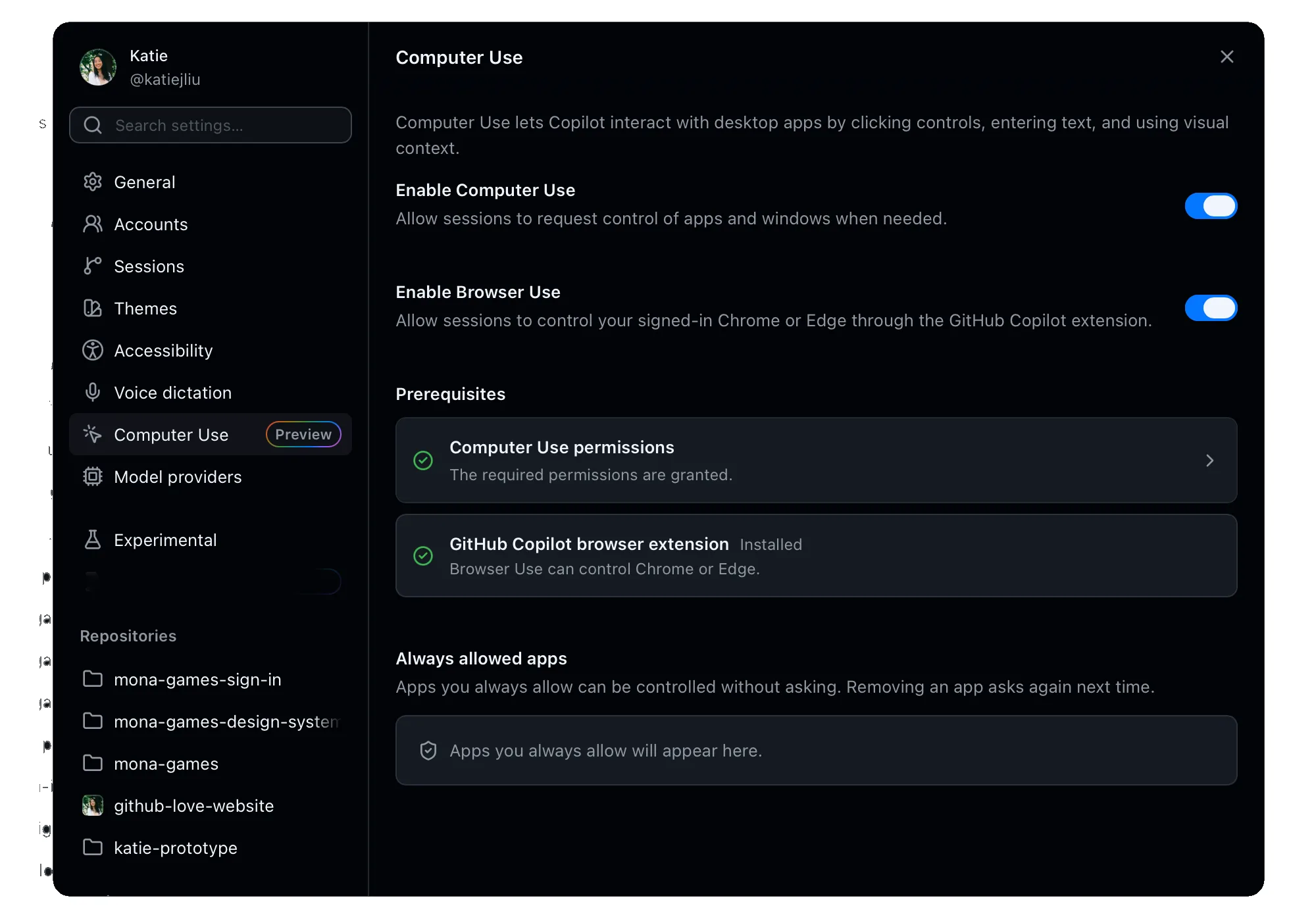
It also sits beside computer use, GitHub name for Copilot acting in desktop applications. The two can be used together, per GitHub, so a task can move between a web page and other work on the machine. In the Copilot app that link is structural, not just marketing. Computer use must be on before browser use can be turned on there.
Features and Specifications
| Area | Browser use specification |
|---|---|
| Maker | GitHub, part of Microsoft |
| Announced | November 17, 2026, in Microsoft Ignite releases |
| Status | Public preview, subject to change |
| Default state | Off by default on every surface |
| Browsers | Google Chrome; Microsoft Edge, with Google Chrome also installed |
| Extension | GitHub Copilot, from the Chrome Web Store |
| Surfaces | GitHub Copilot app, GitHub Copilot CLI, Visual Studio Code, JetBrains IDEs |
| Requirement | Node.js 22 or later, with node available on the system path, to run the plugin |
| Core tasks | Test a web application, fill out a form, navigate to a page and retrieve information |
| Invocation | Automatic when a request is about a browser task, or direct with the browser use command in supported surfaces |
| Tab handling in the app | Runs in an isolated tab group, per the Copilot app changelog |
| Companion feature | Can be used together with computer use |
| Enterprise control | Administrators can block enabling with the features.browserUse managed setting set to false |
Setup, by surface, per GitHub documentation
- Copilot app
- Settings, then Computer Use, turn on Enable Computer Use and then Enable Browser Use
- Copilot CLI
- Enter the plugin command, find and enable the browser use plugin, then start a new session
- VS Code
- Open Settings, search for browser use, and enable the Browser Use setting
- JetBrains IDEs
- Settings, then GitHub Copilot, then Chat, and turn on Enable Browser Use
- Extension check
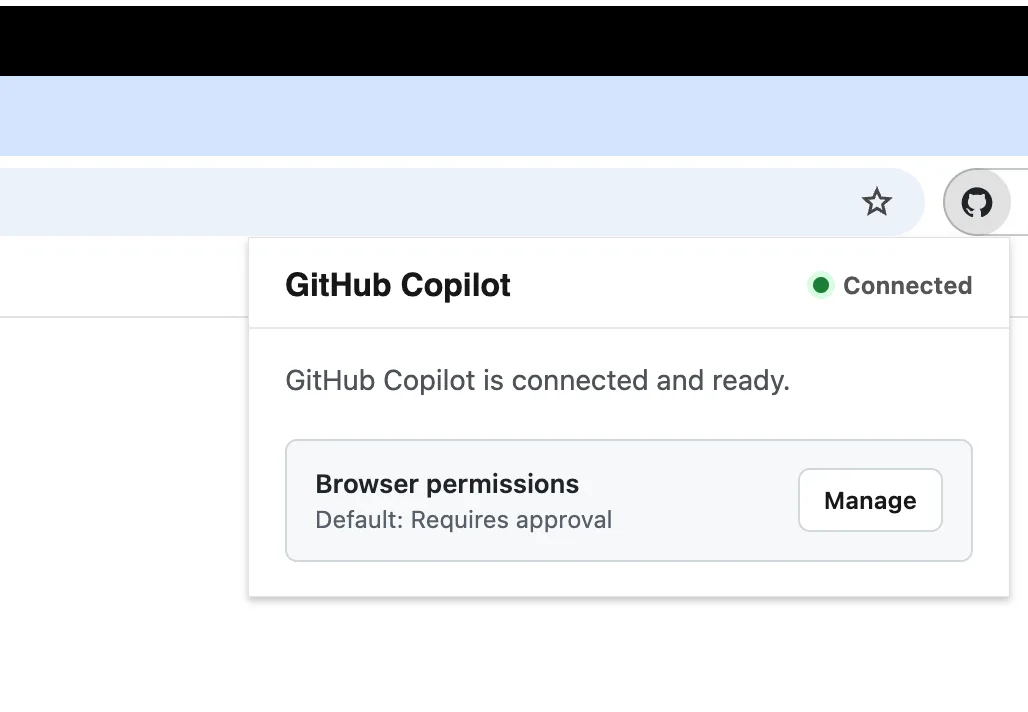
- Click the extension and confirm its state shows Connected
Setup is short, and the friction in it is deliberate. You install an extension, you turn on a switch that is off by default, and in the app you turn on a second broader switch first. Nobody drifts into this feature by accident. The Node.js requirement is the one part that will surprise non developers who meet Copilot through the app, because the extension alone is not enough. The plugin needs Node.js to run.
Real World Experience
This is a research review. Dirty Static did not run browser use, and no firsthand testing is claimed here. What follows draws on GitHub changelog posts and GitHub documentation for the app, the CLI and the IDEs, all published on November 17, 2026 and checked on November 19, 2026, plus launch coverage from Neowin and other outlets. At the time of checking, GitHub had published no success rate, benchmark, or independent test result for this preview, and that absence shapes the verdict.
Start with the workflow GitHub actually documents, because it is narrower and more sensible than the headline version. You give the agent a site, a task, and constraints in plain language. GitHub own worked example asks Copilot to open a test application, check that a sign in form shows a validation message when the fields are empty, submit no real credentials, change no data, and summarise what it finds. That is a good browser agent task. It is bounded, it has a visible pass or fail point, and the constraint sentence does real work.
The form filling case is where readers will feel the pull first. Every team has browser work that is too irregular for a script and too dull to enjoy, status pages to copy between systems, internal forms with the same fields each week, test accounts to walk through a flow after a deploy. An agent that can do that work in a signed in browser, while you watch, removes a real kind of friction. The same is true for retrieval. Asking an agent to go to a page you trust, read it, and bring back the one table you need is a calmer use than asking it to operate a checkout.
Debugging is the third use GitHub pushes, and it connects this preview to work we covered in MAI Code 2 and the new Copilot model shelf. A model that writes a change is more useful when something can open the result, click through the flow it just built, and report what broke. Browser use gives Copilot that loop in your real browser. The older integrated browser tools inside VS Code, which reached general availability on July 1, 2026, already gave agents a browser inside the editor, with agent tabs isolated in fresh sessions. This preview is different in the place that matters. It reaches out of the editor and into Chrome or Edge, with your sessions in it.
The limits GitHub publishes deserve the same weight as the capability list. Web interfaces change. Browser use can select the wrong control, enter text in the wrong location, or have difficulty with dynamic pages and complex workflows, per GitHub documentation. Changes in page state or timing can produce different results or stop a task from completing. None of that is boilerplate. It is a plain description of how browser agents fail, and a preview label means GitHub expects the failure rate to be part of the experience.
The safety warning is plainer still. GitHub says ambiguous instructions or unexpected webpage content can cause unintended actions that affect your data or connected accounts, and tells users to review the sites, the requested actions and the results, especially before allowing changes to data or actions that affect other people. It also warns that pages may show sensitive information, including information about other people, and says to use the feature only with sites and tasks whose visible content you are comfortable providing as context to Copilot, and to avoid asking it to submit real credentials. Read that as the operating manual, not the fine print.
What Works
The surface coverage is the first genuine strength. Browser use launched in four places at once, the app, the CLI, VS Code and JetBrains, with one extension and one idea of permissions. A developer does not need to change tools to try it, and a team does not need to standardise on one editor for the feature to make sense. The JetBrains changelog makes the same point from the other side of the market, bringing browser use to an IDE family that often gets Copilot features later.
The default matters as much as the coverage. Off by default, plus a managed setting that lets an enterprise administrator prevent users from enabling it at all, is the right posture for a feature with this access level. GitHub documentation says setting features.browserUse to false blocks enabling, while setting it to true or leaving it out lets users decide in their own surface. That gives an organisation a real policy choice before the first task runs, rather than a cleanup job after one goes wrong.
Permission levels in the extension settings are the third strength, even though GitHub public pages describe them only in outline. The changelog says you can use the extension settings to manage permission levels and turn on experimental features. That is the right place for the control to live, next to the browser itself, and it gives a user a way to start narrow. Start narrow is also the advice that follows from everything GitHub warns about.
What Does Not
There is no evidence base yet, and for a review that is the central problem. No benchmark from GitHub, no published run from an independent tester at launch, no success rate to set beside the claims of rival tools. Readers who followed our profile of Browser Use 1.0.6 and its new default model will know that even vendor numbers need careful reading. Here there are not even vendor numbers to read. Anyone choosing this feature today is choosing it on workflow fit and trust in the controls, not on measured performance.
The signed in session cuts both ways, and the downside is not solved by the tab group. Prompt injection, where a page hides instructions meant to steer an agent, is the known attack class for every agent that reads untrusted pages and then acts. GitHub warning about unexpected webpage content causing unintended actions points at the same risk without naming it. A careful user, a bounded task and a low value site reduce the risk a lot. They do not remove it, and the pages where browser help is most tempting, busy internal tools and account dashboards, are often the pages where a wrong action costs most.
Platform reach is the smaller complaint. There is no Firefox route and no Safari route in the documentation, Edge depends on Chrome being installed as well, and every surface needs Node.js 22 or later on the path. For a developer machine that is a minor errand. For a mixed team it is a checklist, and checklists are where preview features quietly stay unused.
Competition
| Option | Browser it drives | Session it uses | Best at | Watch out for |
|---|---|---|---|---|
| Copilot Browser Use | Your Chrome or Edge, through the Copilot extension | Your signed in session, in an isolated tab group in the app | Browser tasks inside a Copilot workflow, across app, CLI and IDEs | Public preview, no published reliability record, wrong control risk stated by GitHub |
| VS Code integrated browser tools | A browser inside VS Code | Agent tabs in fresh sessions, with your own tabs private until you share one | Verifying a web app while you code, without leaving the editor | Lives inside VS Code, so it does not cover CLI, JetBrains or the standalone app workflow |
| Playwright MCP and Playwright CLI | A browser the tool launches, across Chromium, Firefox and WebKit in the Playwright family | Usually a clean or configured test profile | Repeatable test automation and agent driven checks you can run in a pipeline | You build and maintain the harness, the profiles and the login handling yourself |
| Browser Use library | A cloud browser or a local Chromium, from Python code | A session your code sets up | Giving a model a browser inside your own Python agent or product | A library, not a finished Copilot feature, with model and browser costs and your own safety work |
The table shows why this launch matters even with no benchmark attached. The rivals are mostly harnesses. They are powerful, and our Playwright 1.65 profile shows how capable that route has become, but a harness asks you to assemble the agent, the browser, the login story and the safety story. Copilot browser use arrives assembled, inside a subscription and an editor many developers already open each morning. Assembled and convenient is a strong position, as long as the user remembers that convenience is not the same as proven.
For pure testing, the harness route still has the stronger story today. A Playwright run can be repeated, versioned, and failed in a pipeline without a human watching. Browser use, as documented, is a supervised assistant for tasks you describe and review. Those are different jobs, and treating the second as a replacement for the first would be the fastest way to be disappointed by a promising preview. Readers tracking the wider Copilot agent push will recognise the pattern from Copilot Autopilot and the always on agent, where reach keeps growing faster than the published evidence for it.
Final Verdict
Enable browser use if you already live in Copilot and you have the right first tasks for it, bounded, reversible, and easy to check. Test a form validation flow on a staging app. Pull a table from a trusted internal page. Fill a routine form while you watch, with no payment, no publishing, and no delete button in reach. On that kind of work the feature can save real time today, and the switches GitHub built make the trial a considered one.
Leave it off, or leave the task to a person or a script, when the page can move money, change production data, message other people, or submit credentials. GitHub says the same thing in politer language, and on this point the vendor warning and this verdict agree completely. Browser use is a well placed preview with honest limits and no track record yet. That earns it a careful trial, not a promotion.
This is a research review. It draws on GitHub changelog posts and GitHub documentation for browser use in the Copilot app, Copilot CLI, VS Code and JetBrains IDEs, checked on November 19, 2026. No hands on testing was performed. Product screenshots: GitHub.
Sources
- GitHub Changelog: Let GitHub Copilot interact with your browser
- GitHub Changelog: GitHub Copilot app, Microsoft Ignite releases
- GitHub Docs: About browser use in GitHub Copilot
- GitHub Docs: Using the GitHub Copilot app to interact with your browser
- GitHub Docs: Using GitHub Copilot CLI to interact with your browser
- GitHub Docs: Using GitHub Copilot in your IDE to interact with your browser
- GitHub Changelog: Browser tools for GitHub Copilot in VS Code are generally available
- Neowin: GitHub Copilot can now click buttons and fill out forms in your browser
- Product images: GitHub
END OF TRANSMISSION
Stay curious. Question everything.