Running a model on a GPU has never been the hard part on its own. The hard part is everything around it. You pick an instance, keep the driver and the CUDA toolkit in step with your image, plan capacity, write scaling logic, and then build the wiring that connects that GPU step to the rest of your application.
AWS Lambda GPU support is an attempt to remove that surrounding work for one class of job. AWS announced on November 18, 2026 that Event Functions on Lambda Managed Instances can now run on EC2 G series GPU instances. You bring a function as a container image, and Lambda handles provisioning, scaling, and event integration.
AWS Lambda GPU on Managed Instances
Official siteA serverless way to run GPU work inside an AWS application. Primary use case: custom model inference and other GPU jobs that are triggered by AWS events and sit as one step inside a larger Lambda application.
Key features: curated base images for CUDA, PyTorch, vLLM, and SGLang; a capacity provider that picks the most cost effective available instance from your list; the same 200 plus event sources as other Event Functions; concurrent requests inside one execution environment; and GPU metrics in Amazon CloudWatch and the Lambda console.
What it is
Lambda Managed Instances is the part of Lambda that runs Event Functions on EC2 instances in your own account and in your own VPC, while Lambda still manages the instance life cycle, patching, routing, load balancing, and scaling. GPU support extends that foundation to G series instances.
That distinction matters. This is not the classic Lambda model where you pay only for the milliseconds a function runs. The function runs on EC2 capacity that Lambda provisions for you, and the bill follows that capacity. What you give up in pure pay per use billing, you gain in hardware choice, longer running jobs, and the ability to keep a GPU busy across many requests at once.
AWS is plain about the intended scope. The company says the feature is optimised for inference rather than training, and for custom models rather than large foundation models that are already available on Amazon Bedrock.
What you can build with it
AWS lists five broad kinds of work. Custom model inference covers decision models, computer vision, speech to text and text to speech, recommendation, document analysis, and small to mid size language models that form part of an application. A second group is inference for agents, where a custom model is triggered directly by an AWS event and composed with the rest of the application.
The other groups sit outside language models entirely. Media processing and transcoding can run as pipelines triggered on upload. Rendering work covers frame and asset rendering, diffusion, and text to video generation. Scientific computing and financial modelling cover simulations, matrix computation, and risk analysis.
How a GPU function works
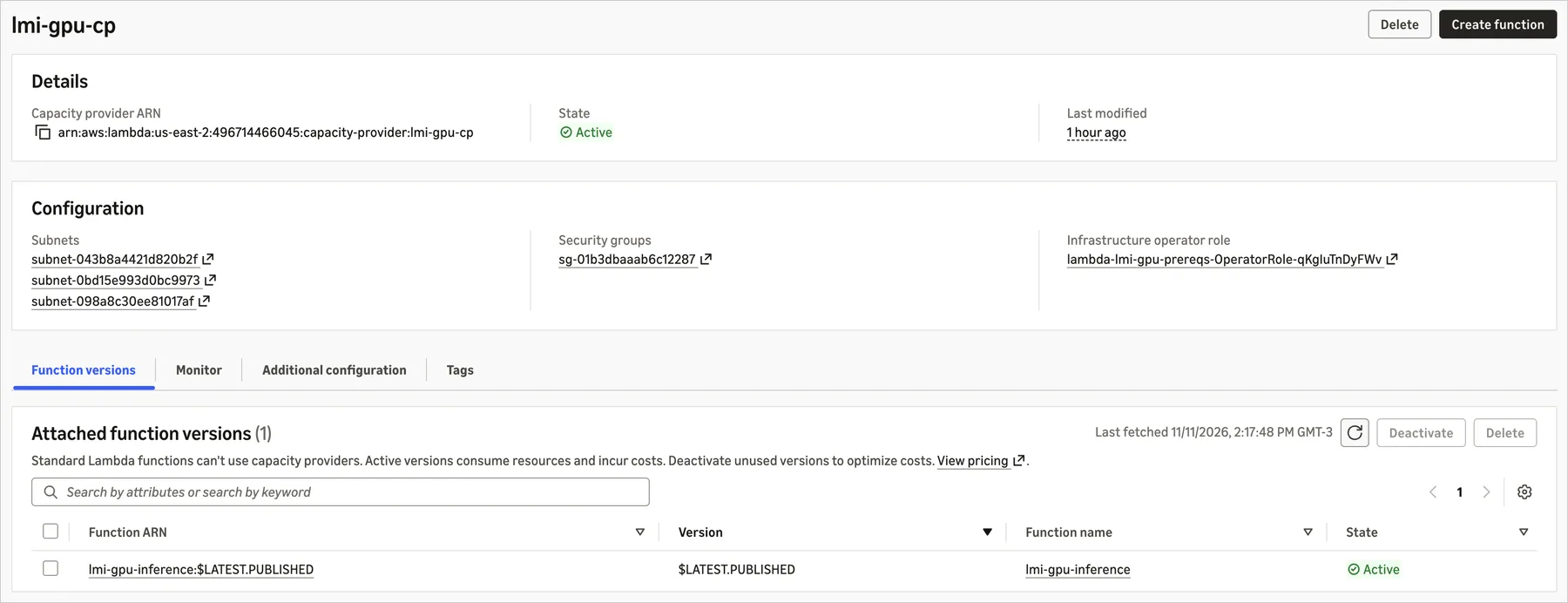
You start with a capacity provider. In it you name the instance types Lambda may use, for example g5.2xlarge, g6.2xlarge, and g6e.2xlarge, and you set how it scales. Listing several types is not decoration. It lets Lambda choose a cheaper available option first and move to another generation when the first choice has no capacity.
Next you build a container image. GPU functions are deployed as OCI container images, and AWS supplies curated base images so you do not install or reconcile the GPU software stack yourself. The images AWS names are base:cuda for the CUDA toolkit and runtime, cupy:cuda for CuPy with NumPy, SciPy, Pandas, and Numba, pytorch:cuda for PyTorch with torchvision, torchaudio, transformers, and FFmpeg, and the serving images vllm:cuda and sglang:cuda.
The launch example shows how thin that can get. With the vLLM base image, the whole Dockerfile in the AWS post is one line naming that base image. You set the MODEL_ID environment variable to a model on Hugging Face or ModelScope, to an Amazon S3 location, or to a local path, and Lambda downloads the model, manages GPU memory, and serves requests in the OpenAI compatible format the image provides. AWS says that route took about 10 minutes in its example, most of it unattended while capacity was provisioned and the model warmed up.
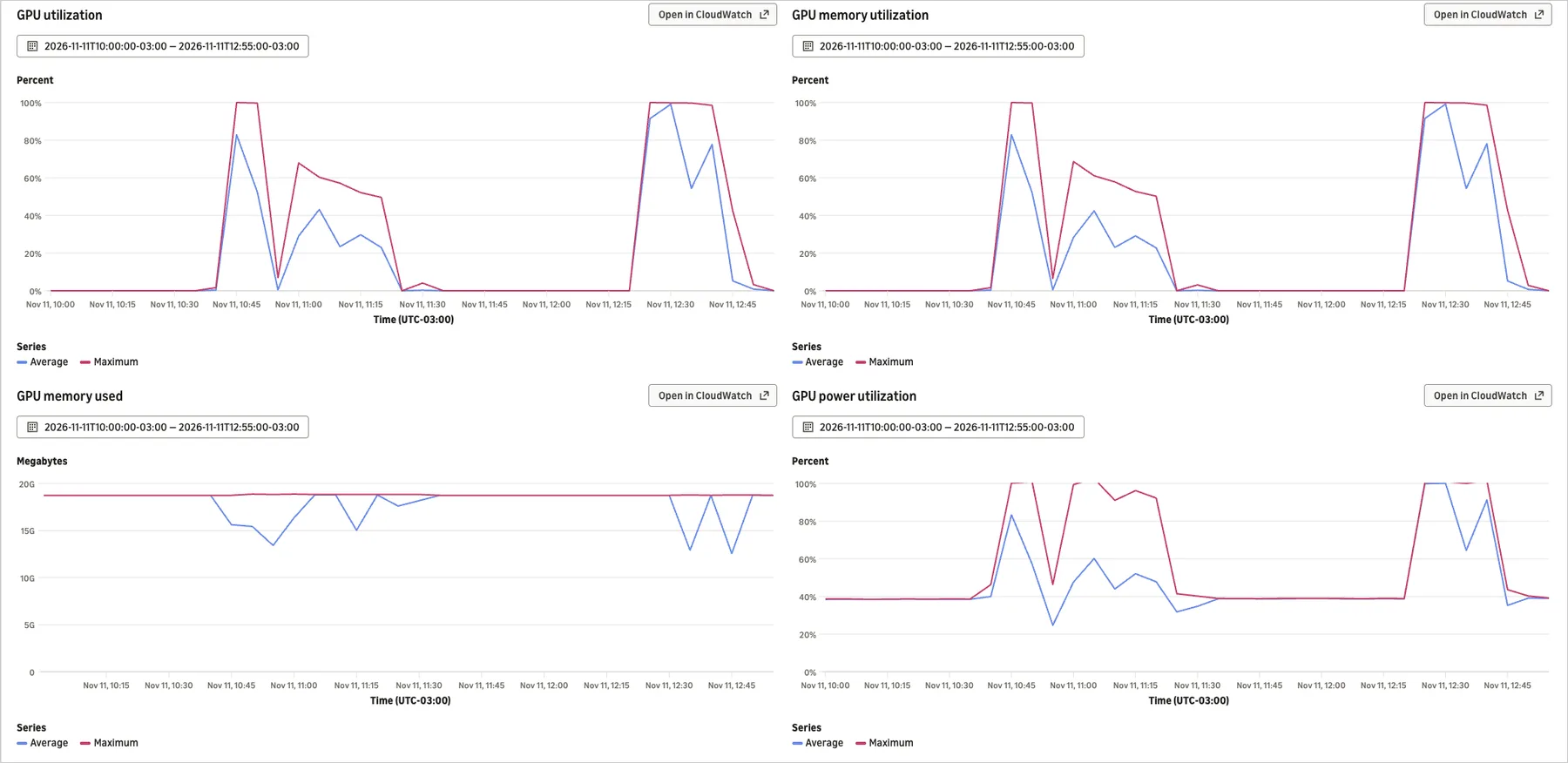
Two settings shape how well the GPU gets used. AcceleratorConfig sets AcceleratorMemorySize, the minimum accelerator memory the function needs, from 3 to 48 GB, and Lambda places the work on the smallest available GPU that meets it. PerExecutionEnvironmentMaxConcurrency sets how many requests one execution environment may process at once, up to 48. In the AWS example, four concurrent invocations finished in about the same time as a single one, because the vLLM server batched them on one GPU sharing one copy of the model.
Functions run from a published version, and that timing helps. Publishing provisions the execution environments, and each one downloads the model weights and warms up the engine before the version becomes active. The cold start cost lands at publish time rather than on the first caller, though a new version or a new model still needs that warm up.
Limits and platforms
Facts checked November 19, 2026 against the AWS launch post and the AWS Lambda pricing page.
Specifications
- Announced
- November 18, 2026, generally available at launch
- Instance families
- G4dn, G5, G6, G6f, Gr6, Gr6f, and G6e at launch, with more families promised
- Container image
- Up to 32 GB, with 10 GB per file
- Ephemeral storage
- Up to 32 GB of NVMe storage in /tmp
- Memory
- 2,048 to 32,768 MB
- Accelerator memory
- 3 to 48 GB requested per function
- Concurrency
- Up to 48 concurrent requests per execution environment
- Capacity
- Up to 15,000 vCPUs per capacity provider
- Timeout
- Up to 90 minutes for asynchronous and event source mapping invocations
| Family | GPU noted in launch coverage | Accelerator memory |
|---|---|---|
| G4dn | NVIDIA T4 | 16 GB |
| G5 | NVIDIA A10G | 24 GB |
| G6 and Gr6 | NVIDIA L4 | 24 GB |
| G6e | NVIDIA L40S | 48 GB |
The table covers the families AWS and launch coverage name most often. The full launch list also includes G6f, Gr6f, and Gr6 variants, and the function request itself is stated in accelerator memory rather than as a named GPU, so Lambda can place the work on a larger GPU than the minimum you asked for.
GPU functions trigger from the same event sources as other Event Functions, including Amazon S3, Amazon SQS, Amazon API Gateway, and Amazon EventBridge, with the same scaling, error handling, and retries, and no custom integration code. They also compose with the rest of Lambda. Durable functions can orchestrate longer workflows around the GPU step with checkpointing and recovery, and Lambda MicroVMs can run tool logic on CPU and call the GPU function only for the inference step.
Pricing
There are three parts to the Managed Instances bill, and GPU functions use the GPU rate for the middle one.
| Charge | GPU function rate |
|---|---|
| Requests | $0.20 per million requests |
| Management fee | 9.75 percent on top of the EC2 price for GPU G series instances |
| EC2 instances | Standard EC2 instance pricing for the capacity Lambda provisions |
AWS notes that Managed Instances functions do not pay a separate charge for the execution duration of each request, unlike default Lambda functions. Savings Plans and Reserved Instances can apply to the EC2 part of the bill, and an EC2 On Demand Capacity Reservation that matches your capacity provider configuration can be used for more predictable GPU availability.
That structure carries a warning in plain sight. You pay for instance capacity, so an idle GPU costs money in much the same way an idle GPU you manage yourself costs money. The management fee buys you freedom from drivers, scaling code, and fleet operations. On a workload that runs flat out all day, that fee is a real percentage on a large instance bill. On a workload that arrives in bursts, in events, or as one step in a bigger application, avoiding a permanent GPU fleet can be worth more than the fee costs.
What Works
- No GPU drivers, CUDA versions, AMIs, clusters, or device plugins to operate, with curated images for PyTorch, vLLM, and SGLang
- The same event sources, identity, networking, and tooling as the rest of Lambda, inside your own VPC
- Concurrent requests share one GPU and one copy of the model, which lifts utilisation on small models
- Cold start work happens when a version is published, not when the first caller arrives, and timeouts reach 90 minutes for async work
What Does Not
- You pay for EC2 capacity rather than only for request duration, so idle GPU time still lands on the bill, plus a 9.75 percent management fee
- Scope is inference and custom models by design, not training and not a replacement for large foundation models on Bedrock
- New accounts may need a quota increase before the first test can run
- Container, storage, and accelerator memory limits cap the size of model and job that fit in one function
Which should you choose
Choose Lambda GPU when the model is yours and the job arrives as an event. A fine tuned classifier, a vision model, a speech model, or a small language model that sits inside a document pipeline or an agent workflow is the shape AWS built this for. The win is that the GPU step joins the application you already have, with the same triggers and the same operations story.
Choose Amazon Bedrock when the model is a general foundation model. AWS makes this call itself. If the model you want is already served on Bedrock, running your own GPU copy of a similar model on Lambda adds work without adding control you need.
Price a fleet you manage yourself when utilisation stays high all day. If a GPU will be saturated around the clock, compare the full instance bill plus the 9.75 percent fee against the cost of running that instance well yourself. The fee is easiest to justify when it replaces fleet work that is bursty, occasional, or spread across many small functions that can share capacity.
Final thoughts
For years the Lambda story stopped at the exact point where many AI applications start, because the function could orchestrate a model but could never be the model. That gap is now closed for a defined and useful slice of work: custom inference, media jobs, rendering, and simulation that are triggered by events and live inside an AWS application. It will not replace a training cluster or a foundation model service, and AWS does not claim that it will. What it does is let a team add a GPU step to an application it already runs, without opening a second infrastructure stack just to hold that step.
Sources
- Launch, scope, limits, images, and example: AWS Lambda now supports GPU instances for Event Functions on Lambda Managed Instances, AWS News Blog, November 18, 2026
- Managed Instances overview: AWS Lambda Managed Instances, AWS
- Console screenshots: AWS
END OF TRANSMISSION
Stay curious. Question everything.