
Every phone editor meets the same wall. The project grows past a dozen clips, the cut has to land on one exact frame of the beat, and your thumb is covering the part of the timeline you need to see. Brett Westervelt, who runs Edits at Instagram, says creators described that moment to his team word for word, and on November 5 Instagram answered it by putting Edits on the Mac.
The desktop app is free, and it is built for the projects that outgrow a phone. It also carries the fight to ByteDance’s CapCut onto the ground CapCut has held since 2021. And tucked into the launch is the most interesting move of all: the editor ships with a socket that lets an AI agent do real work inside it.
Edits
Official siteInstagram’s standalone video editor, launched on phones in April 2025 and now on the Mac. Primary use case: editing short form video, from quick Reels to longer multi clip projects, with licensed music, automatic captions and publishing straight to Instagram.
Key features: a multi track timeline with keyframes for transitions; audio waveforms and beat markers for cuts that land on the music; colour wheels, curves and log conversion, with custom LUT import; your own font files; keyboard shortcuts you can customise or import from other editors; licensed and royalty free music, sound and video effects; automatic captions in multiple languages; saved audio and text styles that carry over from the phone app; direct publishing to Instagram with tagging, locations and Trial Reels; exports at up to 4K with no watermark, in vertical and horizontal formats.
Advantages: free, with no watermark and no export toll; the Instagram music library and native publishing remove the usual round trip through a phone; an MCP connection lets outside agents work with the editor’s own tools. Limitations: Mac only, and only on Apple silicon; no Windows or Linux version and no date for one; a project cannot yet be edited across phone and desktop; the feature set is still growing, with updates promised weekly.
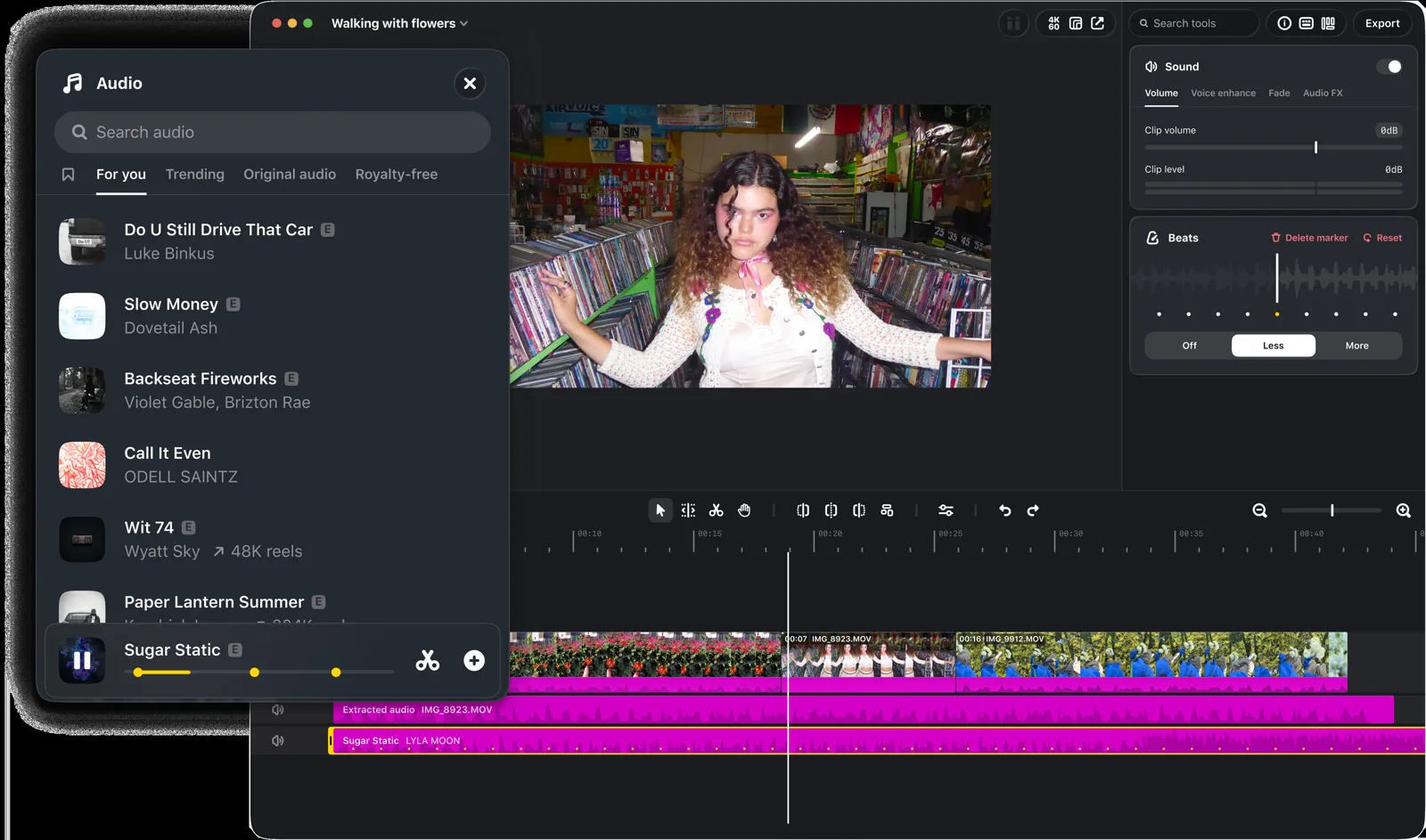 Edits on desktop: the music library, the Beats panel and the timeline. Image: Instagram
What the desktop app adds
The centre of the app is a timeline that behaves like a grown up editor’s. Clips stack across tracks, transitions take keyframes, and the audio waveform sits under the picture so a cut can land on the exact beat. A Beats panel marks the music for you, and Instagram’s launch footage shows markers laid along the waveform with controls for how many you get.
Colour gets real tools this time: wheels, curves and log conversion, plus the option to import your own LUT files. Text takes your own font files. Keyboard shortcuts can be customised, and Instagram says they can be imported from other editing software, which is a quiet admission of where it hopes converts will come from.
The phone app’s assets follow you part of the way. Licensed and royalty free music, sound and video effects are all here, automatic captions work in multiple languages, and the audio and text styles you saved on mobile show up on the desktop. More than 50 million creators use Edits on phones, Instagram says, and the desktop app is pitched as the room those users graduate into.
The agent socket
The feature that separates this launch from every other free editor is not on the timeline. Matthew Simari, who leads product management for Edits, told The Verge the desktop app includes an MCP interface covering all of the tools in Edits. MCP, the Model Context Protocol, is the standard that lets an AI agent call an app’s tools directly, and in Edits you switch it on in Settings.
His example is worth picturing. You ask an agent to make a rough cut from a video sitting in your Downloads folder. The agent works through the Edits tools, assembles the cut, and leaves you a project file. You open that file in Edits and finish the job by hand, moving between agent work and your own edits as you like.
“You can use any agent you want, you can use Muse, we would love you to, but really any agent you want of your choice, to edit, tweak, work with your video,” Simari told The Verge. Muse is Meta’s own agent, and the offer to plug in a rival’s agent instead is a notable choice from a company that usually builds walls. It is the same pattern Dirty Static saw in WordCraft, where the app’s commands serve the person and the agent alike. Editors are becoming toolboxes that software can hold.
One caution belongs here. The MCP detail rests on Simari’s interview, and at launch the Edits download page itself does not describe the feature. Treat it as announced and rolling out rather than documented, and check Settings on your own install before planning a workflow around it.
Publishing without the phone round trip
Edits on desktop posts straight to Instagram, with the native furniture attached: tagging, locations and Trial Reels. That kills a workflow every creator knows by heart: edit on the big screen, export, move the file to the phone, fix the details the transfer lost, then post.
Exports also stand on their own. The app handles vertical and horizontal video and exports at up to 4K with no watermark, so a finished piece can travel to other platforms or sit in an archive without a logo stamped on it. For a free app from a platform company, the absence of a watermark is the whole business model in one detail: Instagram wants the editing to happen inside its own tool, and it is willing to give the export away to get it.
Edits vs CapCut
CapCut is the reason Edits exists. Meta launched the phone app last year as its answer to ByteDance’s editor, and CapCut has had a desktop app for Windows and Mac since 2021. The desktop gap is what this launch closes, partly.
| Edits on desktop | CapCut on desktop | |
|---|---|---|
| Platforms | macOS, Apple silicon only | Windows and Mac, since 2021 |
| Price | Free | Free tier, with a paid Pro tier above it |
| Exports | Up to 4K, no watermark | Watermark and feature limits vary by tier |
| Publishing | Straight to Instagram, with tagging and Trial Reels | Built around TikTok |
| Project handoff | Not yet between phone and desktop | Projects follow you across devices |
| Agent access | MCP for outside AI agents | No equivalent announced |
The table cuts both ways. CapCut still runs on far more machines, and its projects follow a creator from phone to desk and back, which Edits cannot do yet. Edits counters with price, a clean export, and the agent socket. Which column matters more depends on where your audience lives and how much of your editing you plan to hand to software.
The two gaps
The first gap is the platform list. Edits on desktop is macOS only, and only on Macs with Apple silicon, M1 or later. Intel Macs are out, Windows is out, and Instagram has announced no date for either. CapCut’s largest desktop audience sits exactly in the space Edits just skipped.
The second gap is the handoff. A project started on your phone cannot be finished on your Mac, and the reverse is also true. Instagram says editing one project across both is in development, and it has promised updates to the desktop app every week. The promise has history, though: the company previewed desktop editing in June and spoke then about synced workflows, so the missing piece has been missing since the first announcement. Judge the app on what shipped, not on the roadmap.
Which should you choose
If you publish to Instagram, own an Apple silicon Mac, and your phone edits have started to feel cramped, Edits on desktop is an easy download: free, familiar, and honest about its exports. The agent socket makes it worth a look even for creators happy elsewhere, because no rival editor offers one yet.
Stay with CapCut if you edit on Windows, if your projects move between devices daily, or if your workflow and templates already live there. Switching editors costs more than any subscription, and Edits has not yet earned that cost from anyone outside the Mac and Instagram overlap.
Final thoughts
The timeline and the colour tools make Edits a credible desktop editor. The MCP socket makes it a sign of where editing software is going: the next competition is not only about whose timeline feels better, but about whose tools an agent can drive. Instagram shipped the socket first, on a free app, five years after CapCut reached the desktop. Late, it turns out, is not the same as behind.
Facts checked November 6, 2026.
Sources
- TechCrunch, Instagram brings Edits to desktop to take on CapCut
- The Verge’s interview with Matthew Simari, as reported by Unite.AI and iClarified
- AppleInsider, Instagram brings free Edits video editor to Mac
- Instagram, Edits for desktop
END OF TRANSMISSION
Stay curious. Question everything.