
Zoho Analytics MCP Server gives external agents close to 20 tools over the Zoho Analytics V2 API: SQL queries, chart and pivot and summary reports, table and workspace creation, data import, and row adds, updates and deletes. This piece maps the tool list across its three deployments, names the governance Zoho does provide, and flags the gap the launch material leaves open: no per action confirmation step is named for any write.
Most analytics connectors let an agent look. This one lets it touch. Zoho Analytics MCP Server hands an outside agent your workspaces, your tables and your reports, and then hands it the tools to change them: add a row, update records, delete rows, create a table, create a workspace, import data.
That reach is the product. It is also the risk, and Zoho is unusually plain about the first half of that sentence. Its own walkthrough counts close to 20 tools and states the server is not a read only connector. What neither the walkthrough, the launch blog of October 28, 2026, nor the tools reference names is a confirmation step that pauses a write and waits for a human before it runs.
Zoho Analytics MCP Server
Official siteA middleware layer between an MCP host and the Zoho Analytics V2 API. Primary use case: letting an external agent query, build and maintain analytics inside a Zoho Analytics account as part of a wider workflow.
Key features: SQL SELECT queries against any workspace; discovery tools that list workspaces, search views and pull schema detail; chart, pivot and summary report creation; row adds, updates and deletes; table, workspace and query table creation; data import and, on Local MCP only, export and local file utilities.
Advantages: one standard protocol works across hosts instead of one custom integration per host; the agent works from the same semantic models your team uses, per Zoho; you choose the deployment, local, self hosted or Zoho hosted, and on Zoho MCP you select which tools a server carries. Limitations: the server is in beta and Zoho warns tool names are not stable for production workflows; query results are sent to the host model to form the answer, which is a data governance decision; write tools carry no confirmation step named in the launch material.
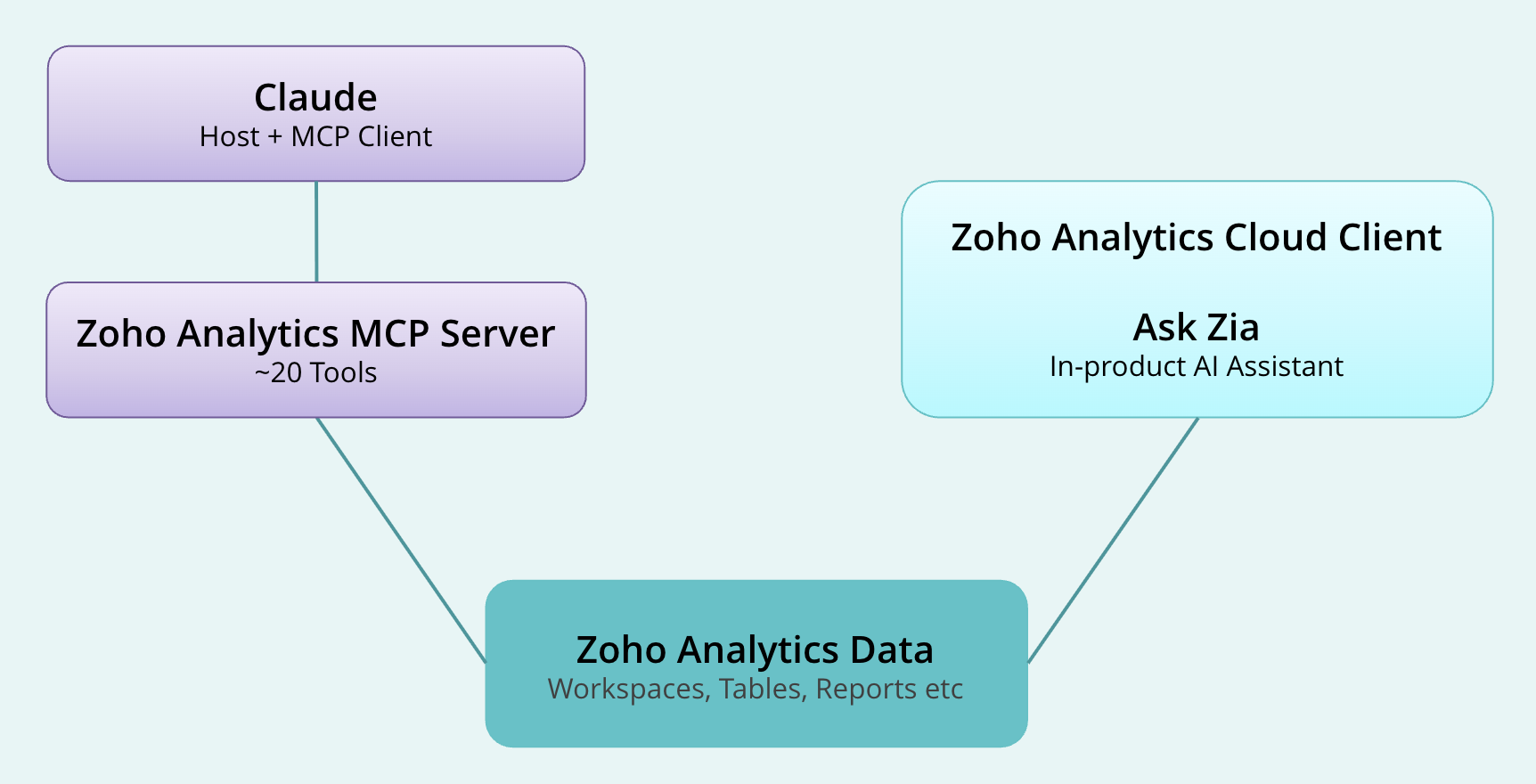 The shape of the connection: the host asks, the server calls the V2 API, and the result returns to the host. Image: Zoho
What the close to twenty tools actually are
Zoho counts close to 20 tools, and the exact count moves with the deployment. The Local MCP set in the tools reference breaks down into four groups, and the shape matters more than the headline number.
| Group | Tools | What they do |
|---|---|---|
| Discovery | get_workspaces_list, search_views, get_view_details | List workspaces, find views, read structure and schema detail |
| Data | query_data, import_data, export_view, add_row, update_rows, delete_rows | Run SQL queries, move data in and out, and change rows |
| Building | create_workspace, create_table, create_aggregate_formula, create_query_table, create_chart_report, create_pivot_report, create_summary_report | Create the workspaces, tables, formulas and reports an account is made of |
| Local file help | analyse_file_structure, download_file | Inspect a CSV or JSON file before import and fetch a file to the local data folder; Local MCP only |
Read that middle row again. Six of the tools write, and two of them delete. delete_rows removes rows from a table based on filter criteria, and update_rows updates rows based on filter criteria with upsert behaviour, per the tools reference. A delete_view tool also exists, and it deletes a view, meaning a table, a report or a dashboard, from a workspace.
The Zoho MCP hosted set is more granular, not smaller. Each step of a multi step operation becomes its own tool call, query_data splits into three separate tools, and folder tools appear that the local set does not have, including a deleteFolder tool that can delete views along with the folder. Granularity gives finer control at each step. It does not add a pause between steps.
The write surface is the story
None of this is hidden, and that is worth crediting. Zoho answers its own frequently asked question, can Claude write to my data or only read it, with the word both, and then lists the write tools again. The walkthrough closes that answer with the one safeguard it names at the point of connection: before connecting to a production workspace, make sure your OAuth credentials are scoped appropriately for the level of access you intend to grant.
Scoping credentials is an administrative control. It decides what an agent is allowed to reach before the agent starts. Observability, which the launch blog names under governance, records what an agent accessed and how it answered after it acts. Data Policies, also named in the launch blog, define access at table, column and row level and enforce it across reports and dashboards.
All of that is real, and all of it sits before or after the action. None of it is a step inside the action: no prompt that says this call will delete rows matching this filter, proceed, and no threshold in the launch material that holds a destructive call for review. The headline pick for this slot named that absence, and a check of the walkthrough, the launch blog and the tools reference confirms it. If Zoho ships such a step, it is not in the documents it published for this launch.
Three ways to run the same server
The server is open source, published on GitHub under the zoho account as analytics-mcp-server, and Zoho offers three deployments. The choice changes who runs the server and how coarse the tools are, but it does not change the write question above.
| Deployment | How it runs | Tool shape | File work |
|---|---|---|---|
| Local MCP | Docker image or Node.js package on your own machine, credentials as environment variables | High level tools that handle multi step operations inside one call | Import, export and file utilities supported |
| Self Hosted Remote MCP | One shared instance on your own host, reached over HTTPS | Same tools as Local MCP | File import, export and local file utilities not supported |
| Zoho MCP | Zoho hosted at mcp.zoho.com, built in a web console, one URL per server | Granular tools that map one to one with single API calls, plus folder tools | File utilities not supported |
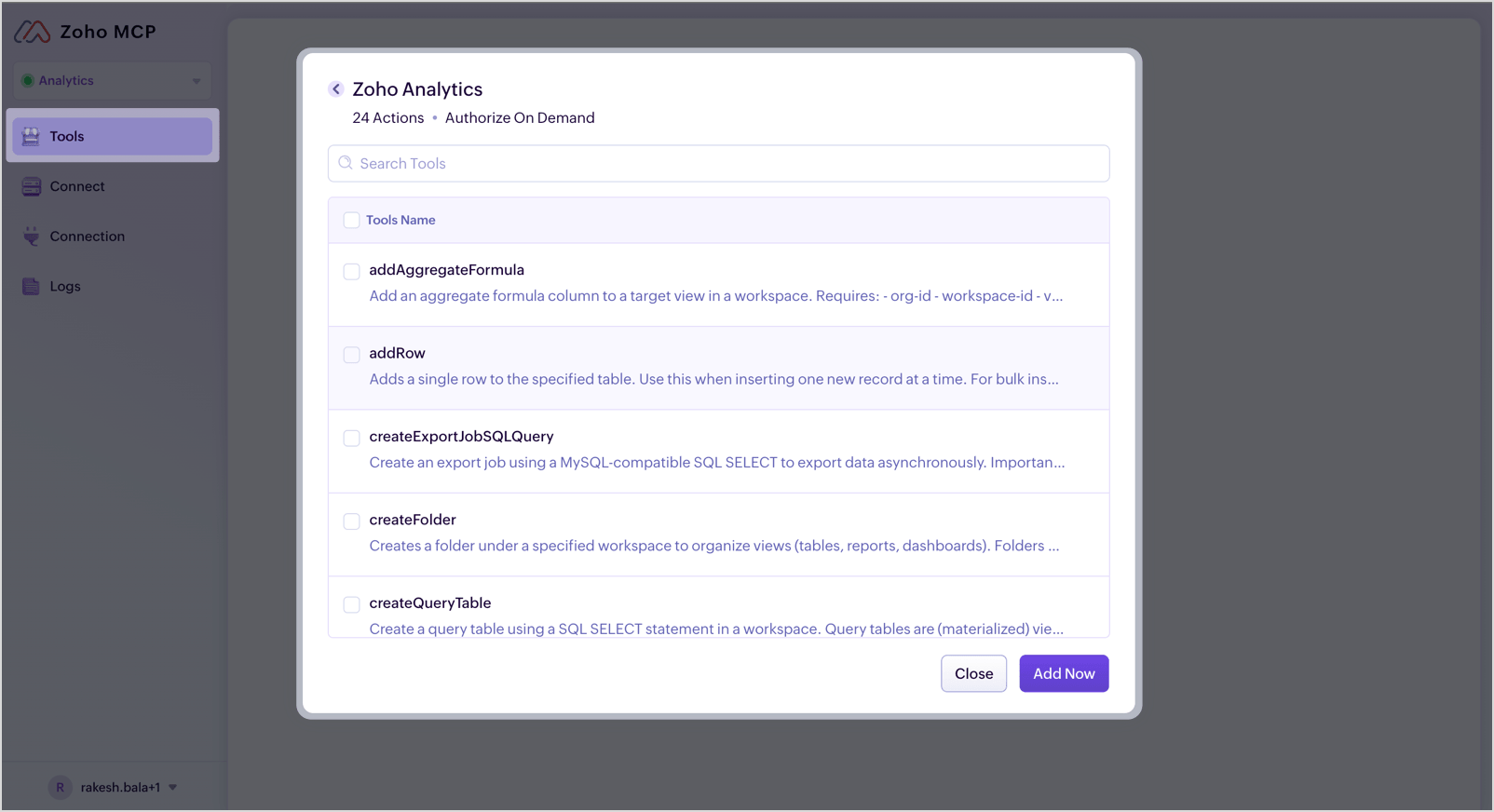 Tool selection in the Zoho MCP console: the server carries only the tools you add to it. Image: Zoho
Hosts are any MCP client. Zoho names Claude Desktop, Cursor, Windsurf and VS Code for Zoho MCP, and its walkthrough adds custom agents built with the MCP SDK. A Claude connector for Claude Desktop and a plug in for the Claude command line tool ship alongside the server, with your Analytics access permissions still in place, per Zoho.
Region is the dull part that breaks setups. Zoho runs separate data centres for the US, EU, India, Australia, Japan and Canada, each with its own server URLs, and the walkthrough calls the wrong region the most common setup issue. Zoho MCP has regional addresses to match, from mcp.zoho.com for the US to mcp.zoho.eu, mcp.zoho.in, mcp.zoho.com.au and mcp.zoho.jp.
What it costs
The MCP server itself has no separate published price. It rides on a Zoho Analytics account, each call spends API units, and unit availability and limits vary by plan, per the walkthrough. Zoho also says the server is not gated by the plan rule that governs Ask Zia, its own assistant inside the product, which sits on Premium and Enterprise plans.
Analytics pricing did not change with the October 28 launch, per Zoho. The published cloud tiers are a free plan, then Basic at $24 per month billed annually or $30 monthly for 2 users and 0.5 million rows, Standard at $48 billed annually or $60 monthly for 5 users and 1 million rows, Premium at $115 billed annually or $145 monthly for 15 users and 5 million rows, and Enterprise at $455 billed annually or $575 monthly for 50 users and 50 million rows. A free 15 day trial needs no credit card, per Zoho.
That structure cuts both ways. A small team can put an agent on its real analytics for the price of a Basic plan, which is a low bar for this much access. It is also a low bar for this much access, and the beta label is Zoho telling you plainly that tool names may shift under a production workflow.
Which should you choose
Choose Zoho MCP hosted if you want the tightest tool list. The console lets you add only the tools a server needs, so a reporting agent can carry query and report tools and no row tools at all. That selection screen is the closest thing to a write guard in the whole setup, and it only exists in this deployment.
Choose Local MCP if the work is yours alone and files matter. It is the only deployment with import, export and local file utilities, and the Docker route works across Claude Desktop, VS Code and Cursor. Scope its OAuth credentials to the workspace it should touch, as Zoho itself advises, and keep it off production data until the beta label comes off.
Choose Self Hosted Remote MCP if a team needs one shared server without Zoho hosting it. Your organisation runs one instance, handles authentication and updates centrally, and every member points a client at one URL. You also take on the hosting and the credential care that Zoho MCP would have handled.
Skip it for now if a mistaken delete would hurt. If your Analytics account holds the only copy of data a business runs on, and nobody has set Data Policies, scoped credentials and a tool list with the delete tools left out, the honest order is governance first and agent second. The server will still be there when the house is in order, and it will still be just as capable.
Final thoughts
Judged as a connector, this is a strong piece of work. It is open source, standards based, honest about its own write tools, priced inside a plan most small teams can reach, and built to let an agent work from shared business definitions instead of guessing what revenue means at your company.
Judged as a handover of control, it is a bet on administration over interruption. Zoho has built the fences around the field and a record of what crossed it, and left the gate itself unwatched. Teams that set the fences with care, narrow credentials, narrow tool lists, production data held back, will get real work out of this server. Teams that connect it wide open because the setup took five minutes will learn what delete_rows does, at agent speed, with a tidy observability log to explain it afterwards.
This piece is a desk assessment built from Zoho documentation and launch material, not a test against a live Zoho Analytics account. Prices, tool names and limits above are the published ones as of this run.
Sources
- Connection walkthrough, tool count, write tools, setup paths, beta status and FAQ: How to Connect Claude to Zoho Analytics Using MCP, Zoho
- Full tool list by deployment, tool descriptions and limits: Tools in Zoho Analytics MCP Server, Zoho
- Zoho MCP hosting, supported hosts, tool selection and regional URLs: Remote MCP Server, Zoho MCP, Zoho
- Launch of October 28, 2026, MCP server, Claude connector, governance, semantic models and unchanged pricing: Introducing the new Zoho Analytics, Zoho Blog
- Plan prices, users and rows: Zoho Analytics Pricing, Zoho
- Source code: zoho/analytics-mcp-server on GitHub, as linked from the Zoho walkthrough
- Body images: Zoho, from the MCP walkthrough and the Zoho MCP documentation
END OF TRANSMISSION
Stay curious. Question everything.