Windows was never supposed to run on an iPhone. Apple closed that door years ago, first with the locked down App Store model, then by restricting the hypervisor that virtual machine apps depended on. WindowsiOS, an open source project by Ammaar Reshi, goes through the wall instead. It runs the full retail build of Microsoft Windows 11 24H2 ARM64 on a foldable iPhone Duo, locally, with no jailbreak.
Reshi announced the project on November 11, 2026, with a 57 second video of the unfolded phone running the Windows 11 desktop under touch control, the Antigravity coding app open alongside. He is a lead for product and design at Google AI Studio, and he says he built the whole thing with Gemini 4 Carbon. The desktop in that video is real Windows, build 26100, and the claim attached to it is the bold one: near native speed. That claim is his, nobody has verified it independently, and grading it fairly is most of this profile.
WindowsiOS
Official site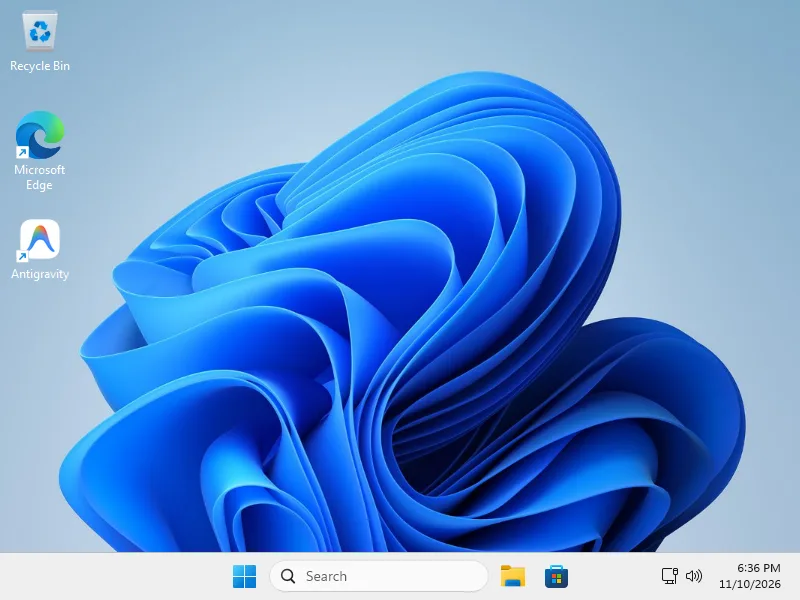 Windows 11 and Antigravity on the physical iPhone Duo. Image: WindowsiOS project
Why Windows on iOS is hard
Start with the speed problem. The emulators that survive on the App Store, UTM SE among them, fall back on the QEMU interpreter, which reads foreign instructions one at a time and acts them out. Per the project README, Windows 11 24H2 under interpretation takes tens of minutes just to reach the desktop, and heavy apps built on Chromium and Electron, Microsoft Edge included, never become usable at all.
The fast road is closed. Apple restricted the hypervisor entitlement on stock iOS starting with version 16.4, which ended hardware virtualization on phones nobody had jailbroken. On iOS 26 and 27 hardware, the Trusted Execution Monitor, shortened to TXM, adds another lock, signing page tables so apps cannot simply mark their own memory as executable.
Then there is the kernel itself. Windows insists on address translation in 4 KB blocks, called translation granules, while the Darwin host underneath iOS works in 16 KB pages. Windows also files its process tags in a different register than macOS or Linux expect, a detail the README names by its register, TCR_EL1.A1, plus it leans on Prism, its built in x86 emulation, with strict memory ordering rules. Any engine that wants to host Windows has to satisfy all of that at once, and then build a believable PC around it: UEFI firmware, ACPI tables, NVMe storage, USB, audio, and networking, all inside the memory ceiling iOS enforces on apps.
The engine room
The core of WindowsiOS is a dynamic binary translator, software that rewrites ARM64 instructions into ARM64 instructions the host can run at speed, paired with a software MMU. The MMU, short for memory management unit, is the layer that maps memory addresses the way the guest demands, here in the 4 KB blocks Windows requires. A TLB stash, a cache of recent translations filed by process tag, keeps the constant context switches of a desktop from flushing the cache and starting over.
Reshi is open about the foundations. The translator builds on Henge, an earlier ARM64 to ARM64 translator by the developer Leviidev, and on Husk, with debugger attachment techniques from the StikDebug and StikJIT projects, networking from libslirp, firmware from TianoCore EDK2, and drivers from Red Hat and its virtio-win package. The full credits sit in the repository THIRD_PARTY_NOTICES file. Naming Henge as the foundation is honest attribution, and it makes the original work easier to see: the Windows specific MMU behaviour, the Prism fixes, and the hardware platform are what this project adds.
The boldest move is the memory. On TXM hardware the project claims a 384 MiB region of executable memory mapped two ways at once, writable and runnable, alongside 4.5 GB of guest memory that the iOS memory watchdog agrees to leave out of its accounting. It gets both through debugger attachment, while the system marks the process as debugged, the state the code calls CS_DEBUGGED. In plain terms, it walks through the door developer tools use, because stock iOS offers no other door to executable memory of that kind. That is the trick and the caveat in a single move: no jailbreak required, and total dependence on behaviour Apple could restrict in any update.
A whole PC in miniature
Around the engine sits a virtual machine built to Windows standards. Boot firmware comes from EDK2, with a persistent variable store so boot entries survive restarts. ACPI 6.3 tables describe the machine, a GICv3 controller handles interrupts, and storage runs on an NVMe 1.4 controller. USB 3.0 xHCI provides a keyboard and an absolute tablet pointer, which is how the touchscreen steers Windows.
Audio is the detail that sells the effort. Red Hat ships no virtio sound driver for Windows, so the project includes an Intel ICH6 HD Audio controller written from scratch. Windows binds the inbox drivers it already carries, and the guest gains speaker output and microphone input. Networking runs on VirtIO Net with the NetKVM driver, over libslirp user mode NAT, needing no special permissions on the iOS side.
The Windows image itself gets trimmed before it ever boots. Project scripts strip 35 plus background services and telemetry from the image offline, and the README claims the trimmed desktop idles at 1.46 GB of its 4.5 GB, spending 89 percent of its time in the wait for interrupt idle state across four vCPUs on the A20 Pro performance cores. Both numbers are the maker own figures. They are plausible engineering targets and unverified measurements, and this profile treats them as the first kind.
Two postures, one Windows
The foldable hardware gets a interface of its own. Folded, the phone becomes a clamshell laptop: the top half is the screen, the bottom half a keyboard and trackpad deck, a layout the repo calls the Surface Laptop Ultra UI. Unfolded, the same session opens into a full screen Windows canvas. It is product thinking on top of kernel work, and it makes the demo read as a tiny laptop rather than a party trick.
Sign in flows get the same treatment. Desktop apps like Antigravity send users to a browser for Google sign in, with the answer returning to a localhost address inside Windows. A small bridge program in the guest pops the native iOS Safari sheet for that sign in instead, so passkeys and Face ID work, then relays the callback back into Windows. The README showcase shows the Antigravity sign in completed through that bridge.
What the screenshots show
The project evidence is a set of screenshots from the physical phone, and they show working software rather than a boot logo. The Windows 11 desktop runs on the device. Edge renders live HTTPS pages, Wikipedia among them, over TLS 1.3. Antigravity 2.31.0, an Electron and Chromium based IDE, runs natively inside the guest. Even Prism works in there, so older x86 Windows apps get translated by Windows itself, nested inside the outer translation.
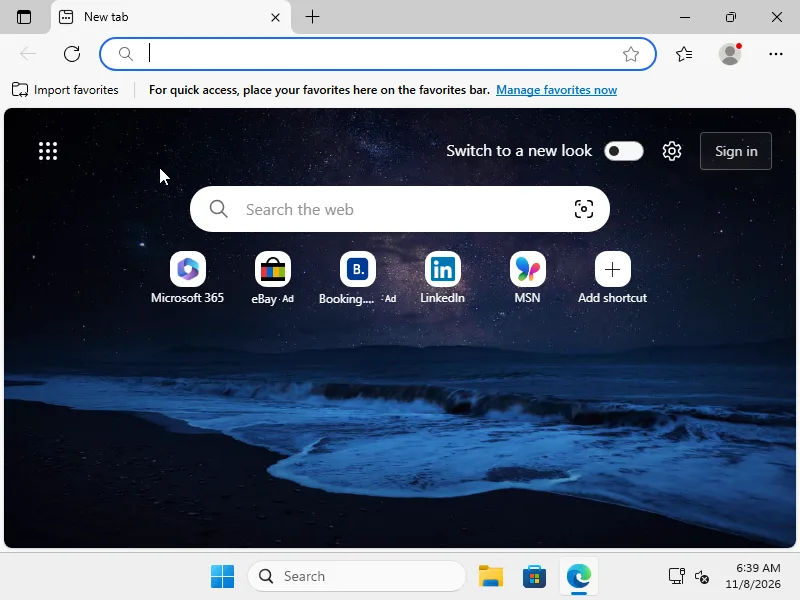 Edge running live inside Windows on the Duo. Image: WindowsiOS project
Treat all of it as the maker evidence, because that is what it is. Screenshots and a short video prove the system boots and runs. They cannot prove how fast it feels in an hour of real use, and nobody outside the project has run it yet.
Price and platforms
WindowsiOS costs nothing and ships as source only, under GPL-2.0-or-later. The catch is the shopping list. Building takes a Mac with Apple Silicon, M1 or newer, with Xcode and the usual build tooling. You supply your own official Windows 11 24H2 ARM64 ESD from Microsoft. The EDK2 firmware and the virtio-win drivers are fetched while you provision, and the repository deliberately holds no disk images and no Windows binaries. Launching onto the phone runs through an LLDB script aimed at iOS 26 and 27 TXM hardware.
The demonstrated target is the foldable iPhone Duo, model iPhone19,4, running an A20 Pro on iOS 27 TXM. The repository opened on November 8, 2026, and at the time of writing it held five commits and about 39 stars, with the announcement landing three days after the first commit.
Handle the claims with care
Every speed and memory figure in this story comes from one source, the project itself, and none of it has independent verification yet. The demo hardware is the newest foldable iPhone on the newest iOS, which is the friendliest possible stage. The executable memory route leans on debugger attachment behaviour that Apple controls and could close. None of that erases the achievement. All of it belongs in any honest account of where the project stands today.
What Works
- Runs the full retail Windows 11 24H2 ARM64 build, unmodified, rather than a cut down shell
- A real translator with a Windows tuned software MMU instead of a slow interpreter
- A complete virtual PC: UEFI firmware, NVMe storage, USB input, working audio, and networking
- The clamshell mode and the Safari sign in bridge show product thinking, not just kernel work
- Free and open source, with honest upstream credit to Henge and the projects it stands on
What Does Not
- Zero releases and nothing to install; building it is a research project in itself
- Every performance and memory figure comes from the maker, unverified by anyone else
- Demonstrated only on the newest foldable iPhone hardware running iOS 27
- The executable memory route leans on debugger attachment behaviour Apple could close
- You must supply and license your own Windows image; the repo ships none
Who should try it
Best for: virtualization nerds, iOS security researchers, and anyone who enjoys reading a masterclass in applied stubbornness. The source is the product right now, and it rewards reading, from the ASID handling in the MMU to the audio controller built to satisfy inbox drivers.
Everyone else should watch the repository. The day this project ships a release is the day it becomes a tool other people can judge. Today it is a demonstration, and a spectacular one.
Final Thoughts
WindowsiOS does not turn your iPhone into a practical Windows machine. What it does is retire an assumption the industry has repeated for years, that stock iOS simply cannot host a real desktop operating system at usable speed. A foldable phone, a translator, a software memory unit, and an AI assisted build later, the desktop boots, the browser loads pages, and the coding agents run. Whether Apple tolerates the debugger route, and whether the speed claims survive independent testing, are open questions. The engineering is not.
Sources
- The project repository and README: ammaarreshi/WindowsiOS on GitHub, read November 11, 2026
- Upstream credits: THIRD_PARTY_NOTICES in the same repository (Henge, Husk, StikDebug and StikJIT, libslirp, TianoCore EDK2, Red Hat virtio-win)
- Announcement: post by @ammaar on X, November 11, 2026 (57 second demo video; built with Gemini 4 Carbon)
- Showcase screenshots: WindowsiOS project
END OF TRANSMISSION
Stay curious. Question everything.