
Winch is a Mac app for App Store optimization on the App Store and Google Play that tracks keywords in 175 countries, drafts and localizes listings, draws store art and sorts reviews, all driven by the coding agent and the AI plan you already pay for. This piece covers its 84 MCP tools, its agent controls, its pricing and its limits.
App Store optimization is grunt work with a spreadsheet soul. You track ranks country by country, you rewrite a subtitle inside a tight character limit, you localize the same listing again and again, and you read reviews looking for the bug that came back. Winch takes that whole pile and hands it to an agent. The twist is whose agent and whose bill. It runs on the coding agent you already use and the plan you already pay for, and it exposes every job it can do as a tool your agent can call.
Winch launched in public at the end of October, with a Show HN post on October 31. It is a Mac app from maker Joydle, sold once rather than rented by the month. That pricing choice and the bring your own agent choice are the story as much as any single feature.
Winch
Official siteA Mac app for App Store optimization across the App Store and Google Play. Primary use case: keyword tracking, listing work, localization, store art and review sorting for indie developers and small teams who already live in a coding agent.
Key features: keyword ranks in 175 countries on both stores; listing drafts scored against real searches; localization from a chosen listing; a studio that captions screenshots and draws every size both stores accept; review sorting into themes with regression alerts to GitHub and Slack; a launch planner and a weekly briefing; all 84 tools exposed as an MCP server.
Advantages: no AI credits sold by Winch and no second AI bill, since the agent runs on your Claude, ChatGPT, OpenCode, Ollama or OpenRouter setup; data stays on your Mac, per the maker, with no telemetry and no account to create; nothing writes to a store without your confirmation. Limitations: Mac only for now; the quality of drafts depends on the model and plan you bring; store writing still needs your own App Store Connect or Play Console keys when you want Winch to write back.
The board comes first
Winch starts where ASO starts, with ranks. It searches both stores in every country you sell in and puts the result on one board, with rank, direction, reach and difficulty for each keyword. Reach is how many people a search reaches, and difficulty is how hard its top ten is to beat, in the maker wording.
The board sorts keywords into plain verdicts such as Own, Push, Target, Hard, Niche, Dead and Swap. Rivals sit on the same view. Winch shows the apps above you on your own searches, in every country, and tracks every name, subtitle and version change from the apps you watch.
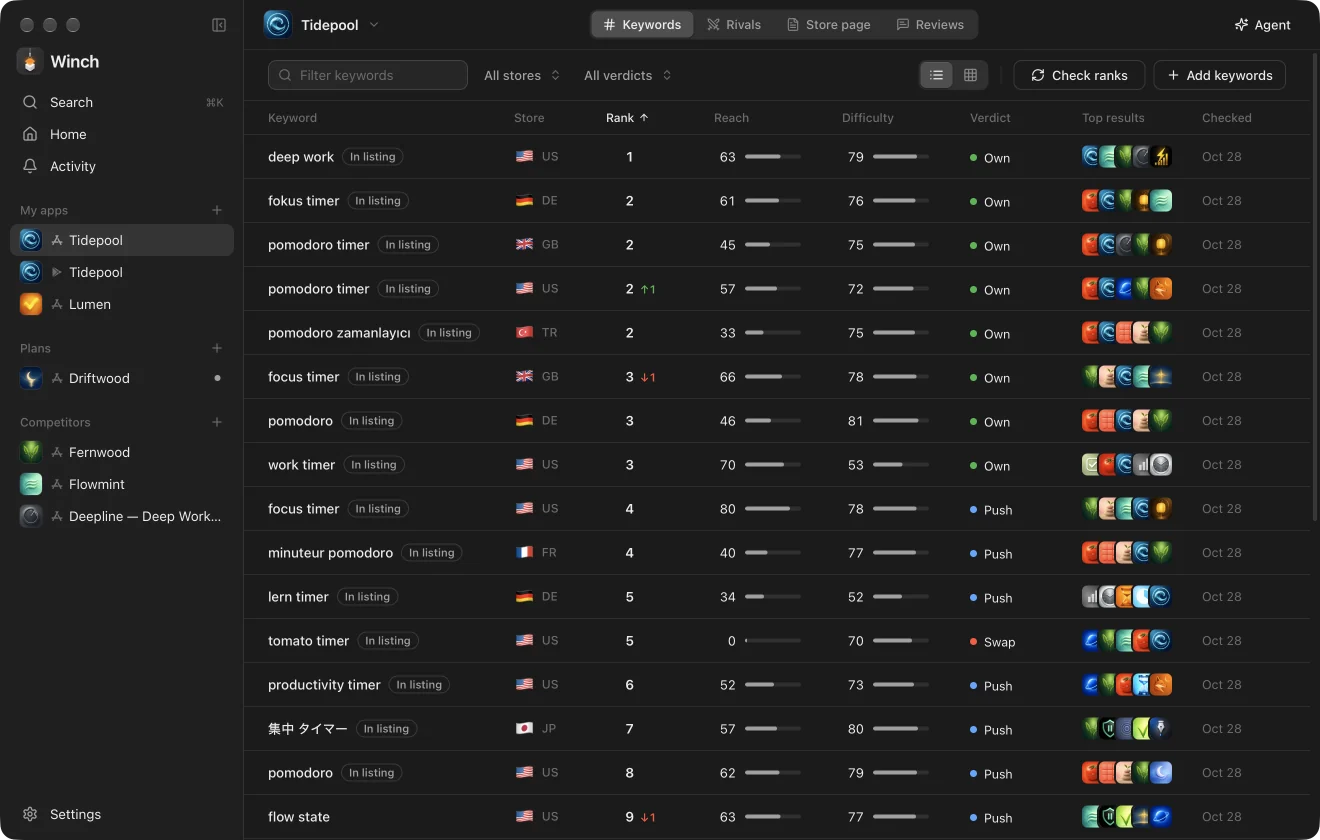 The keyword board: rank, reach, difficulty and a verdict in one place. Screenshot: Winch
Then the agent does the chores
The agent inside Winch sees the ranks, the rivals, the reviews and earlier conversations. Ask in plain words and it searches, tracks keywords, drafts listings, draws store art and plans new apps, answering with numbers you can check, per the maker.
Turn on Act and the agent drives the app itself. Its cursor moves to the work, a warm edge shows that it is driving, and Stop ends the turn. The flow the maker shows is simple: ask what moved, watch the agent run the searches, open the keyword that matters, then draft store page options scored on real searches for you to choose.
The 84 tools are the real product
The part that matters most for agent users is the MCP server. All 84 tools ship as an MCP server for Claude Code, Codex, Cursor and any other MCP client. It works with the Winch app closed, and anything it starts shows live in the window when you open it.
The maker gives the setup as a single command:
claude mcp add winch -- /Applications/Winch.app/Contents/MacOS/Winch --mcp
The example on the site is a localization job. The agent calls get_optimization for an app, then localize_listing for German and Japanese, then store_coverage to check the space left and the words used twice. The drafts come back tested against local phrases in each market, and nothing is written to App Store Connect until publish_drafts is called with confirm.
You can also skip the chat window entirely from a terminal:
Winch --ask "Which keywords did I lose this week?"
That shape will feel familiar to anyone who read our coverage of other MCP tool servers this month. The difference here is scope. This is not eight data lookups or twenty analytics tools. It is one tool for every job inside a full ASO app, with the store writing tools fenced behind a confirmation step.
Listings, art and reviews in one place
Optimize writes your name, subtitle and keywords several ways and shows which version reaches the most people. Every option shows what it gains over the current listing. Choose one and every other language is written from it, with the space left in each language and any repeated words flagged.
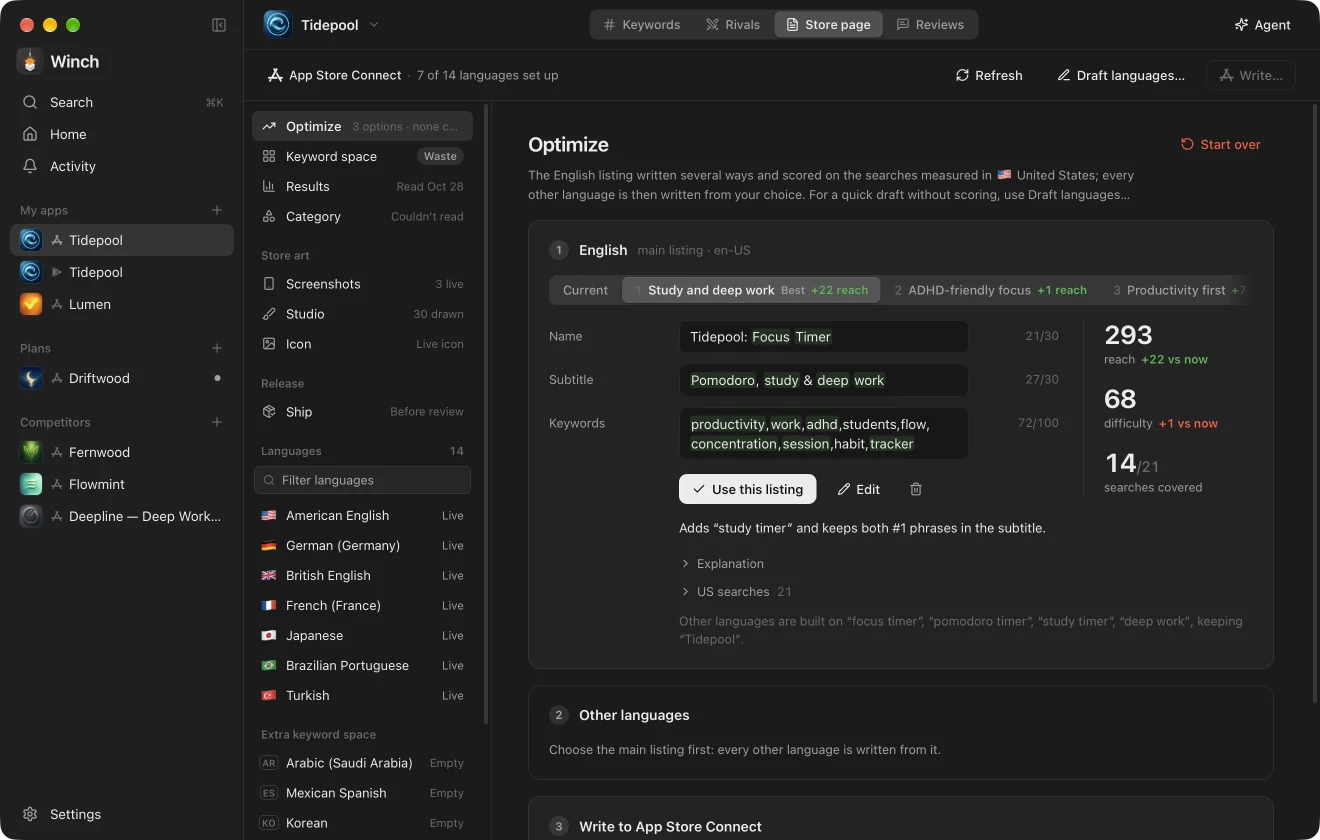 Optimize: three listing options, scored on real searches rather than guessed. Screenshot: Winch
The Studio takes your own screenshots, captions and translates them with your AI, and draws every size both stores take in your own look. Reviews get the same treatment. Winch reads new reviews each day from both stores, in any language, sorts them into themes, and watches for a theme you marked as fixed to return on a later version. When it does, the linked GitHub issue updates and Slack gets one alert. Replies are drafted by your AI and posted only after you confirm the exact text.
Around those jobs sit Results, which shows Apple and Google numbers before and after each listing change, a launch planner that checks a name on both stores and finds keywords you can win before the app exists, and a Monday briefing with what moved, what rivals did, the week in reviews and three things to do.
Runs on your Mac, and on your plan
Winch has no model of its own and keeps no copy of your prompts, per the maker. It finds Claude Code, Codex, OpenCode, Ollama or OpenRouter on your Mac and runs them for you. A Claude Pro or Max plan works through Claude Code, and a ChatGPT plan works through Codex.
You do not need store keys to start. Ranks, reach, difficulty, rivals, public listings and reviews come from public store pages. Connecting App Store Connect or Play Console with your own keys adds your own listings, replies, store numbers in Results, the ship checklist and writing back.
Which should you choose
Choose Winch if you ship apps on the App Store or Google Play, you already pay for Claude Code or Codex, and ASO chores eat hours you would rather spend building. The value is not a smarter model. It is that your existing agent gains 84 store tools, a rank board in 175 countries and a confirmation gate before anything writes.
Skip it if you are on Windows, if you have no paid agent plan and no wish to use Ollama or OpenRouter, or if you want a hosted team dashboard with shared accounts. Winch is a local Mac app with data on your machine and no account system, and that local shape is a feature for solo developers and a limit for larger teams.
Look at a hosted ASO platform instead if you need seats, shared workspaces and reporting for clients. Look at Winch if the work is yours, the Mac is yours and the agent plan is already paid for. In that setup the maths is blunt: one payment, no AI credits and no monthly ASO rent.
Final thoughts
Winch is a clean example of where agent tools are heading. The model is a commodity you already rent from someone else. The durable value is the domain work underneath, the rank data, the listing logic, the review themes and the store connections, wrapped in tools an agent can call safely.
The confirmation gate is what makes it credible. An agent that can rewrite a live listing in every language should never be able to publish that rewrite on its own say so, and Winch does not let it. Draft fast, check the numbers, confirm by hand. That is the right order, and more agent tools should copy it.
Sources
- Product site, features, MCP setup, platform and pricing: Winch
- Launch coverage and maker post: Show HN, Winch, App Store optimization run by your own coding agent, October 31, 2026, via Hacker News
- Screenshots: Winch
END OF TRANSMISSION
Stay curious. Question everything.