
Tabbit is a desktop browser from a Meituan team that puts many frontier models in one address bar and lets an agent act across pages in its own tab group. This research review weighs the model freedom, the agent claims, the pricing picture and the trust cost against Comet, Dia and Brave Leo.
Dirty Static // The Verdict
The widest model choice and the most reusable agent on desktop, if you accept a young browser and numbers that come mostly from the maker.
Best forDesktop researchers and operators who run bounded and repeatable web tasks and want to choose the model for each job in one place
What works
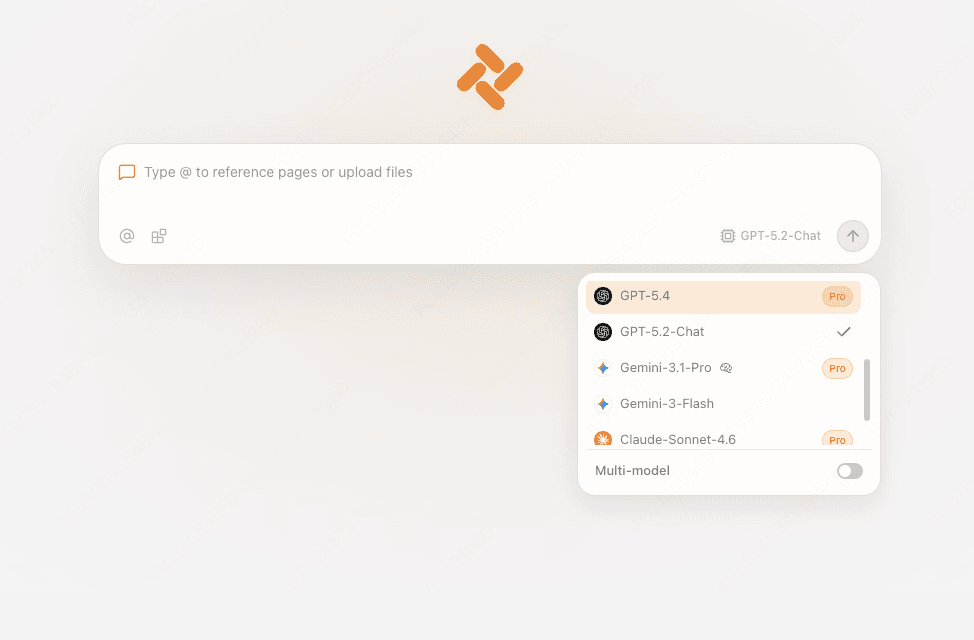
- Genuine multi model freedom across editions, with GPT, Claude and Gemini in the international edition and DeepSeek, Kimi, Qwen and more in the China edition
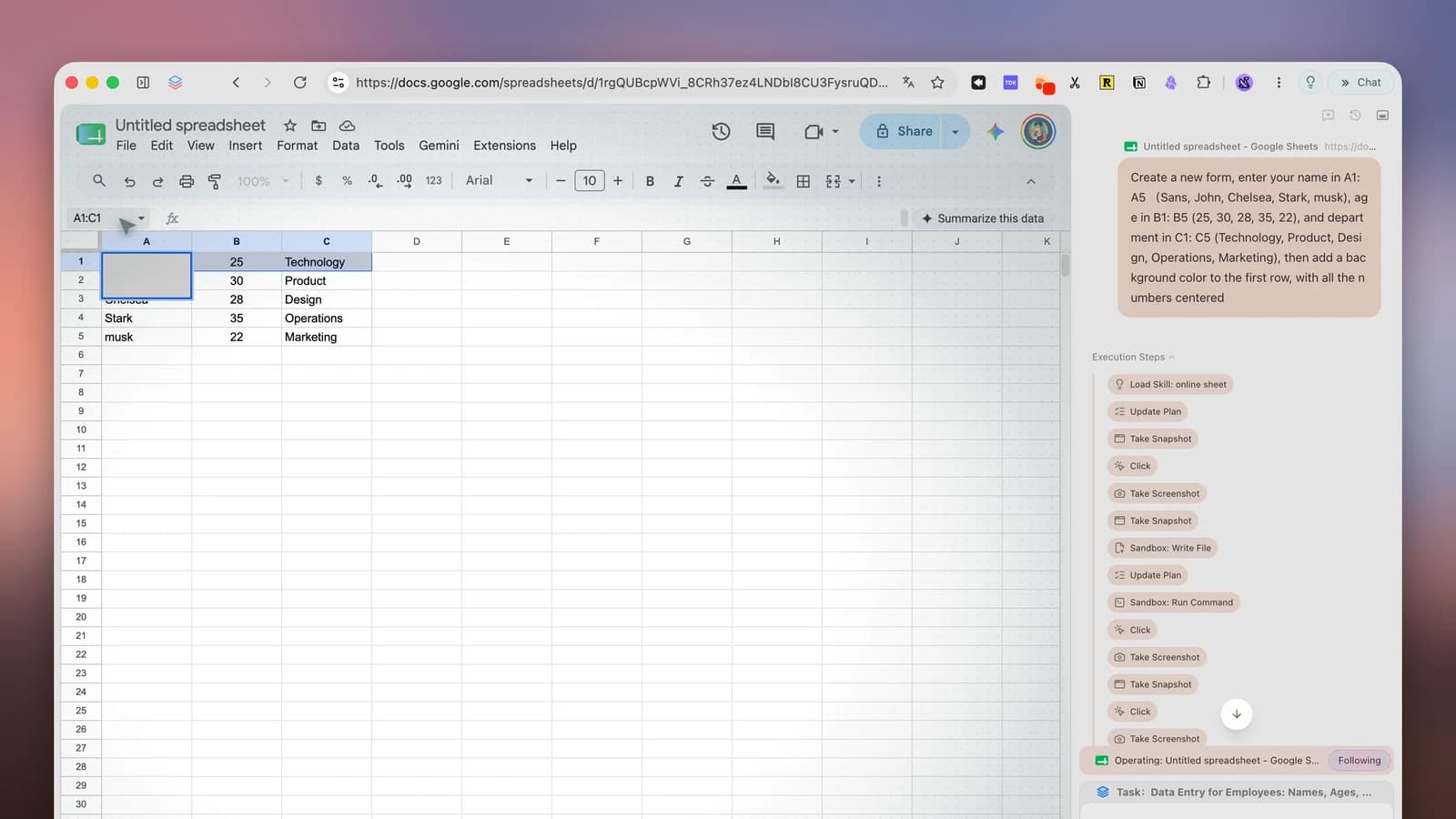
- Agent Mode acts across pages in its own tab group with visible steps, and finished work can be saved as a reusable Skill
- Context is explicit: an @ reference pulls in a tab, a group, a screenshot, a bookmark or a local file only when you name it
- The standard edition is free, and launch reporting says the maker intends that tier to stay free
What does not
- Independent testing is still thin, and the strongest reliability numbers are claims from the maker itself
- No shipping mobile or Linux edition, while Comet already runs on phones as well as desktops
- Pricing past the free tier is clear in China and vague elsewhere, so the current free access to top models has no published end date
- An agent that acts inside your signed in sessions carries a prompt injection risk that no vendor in this class has solved
Research review: based on published testing, specifications, and documentation, not hands on testing.
The AI browser race lost its loudest name this summer. OpenAI shut ChatGPT Atlas down on August 9, 2026, less than a year after launch, and its agent features moved into the ChatGPT desktop app. What remains is a smaller and more interesting field: Perplexity Comet for research, Dia for Mac craft, and Tabbit, a browser from inside Meituan that makes a different bet from both. Tabbit bets that the browser should not marry one model. It should host all of them, and let an agent do work with whichever brain fits the job.
What It Is
Tabbit is a desktop browser built by the GN06 team at Meituan, published under the name Light Years Beyond. It opened for public beta on March 2, 2026, free and with no invite code, and reached version 1.0 on June 9, 2026 for Windows and macOS. A mobile edition was in testing at the 1.0 launch and still has no shipping version on the official download pages.
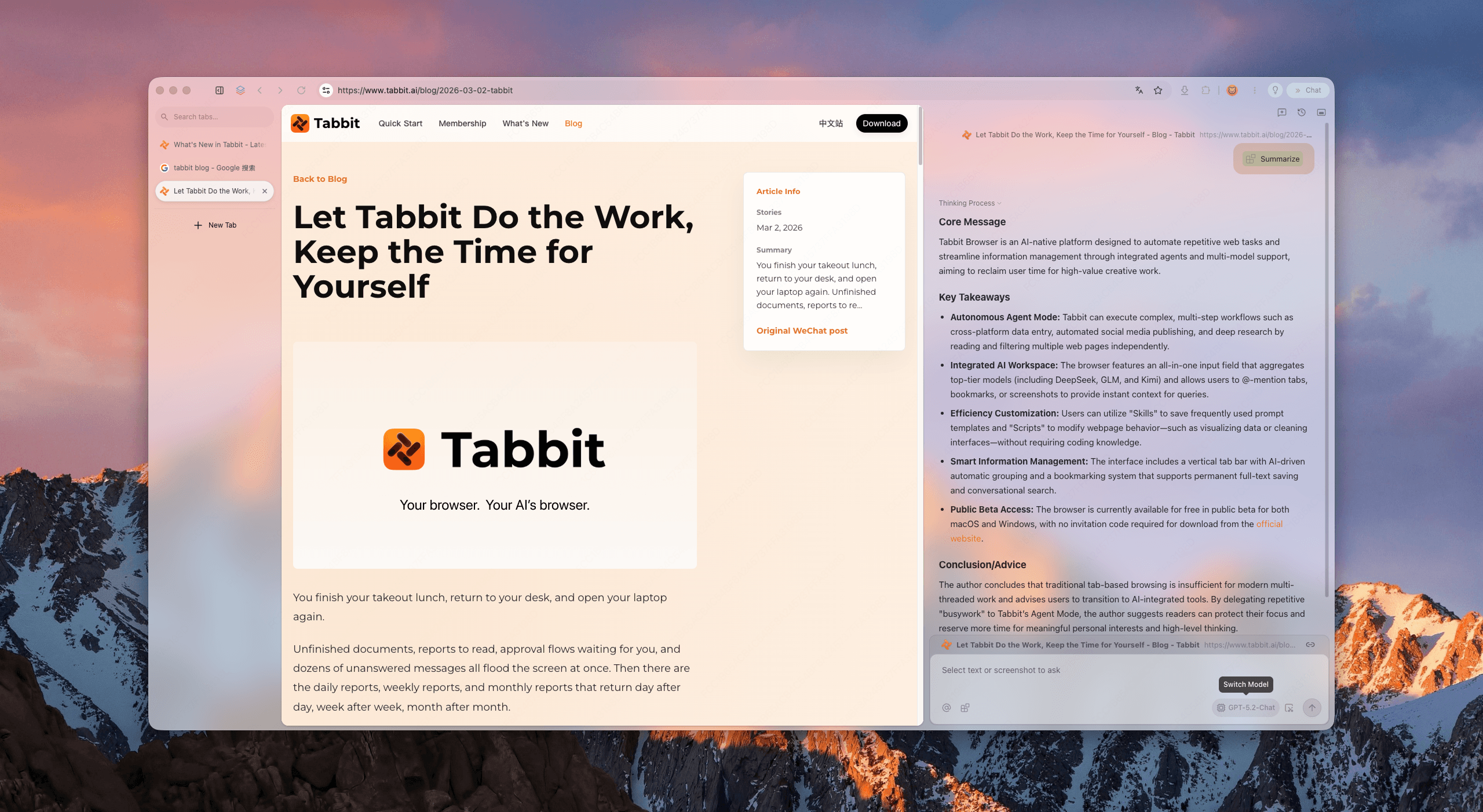
The design premise is that the address bar, the search box and the chat box should be one thing. Tabbit calls it the Omnibox. You type a task or a question, pick a model, and pull context in by typing @ and naming a tab, a tab group, a screenshot, a bookmark or a local file. Nothing enters the prompt until you reference it. Tabs run vertically in a sidebar, with full titles visible, and the browser groups them into workspaces on its own.
Features and Specifications
| Area | Tabbit specification |
|---|---|
| Maker | GN06 team at Meituan, published as Light Years Beyond |
| First release | Public beta March 2, 2026; version 1.0 on June 9, 2026 |
| Platforms | Windows and macOS; mobile in testing at the 1.0 launch |
| Editions | International at tabbit.ai; mainland China at tabbit.com, split to match local model access and compliance |
| International models | GPT, Claude and Gemini families, per the official site |
| China models | DeepSeek, GLM, Kimi, Qwen, Doubao, MiniMax and LongCat |
| Model versions listed at review time | GPT 5.4, Gemini 3.1 Pro, Claude Sonnet 4.6, DeepSeek V3.2, Doubao Seed 1.8, Kimi K2.5, Qwen3.5 Plus, GLM 5 and MiniMax M2.7, per the official download page |
| Agent | Agent Mode reads pages, fills forms, moves data across sites and returns results, running in an isolated tab group with visible steps |
| Context | @ references to tabs, tab groups, screenshots, bookmarks and local files |
| Reuse | Skills save a prompt or workflow for reuse; Scripts turn a described task into a routine with no code; a marketplace shares both |
| Memory | Version 1.0 added a memory function that records preferences and work habits for later tasks, per launch reporting |
| Outside control | A command typed inside coding agents such as Claude Code or Codex can hand browser control to that agent using your existing signed in sessions, per the maker on Product Hunt |
| Migration | Imports bookmarks, history and passwords from Chrome, Edge and Safari, per the maker comparison |
| Price | Standard edition free; Pro at 9.9 yuan per week in China at the 1.0 launch |
The regional split is not a footnote. It is the product strategy in one line. A browser that wants to offer every frontier model has to solve two different compliance maps at once, so Tabbit ships two editions with two model shelves and asks you to download from the domain that matches where you live. Readers outside China get the international shelf. Readers inside China get the domestic shelf. Neither edition offers the other shelf, and the model list on each side can change without notice.
Real World Experience
This is a research review. It draws on the official product pages, the 1.0 launch reporting, the maker comparison of the 2026 field, a Product Hunt launch post from the product team, and the small amount of independent writing that exists in English. That last clause matters. Tabbit has heavy coverage in Chinese media and thin coverage elsewhere, so more of this review rests on maker claims than we would like, and each claim below is labelled as one.
Start with the agent, because the agent is the product. In Agent Mode you describe a task in plain language. Tabbit reads the pages involved, fills forms, extracts data, moves results across sites and delivers a table, a report or a finished form, while the work runs in a separate tab group that leaves your own tabs alone. The execution steps stay visible as it works. When a task works, you can save it as a Skill and run it again on demand or on a schedule, which is the part of the pitch with real leverage: the second run of a bounded task costs you almost no attention.
The maker puts two different numbers on how well that agent works, and they do not measure the same thing. At the 1.0 launch in June, the team said its agent task success rate had risen from 53.1 percent in March to 91.8 percent, across a beta in which it shipped more than a hundred new features. On Product Hunt in the autumn, a product manager reported a stricter public yardstick: across 75 runs on tasks from the BrowserBench set, Tabbit scored a 64 percent success rate, finished about 1.9 times faster than a rival agent browser, and used 61 percent fewer input tokens. Both figures are company claims from company chosen tests. The gap between them is the honest part of the story. Agent reliability depends hard on the task set, and no independent lab has yet published a Tabbit run you can check line by line.
Agent task success rate, percent (company reported)
Left bar: the maker figure at public beta in March 2026 and at the 1.0 launch in June 2026, from launch reporting of the maker announcement. Right bar: the maker run on BrowserBench tasks reported on Product Hunt. Different task sets, so the bars describe progress claims, not a single measured scale.
Usage data from the launch points the same way as the pitch. The team reported average monthly token use of 8.53 million per active user in May 2026, and said more than 60 percent of active users switch models by scenario or run several models at once on one question. Treat both as maker figures. If they are even roughly right, the multi model shelf is not decoration. People with a shelf use the shelf.
Independent experience is thinner and cooler. One hands on account in July, written when Tabbit was offering free access to top models such as Claude Opus 4.8 and GPT 5.5 to users who set it as their default browser, praised the value and flagged the cost: the browser felt sluggish in brief use, in the way several young AI browsers do when the agent machinery runs under the page. That matches the structural risk of the category. A browser that watches context, keeps memory and runs agents has more moving parts than the Chrome it wants to replace, and you feel those parts on older hardware first.
What Works
Model freedom is real, and it compounds. Models have seasons. A lab leads for a quarter, then stalls, then ships again. A browser tied to one lab inherits that rhythm whether you like it or not. Tabbit lets you route a hard reasoning job to one model, a long document to another and a cheap sweep to a third, and its own comparison says the shelf aims to add new flagship models within 12 hours of launch. The multi model mode, which puts several answers to one question side by side, is the single best fact checking habit any of these browsers teaches.
The reuse layer is the second genuine strength. Skills and Scripts turn a good prompt into a standing routine, and the isolated tab group with a visible step trail turns an agent from a demo into a tool you can supervise. Add the outside control hook, which lets a coding agent drive Tabbit through your existing signed in sessions while you keep browsing in parallel, and Tabbit starts to look less like a browser with a chatbot and more like a workbench that other tools can also use. For bounded and repeatable desktop work, that stack has no free rival today.
What Does Not
Trust is the bill, and it arrives in three parts. The first is access. An agent that fills forms and moves data for you acts inside sessions where you are signed in, and the documented attack class for this whole category is prompt injection, where a hostile page hides instructions that steer the agent. The best known case, nicknamed CometJacking, was demonstrated against Comet and later patched, per public summaries, but no vendor claims the class is solved. Tabbit reduces the blast radius with explicit @ context and visible steps in an isolated group. It does not remove the risk, and neither does anyone else. Keep payments, deletions and publishing in human hands.
The second part is provenance. Tabbit comes from a team inside Meituan, one of the largest consumer platforms in China, and the international edition is published from outside the mainland. That backing explains the pace, the model deals and the free tier. It also means the data policy of your edition deserves an actual read before you hand the browser your work context and a memory of your habits, because the browser asks for more context than any tool it replaces. The third part is youth. There is no shipping mobile edition, no Linux edition, performance complaints in early hands on use, and a benchmark record written almost entirely by the maker. None of that is disqualifying. All of it argues for a trial profile before a full migration.
Competition
| Browser | Platforms | Model choice | Agent | Price picture |
|---|---|---|---|---|
| Tabbit | Windows and macOS | Widest shelf in the class, split by regional edition | Full agent in an isolated group, with Skills you can save and rerun | Standard free; Pro 9.9 yuan per week in China; international paid pricing not yet published in full |
| Perplexity Comet | Windows, macOS, iOS and Android | Perplexity stack, with some choice on paid tiers | Full agent, strongest at cited research | Browser free since October 2025; Pro at $20 a month and Max at $200 a month add model and agent capacity |
| Dia | macOS on Apple silicon only, Windows waitlist | Vendor stack | Supervised skills rather than full execution | Free tier with limits; Pro widely reported at $20 a month |
| Brave Leo | Desktop and mobile, broad platform support | A mix of models, plus bring your own model, including local models | No page actions; an assistant only | Free browser with a paid premium tier |
| Chrome with Gemini | Desktop and mobile | Gemini only | Limited automated browsing in preview in the US | Free tier with limits; heavier use sits in paid Google AI plans |
The table draws the map cleanly. Comet is the research leader and the only AI first browser with a real phone story. Dia is the craft pick if your work lives in Mac apps and connected work tools, and if you accept supervision over execution. Brave Leo is the privacy pick, the one entry that can run a model you bring yourself and keep more of the work on your own machine, at the cost of an agent that does nothing on the page. Tabbit wins exactly two columns, model choice and reusable agent work on desktop, and in this category those are the two columns that decide daily leverage.
Final Verdict
Try Tabbit if your browser work is desktop bound, repetitive and spread across models you currently rent one at a time. The free standard edition, the saved Skills, the visible agent and the open model shelf add up to the most leverage per dollar in this class right now, because the dollar figure is zero. Run your first tasks in a fresh profile, watch the step trail, and keep the agent away from money and irreversible clicks while you learn its failure modes.
Stay with Comet if research with citations is the job, or if your browsing lives on your phone. Stay with Dia if you are on an Apple silicon Mac and your context lives in work tools rather than tabs and files. And keep the wider warning that applies to every name in the table, Tabbit included: an agentic browser is a new kind of access to grant, the independent testing record for the whole class is still short, and the vendor numbers, however encouraging, are vendor numbers. Tabbit has built the most open shelf and the most reusable agent of the survivors. Whether it earns your default slot depends on how much young software you are willing to supervise.
This is a research review. It draws on the official Tabbit product and comparison pages, launch reporting of the June 2026 version 1.0 announcement, the product team post on Product Hunt, and independent coverage from PiunikaWeb, checked November 2026. No hands on testing was performed. Product screenshots: Tabbit.
Sources
- Tabbit: Official product routing and download page
- Tabbit: AI Browser Comparison 2026, Comet vs Dia vs Tabbit vs Chrome
- BigGo Finance: Meituan launches AI browser Tabbit 1.0, standard version free, Pro at 9.9 yuan per week
- WeDoAny: Meituan GN06 team launches Tabbit 1.0
- Product Hunt: Tabbit AI launch post and BrowserBench claims
- PiunikaWeb: Tabbit offers free access to top models, with early performance notes
- AIBase: Tabbit public beta launch, March 2, 2026
- Product images: Tabbit
END OF TRANSMISSION
Stay curious. Question everything.