
steamac, shipped as the FX Steam Launcher, downloads Valve's signed ARM64 SteamOS image and boots it inside a lightweight virtual machine on Apple silicon, reaching the GPU through Venus and Metal. This piece covers how the stack fits together, the two Vulkan drivers on offer, the games the project has verified with its own frame rate numbers, and the hard limits around DirectX 12 and anti-cheat.
SteamOS was built for hardware Valve controls: the Steam Deck, the Steam Frame, machines with Steam’s name on the box. A Mac was never on that list, and Apple silicon made the idea stranger. Wrong processor family, wrong graphics API, wrong everything. A small open source project called steamac disagrees, and it brought receipts: a signed and notarized Mac app, ten public releases in October 2026 alone, and Valve’s own SteamOS build running in a window on an M series Mac.
This is not Wine, not a fork, and not a streaming trick. The app, called FX Steam Launcher, boots the genuine ARM64 SteamOS image that Valve ships for Steam Frame inside a lightweight virtual machine, then pushes the graphics through a chain of translation layers until they land on Metal. Windows games run. Controllers rumble. The Steam gamepad interface fills the window, and closing that window shuts SteamOS down cleanly in two to four seconds.
FX Steam Launcher (steamac)
Official siteA launcher that installs and runs Valve’s official ARM64 SteamOS in a microVM on Apple silicon. Primary use case: playing your Steam library, including Windows only games, through the real SteamOS on a Mac you already own.
Key features: downloads Valve’s signed SteamOS image and verifies its signature and checksum before writing it to a sparse disk; GPU acceleration through Venus and a choice of two Vulkan on Metal drivers; any gamepad macOS recognises arrives in SteamOS as the same kind of controller, with rumble; sound through CoreAudio to speakers, AirPods or an external DAC, with up to 12 channels of PCM for surround layouts; a Desktop Mode with the Plasma desktop when you want a Linux desktop instead of the gamepad interface.
Advantages: SteamOS itself is untouched, so official Valve updates install and roll back as they do on Valve hardware; the released app needs no Docker and no toolchain; the whole project is public source, and its limitations are documented in its own README. Limitations: DirectX 12 tops out below what many new games demand; anti-cheat systems that block virtual machines will not run; the project is young and moving fast, with ten releases between October 6 and October 24, 2026.
Valve’s image, not a fork
The disk creation step is the part that should make a sceptic relax. The launcher downloads the SteamOS image from Valve’s own servers, a signed bundle of about 4.5 GB, checks the signature and the checksum, and writes it to a sparse disk image. SteamOS is not bundled with the app and does not belong to the project: you accept Valve’s SteamOS licence and the Steam Subscriber Agreement while creating the disk, the same paperwork as on Valve hardware.
Because the root filesystem stays untouched, the normal SteamOS update machinery works. Updates land in the spare A/B partition slot and roll back if they fail, and the project has verified that flow against a real September 2026 update and rollback. Every change steamac needs lives in its own layer on top of the stock system.
The virtual machine itself is deliberately small. It runs on Apple’s Hypervisor.framework through libkrun, the lightweight virtual machine monitor the project builds on. There is no kernel extension and no Docker container in the path of the released app; Docker only appears if you choose to compile the project from source yourself. Inside the window, gamescope draws the real SteamOS interface and a native Metal window presents it, with the guest resolution following the window size at constant DPI so text stays sharp in a window or full screen.
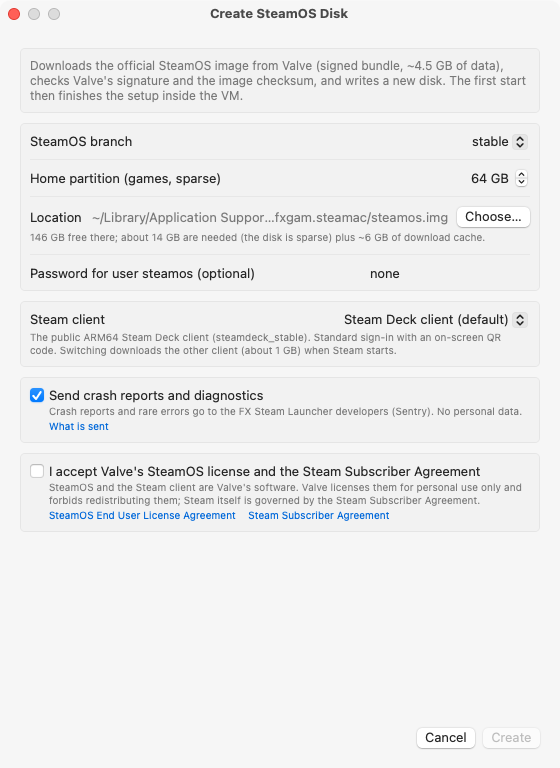 Creating the disk: pick a SteamOS branch, size the games partition, choose a Steam client, accept Valve’s licence. Image: steamac repository, docs/media.
 The real SteamOS gamepad interface, drawn by gamescope inside the VM. Image: steamac repository, docs/media.
Six layers between the game and the GPU
The graphics path is a relay race, and every handoff is a known open source component. A Windows game speaks DirectX. Proton 11, the ARM64 build that Steam itself installs inside the guest, turns that into Vulkan through DXVK for DirectX 9 to 11 and vkd3d-proton for DirectX 12. The guest’s Mesa Venus driver carries the Vulkan calls out of the machine over virtio-gpu, virglrenderer replays them on the host, and a Vulkan on Metal driver translates them into Metal for the Apple GPU. SteamOS sees a graphics device named Virtio-GPU Venus with the host chip in brackets and Vulkan 1.4 support.
The x86 problem is handled by FEX, the just in time translator Steam also installs. It converts x86 code to ARM64 as the game runs. One detail does heavy lifting here: Apple silicon can enforce the strong memory ordering x86 software expects, in hardware. A guest kernel patch exposes that ability through a setting called PR_SET_MEM_MODEL, and FEX switches it on instead of emulating memory barriers in software, which is a large part of why the frame rates below exist at all.
Unified memory gets adult supervision, too. The launcher reserves a GPU budget, anywhere from 256 MiB to 16 GiB depending on the machine, and advertises it to games through Venus as video memory. Texture settings in games then budget against a number that means something, instead of the whole machine’s memory until the Mac starts swapping. The launcher can also upscale the guest picture with Apple’s MetalFX super resolution when the window is larger than the guest resolution, which is the kinder option on Retina screens.
Pick your driver
The last hop to Metal comes in two flavours, chosen under Settings, Advanced, Vulkan driver. Both report shader model 6.0, and neither can conjure features the Apple GPU lacks.
| MoltenVK | KosmicKrisp | |
|---|---|---|
| What it is | Vulkan on Metal, the UTM fork plus steamac patches | Mesa’s Vulkan driver on Metal 4 |
| Needs | macOS 15 or later | macOS 26 or later |
| DirectX 12 feature level | 11_0 | 12_0 |
| Stellar Blade Demo on an M1 Max, project test | about 18 FPS | about 29 FPS |
| Notes | Works on every supported Mac; the patches add geometry shaders, transform feedback and million entry descriptor heaps | The default where available, and the faster of the two in the project’s tests |
MoltenVK is the safe seat: it runs everywhere steamac runs, and the project’s patches close the gaps that used to break games. KosmicKrisp is the performance pick and the only route to feature level 12_0, because it builds tiled resources on Metal 4 sparse resources. If your Mac is on macOS 26, the launcher defaults to KosmicKrisp and you only need this table when a game misbehaves.
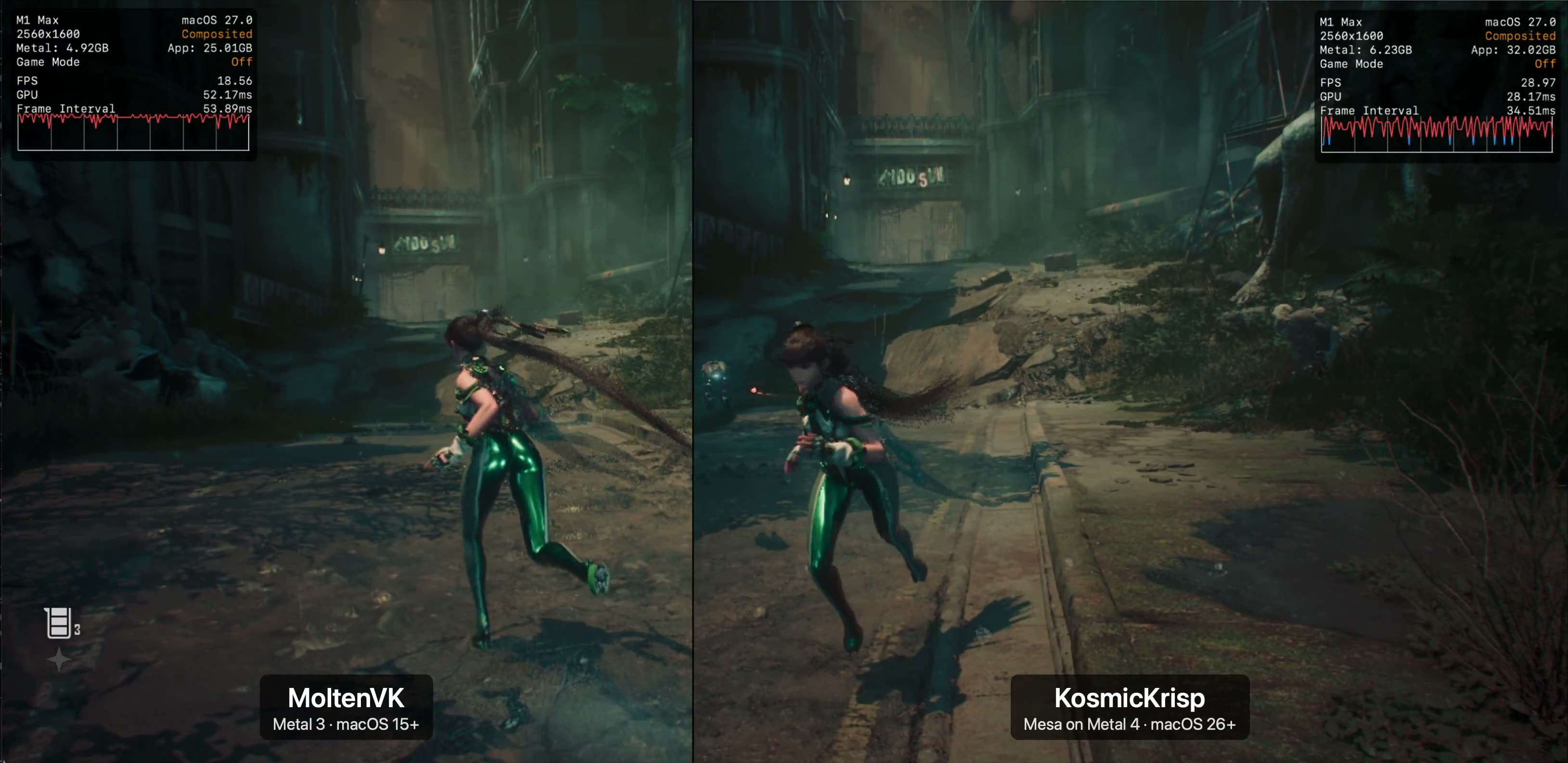 The project’s own split screen test: the same DirectX 12 scene on both drivers. Image: steamac repository, docs/media.
What actually runs
The project documents specific games rather than waving at compatibility in general, and its numbers come from its own published tests.
Death’s Door was the first game verified, a DirectX 11 title running through DXVK. On an M1 Max, its title screen holds about 41 FPS on the standard path and about 117 FPS through the experimental DXMT path added in version 1.9.2, with the test display capped at 120 Hz. DirectX 11 is where this stack is comfortable, and the numbers show it.
Heroes of Might and Magic: Olden Era ran for seven minutes without a single error in the project’s offline test, and Diplomacy is Not an Option runs as a Windows x86-64 game through Proton and FEX. American Truck Simulator is the odd one out in a good way: a native Linux x86-64 build running under FEX with OpenGL routed through zink, working on both drivers.
Stellar Blade Demo is the DirectX 12 proof. The project documents it at 60 FPS at 1280 by 800 on an M4 Max, and at about 29 FPS on an M1 Max with KosmicKrisp against about 18 with MoltenVK. Dragon’s Dogma 2 is the trophy and the exception: version 1.9.4 made it run at all, on KosmicKrisp on M2 and newer chips, feeding it the exact feature level and shader model it demands through its launch options. On an M5 Max it plays at about 40 FPS at 1280 by 720, and its first launch shader compilation takes about 8.5 minutes on that machine, down from 62 minutes in the previous build.
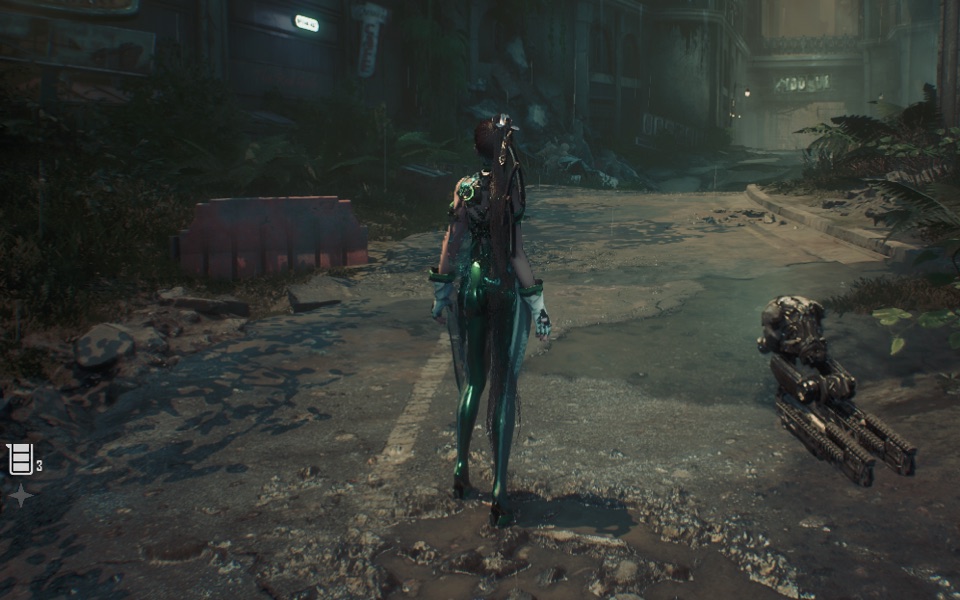 Stellar Blade inside the VM: DirectX 12, translated twice, drawn by Metal. Image: steamac repository, docs/media.
What you need
| Requirement | Detail |
|---|---|
| Mac | Apple silicon, any M series chip; the project’s own tests use an M1 Max as the floor for DirectX 12 |
| System | macOS 15 or later; macOS 26 or later for KosmicKrisp and feature level 12_0 |
| Free space | 20 GB to create the disk, about 14 GB of disk plus a 6 GB download cache; the disk is sparse and grows as games install |
| Accounts | A Steam account and your own games; the launcher fetches SteamOS from Valve under Valve’s licence |
One honest contrast: that light footprint belongs to the released app. Building steamac from source is a different hobby, needing about 150 GB of free space, Xcode, Rust and container builds for the kernel and Mesa. Download the DMG.
Which Mac, and who should bother
If your library leans on DirectX 9, 10 and 11, hardware you already own is probably enough. The project’s M1 Max numbers put that whole era of games in comfortable territory, and lighter chips still clear the bar for older titles. This is the reader steamac was built for: a Mac on the desk, a Steam library full of Windows games, and no wish to buy a second machine.
If DirectX 12 is the point, the project’s data draws a clear line. An M1 Max is a marginal DirectX 12 machine at 18 to 29 FPS in its test title, an M4 Max is documented at 60 FPS at 1280 by 800, and the newest Max chip runs the hardest verified case, Dragon’s Dogma 2, at about 40 FPS at 720p. Buy the Max chip and the memory headroom, not the base model. Unified memory is shared between the virtual machine and the game, and the GPU budget comes out of the same pool.
If your evenings run on competitive multiplayer protected by anti-cheat that rejects virtual machines, skip this entirely. That wall is stated in the project’s own limitation list, and no driver choice climbs it.
Final thoughts
steamac earns attention for what it refuses to do. It does not fork SteamOS, does not wrap macOS Steam in a skin, and does not hide its limits in a footnote written by marketing. The image is Valve’s, the signatures are checked, the frame rates are published with the hardware named, and the failures are listed in the same document as the victories. The project is four weeks old and shipping weekly, so treat today’s limits as a progress report rather than a verdict. For a Mac owner with a DirectX 11 heavy library, it is already the most honest route to real SteamOS we have seen.
Sources
- Tip and initial coverage: Gadget Pilipinas, SteamOS on Mac: steamac Runs Valve’s ARM64 Build
- Project source, README, status and limitations: fxgl/steamac on GitHub
- Current release notes, including Dragon’s Dogma 2 figures and signing details: FX Steam Launcher 1.9.4
- Project site, including the download walkthrough, graphics and games pages: fxgl.github.io/steamac
- All screenshots in this article come from the steamac repository, docs/media folder (project and Valve material), downloaded and hosted here rather than hotlinked.
END OF TRANSMISSION
Stay curious. Question everything.