Ghosthand turns a Mac into a Bluetooth mouse and keyboard for a real iPhone, so an agent can see the screen over USB and tap, scroll and type in any iOS app with no jailbreak, no Xcode and no app on the phone. This piece covers how the split link works, what the agent loop looks like in practice, how it compares with Appium and iPhone Mirroring, what it costs, and where its limits sit.
Most phone work still lives behind glass with no API behind it. Posting to TikTok, checking a flow in Settings, testing an app that only ships on iOS: an agent can reason about all of it and still have no hands. The usual bridges ask for a jailbreak, a signed test runner, or a simulator that is not the real device at all.
Ghosthand takes the desk route instead. Plug a real iPhone into a Mac over USB so the agent can see the screen, pair that same Mac over Bluetooth so it acts as a mouse and keyboard, and the agent works the phone the way a person at a desk would. No app sits on the phone. No Xcode project runs on it. The phone stays a phone, and the Mac does the reaching.
Ghosthand
Official siteControl for real iPhones built for agents. Primary use case: giving an agent hands inside iPhone only apps and system flows that have no API.
Key features: screenshots over USB in about 0.3 seconds per frame per the maker docs; taps, double taps and triple taps, holds, swipes and scroll at screenshot coordinates or by on screen text found with on device OCR; fast keyboard typing plus Home, Enter, Escape, arrow and volume keys; screen recording with sound while actions continue; passcode unlock and lock over the Bluetooth keyboard; files, photos and app handling over USB with no Developer Mode; several iPhones at once, each on its own lease; a CLI, a remote MCP server and an HTTP API that share the same commands.
Advantages: nothing to install or sign on the iPhone; the agent can use App Store apps, system apps, Settings and the lock screen; leases stop two agents driving the same phone at once. Limitations: a Mac and a cable must stay in the loop at all times; typing is US ASCII only per the docs; fleet size tops out at about seven iPhones per Mac by Bluetooth, with two tested.
Two links, two jobs
The design splits seeing from touching, and each half uses the link that suits it. USB carries the picture. macOS lists a trusted iPhone as a capture device, the daemon reads frames from it, and screenshots land as PNG or JPEG files sized in screen points so the coordinates an agent reads are the coordinates it taps.
Bluetooth carries the touch. The daemon presents the Mac as a Bluetooth Classic HID device, the same profile a real keyboard and mouse use, and iOS accepts that input through AssistiveTouch. Acquire turns AssistiveTouch on over USB and release turns it off again, so a personal phone returns to normal when the work ends. The maker is open about the plumbing here: macOS has no public API for acting as a Classic HID device, so the daemon uses a private CoreBluetooth path, and a macOS update could change it. That honesty matters. It names the fragility instead of hiding it.
Setup is two manual steps and the rest is automatic. Connect over USB, unlock and tap Trust, then pair from Settings and Bluetooth on the phone. Sign in happens once per Mac with Google, permissions for Camera and Bluetooth are granted by the person in the setup window, and agents are told to open setup and wait rather than click through it themselves.
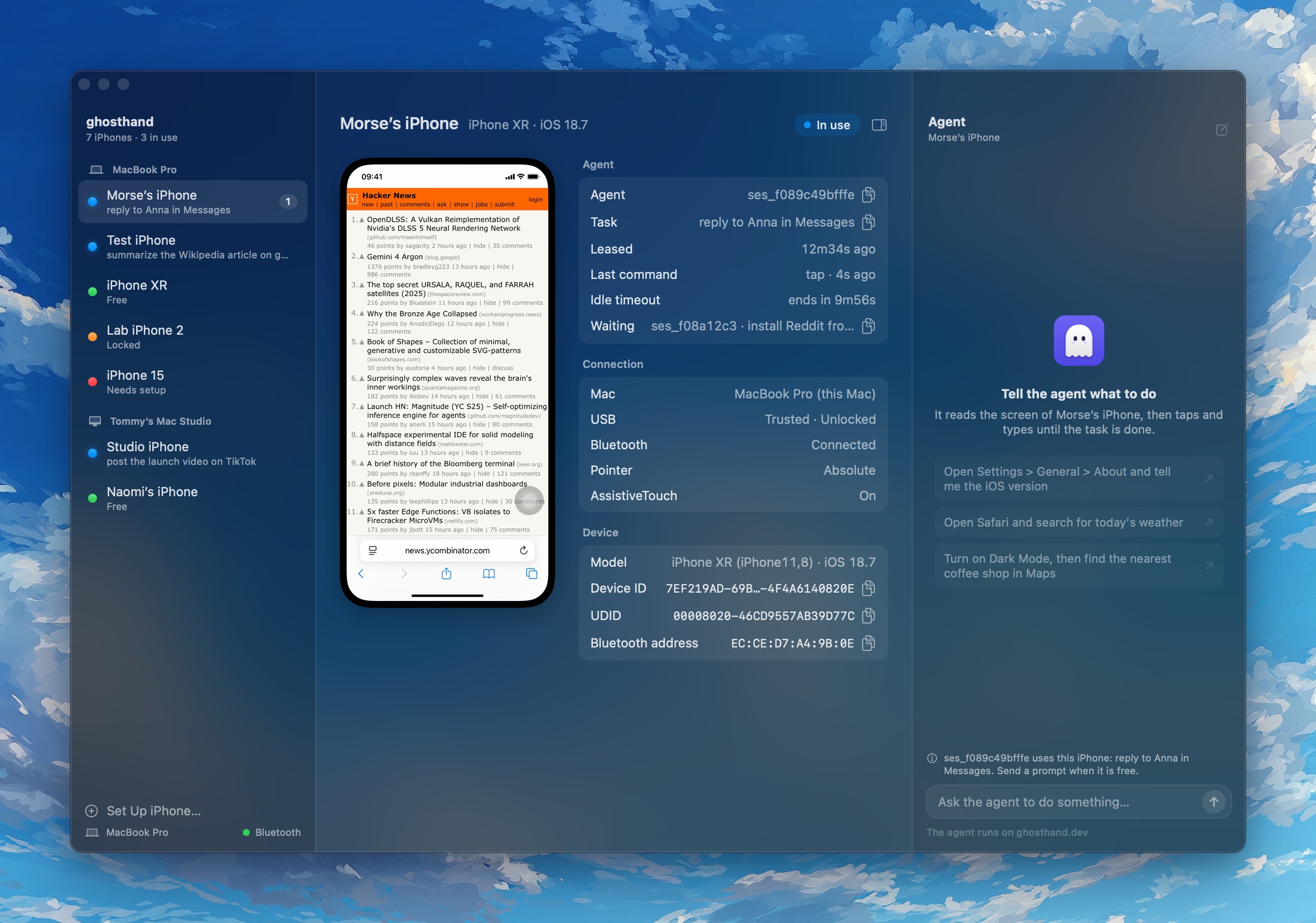 The control plane: every iPhone, its agent, its task and its live screen in one window. Screenshot: Ghosthand
The agent loop, one call at a time
Ghosthand is built around a tight loop and a blunt rule about cost. Each tool call is the slow part, not the phone, so an action can return the new screen in the same call with a screenshot flag, a screen text flag, or both. The agent reads text first when text is enough, reads the image when icons or layout matter, acts once, then reads again before deciding the next move.
The docs push that discipline hard. Tap by text rather than by guessed pixels where you can, check focus before you type because typed keys go to whichever field holds focus, and never script clever loops that wait for a word you hope will appear. Sheets and alerts arrive without warning in iOS, and a loop waiting for one guessed word waits forever. One action, one full read, one decision: that is the pattern the skill and the MCP tools both teach agents from Claude Code, Cursor, OpenCode, Codex and other clients.
Under that loop sits a proper control model. Every command except list needs a lease, one agent per iPhone at a time, with other agents waiting or getting a clear leased by error. The dashboard shows each phone with a status dot, the lease age, the last command and any agents waiting, and a person can take control at any point by hovering the live screen and clicking it, with their input landing between agent commands.
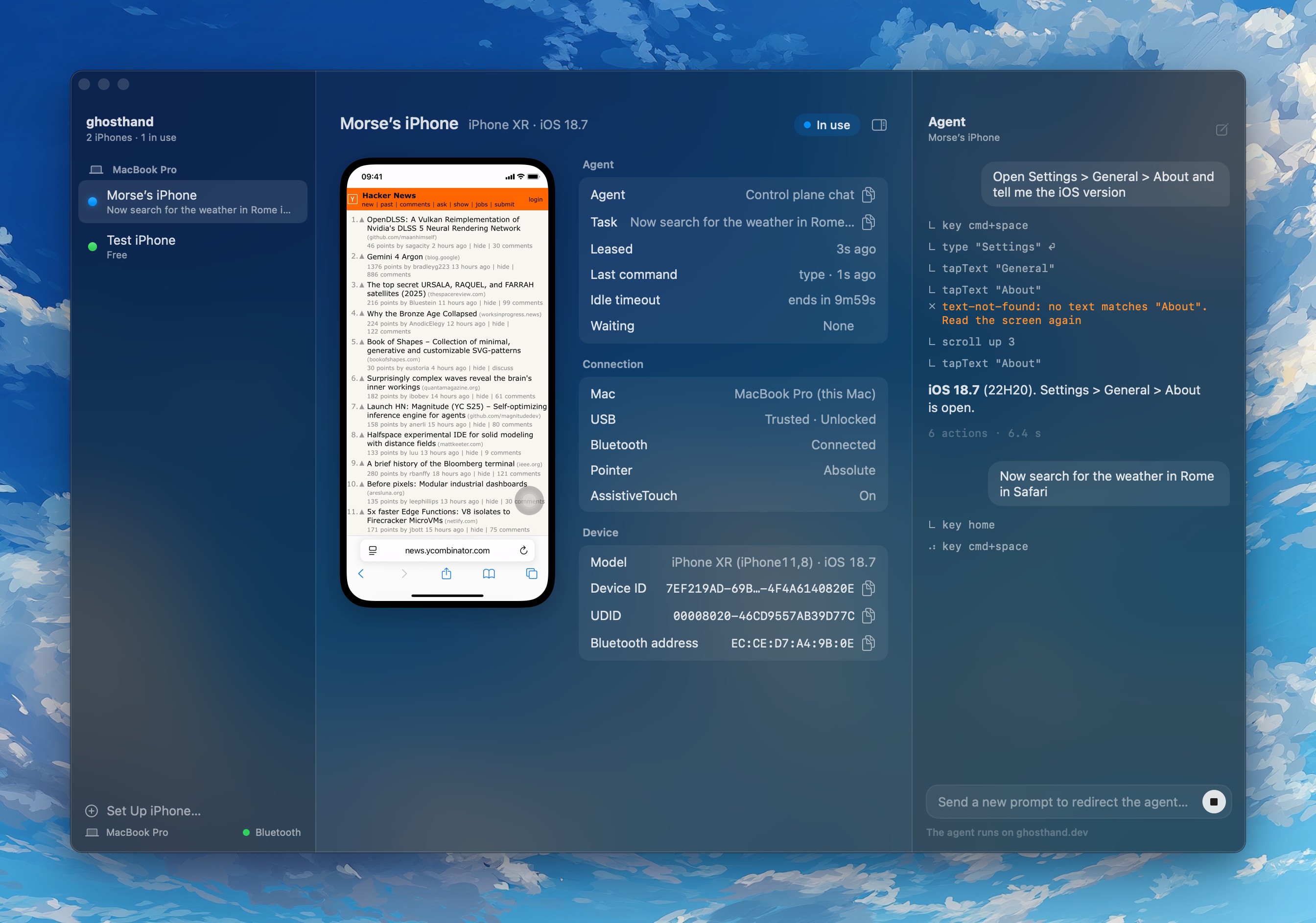 Agent chat in the control plane: type a task and watch each tool call land as one line. Screenshot: Ghosthand
How it stacks up
The honest comparison is with the tools builders already reach for. Appium drives iOS through WebDriverAgent, a signed test runner built on XCTest, and iPhone Mirroring shows one phone on a Mac under tight conditions. Ghosthand differs from both in where the work lives: nothing runs on the phone at all.
| Tradeoff | Ghosthand | Appium with WebDriverAgent |
|---|---|---|
| Phone setup | USB trust plus Bluetooth pairing | Development setup plus a signed runner |
| Signing renewal | None, no runner is installed | Free Personal Team profiles expire after 7 days; a paid membership avoids the weekly limit |
| Input | Mouse, keyboard and wheel through AssistiveTouch | Native UI testing gestures, including multi touch |
| Finding controls | Screenshots, on device OCR and coordinates | UI elements and attributes, plus screenshots and coordinates |
| App handling | Navigate through the visible UI | Direct launch, terminate and state queries |
| Text input | US ASCII only | Broader text support, depending on the field |
| Fleet size | About 7 per Mac by Bluetooth, 2 tested | No Bluetooth limit; set by host resources and USB |
Against iPhone Mirroring the split is just as clear in the maker table. Mirroring needs the same Apple Account on both devices, works with one iPhone at a time, pauses after inactivity and keeps the phone locked while it runs. Ghosthand needs no matching accounts, keeps the phone unlocked for capture, holds several phones at once, and states no EU restriction where Mirroring is unavailable in the EU.
Pricing, in full
The pricing page is short enough to print whole. The free plan covers one iPhone on any Mac, with every core feature, the CLI, the MCP server, the HTTP API, recording and the control plane, and no time limit. Pro costs $99 per month per Mac and unlocks unlimited iPhones on each paid Mac, phone tasks through the built in agent, and read access to the daemon source code and private skills on GitHub. Prices are in USD, or the same amount in EUR, and billing runs on Stripe.
Counting is by first lease. On the free plan the first iPhone your agents lease becomes your free iPhone, and a second one fails with a clear error that names it. On Pro the first Macs that lease fill the paid slots. If the service cannot be reached, a phone that was allowed before keeps working for 7 days on Free, and until 3 days after the paid period on Pro. The privacy note on the same page is worth repeating: screenshots, screen text and typed text never reach the maker servers, and the only server call is the plan check at each lease.
Which should you choose
Choose Ghosthand if your agent needs iPhone only apps. Social posting, account flows, Settings changes like turning off a SIM PIN, and checks inside apps with no web twin are its home ground. If the task can only happen on a real phone screen, this is the shortest path from prompt to tap.
Choose it if signing chores are your pain. Teams that have lived through expired WebDriverAgent profiles and runner crashes will feel the appeal at once. Two pairing steps and no runner to renew is a real operational saving, even before the agent writes a line.
Choose it if one phone is enough to start. The free plan is not a trial clock. One iPhone, full features, no time limit means a solo builder can ship a real phone workflow and pay only when a second phone or a second Mac enters the picture.
Stay with Appium if you need the element tree. Structured UI queries, direct app lifecycle control, multi touch gestures and fleets past the Bluetooth ceiling belong to the test runner world. Ghosthand trades that depth for reach, and for test suites that depth is the point.
Look elsewhere if you have no Mac in the room. The CLI runs only on macOS, the cable must stay in, and Android is outside this product entirely. A cloud device farm or a cross platform test stack serves that need better.
Final thoughts
The clever part of Ghosthand is not that an agent can tap a phone. It is that it asks almost nothing of the phone to do it: trust once, pair once, and let AssistiveTouch do the rest. That restraint is also its ceiling. Vision and OCR replace the element tree, ASCII replaces full text, and Bluetooth replaces scale.
For the builder whose work is trapped inside iPhone apps, that trade will often be worth it. A $0 start on one phone, a flat $99 per Mac when the bench grows, and a phone that goes back to being yours the moment the lease ends: as hands for agents go, these are clean ones.
Method note: this is a desk review built from the maker site, its full product docs and its pricing page, not a run on our own iPhone. Speeds, fleet counts and reliability notes above are the published maker figures and are labelled as such where they appear.
Sources
- Product site, setup, agent loop, limits, security and Appium comparison: ghosthand.dev
- Pricing, plan counting, offline grace and source access: ghosthand.dev/pricing
- Launch roundup listing and independent summary: The Tool Nerd, October 27, 2026
- Control plane and agent chat screenshots: Ghosthand, from ghosthand.dev
END OF TRANSMISSION
Stay curious. Question everything.