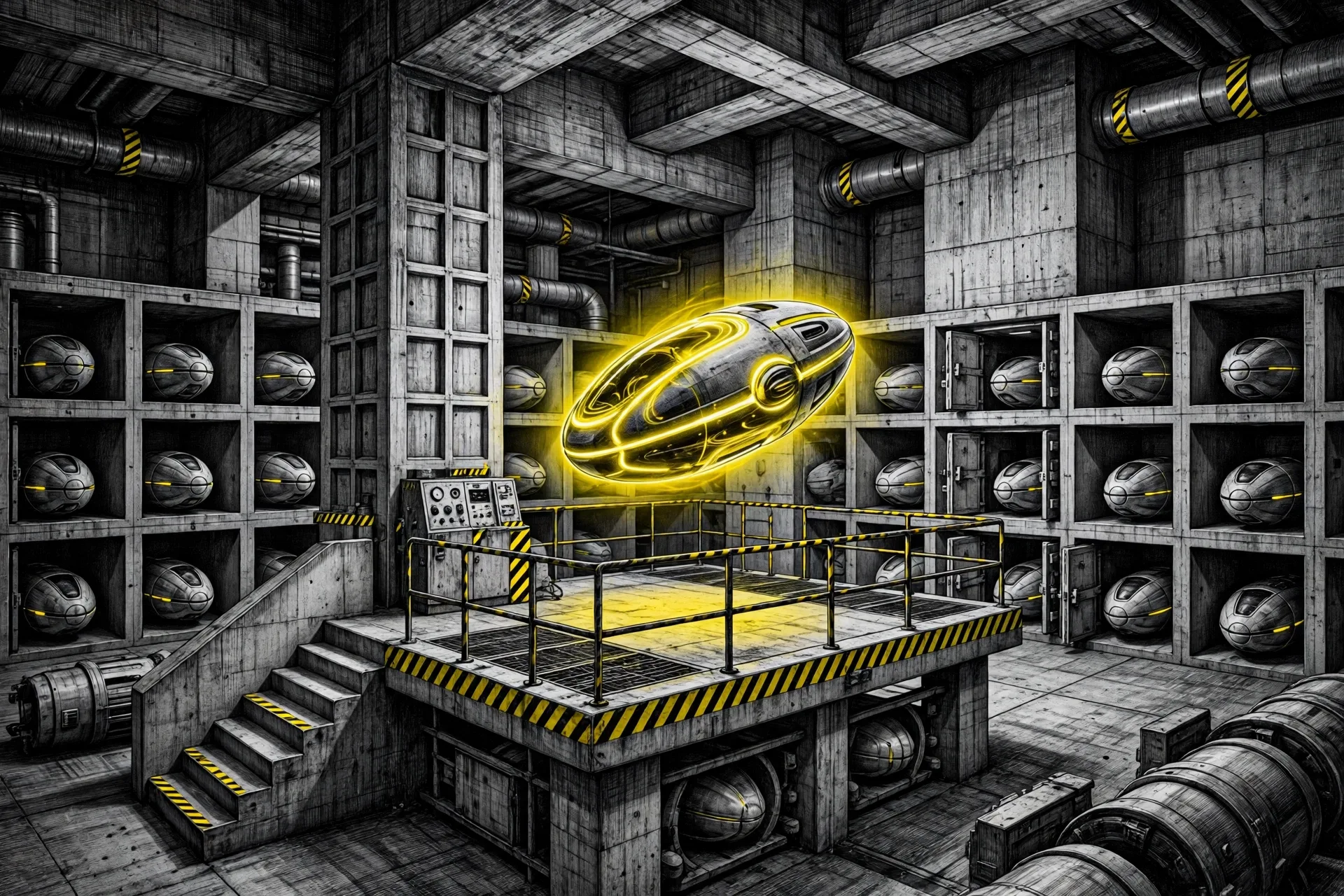
An agent spends most of its life waiting. It runs code for a few seconds, then sits idle while a model thinks, a tool answers, or a person reads. In plain Kubernetes, that idle session still holds a Pod, with memory and compute locked to a conversation that is doing nothing.
Agent Substrate attacks that waste. Google built it, reached version 1.0 this week, and donated it to the Cloud Native Computing Foundation, where it sits in the CNCF Sandbox. Google says the managed form, Agent Substrate on GKE, is now generally available. This tutorial uses the open source build that the kagent project documents: Substrate 0.0.9 on a local kind cluster, with one agent running inside a gVisor sandbox.
What You Will Build or Learn
You will end with a local kind cluster that runs Agent Substrate in the ate-system namespace and kagent with the Substrate link turned on. You will create a declarative agent named hello-substrate. That agent runs as a Substrate Actor inside gVisor, not as a plain Deployment.
You will also learn the three words that explain the whole system. An Actor holds one session and its state. A Worker provides compute from a shared pool. A Gateway controls traffic in and out and can inject secrets by Actor identity, so keys stay outside the agent environment. Google describes that split in its 1.0 announcement, and the steps below follow the kagent guide for Agent Substrate.
Before You Begin
Read the scope before you type. This is a local test cluster, not a production setup. The kagent guide states that the Substrate 0.0.9 chart defaults to JWT auth backed by Kubernetes ServiceAccount tokens, so a plain kind cluster works with no feature gates and no custom kind config. Production choices such as isolation with Cloud Hypervisor microVMs, storage, and access policy sit outside this walkthrough.
One claim needs a label before the steps start. The figures in the Short Version, restore in under 500 milliseconds, 10x density over standard container runtimes, and more than 500 suspend and resume actions per second, are Google figures for the 1.0 release. This tutorial does not measure them. A single worker on a laptop can show the suspend and resume shape. It cannot prove density at scale.
Step 1: Create a kind Cluster
Action: create a local Kubernetes cluster named kagent-substrate.
kind create cluster --name kagent-substrate
Expected result: kind reports the cluster ready and kubectl points at it. No custom config is needed for Substrate 0.0.9, per the kagent guide.
Step 2: Export Your Model Key and Check It
Action: export an OpenAI API key in the same shell you will use for Helm, then prove the shell can see it. Use a placeholder in any notes you keep.
export OPENAI_API_KEY="your-key-here"
[[ -n "${OPENAI_API_KEY:-}" ]] && echo "key is set (len=${#OPENAI_API_KEY})" || echo "OPENAI_API_KEY is empty, export it first"
Expected result: the check prints the key length and never prints the key. The guide warns against putting the export and the Helm command on one line, because the shell can expand the variable before the assignment runs and pass an empty string.
Step 3: Install Agent Substrate 0.0.9
Action: install the Substrate custom resources first, then the Substrate control plane and data plane, both into ate-system.
helm upgrade --install substrate-crds oci://ghcr.io/kagent-dev/substrate/helm/substrate-crds --version 0.0.9 --namespace ate-system --create-namespace --wait

helm upgrade --install substrate oci://ghcr.io/kagent-dev/substrate/helm/substrate --version 0.0.9 --namespace ate-system --wait --timeout 10m

kubectl get pods -n ate-system
Expected result: the pod list shows ate-api-server, ate-controller, atelet pods, atenet-router, the valkey-cluster pods and rustfs in Running state, plus a few init jobs in Completed state. Names vary in suffix. State is what matters here.
Step 4: Install kagent With Substrate Turned On
Action: install the kagent custom resources, then kagent itself with the Substrate flags from the guide. Pin the charts. Versions before v0.9.7 lack the values this step sets, and Helm ignores unknown values in silence, so an old chart starts with no Substrate link and no error.
helm upgrade --install kagent-crds oci://ghcr.io/kagent-dev/kagent/helm/kagent-crds --version 0.10.6 --namespace kagent --create-namespace --wait

helm upgrade --install kagent oci://ghcr.io/kagent-dev/kagent/helm/kagent --version 0.10.6 --namespace kagent --timeout 10m --wait --set providers.openAI.apiKey="$OPENAI_API_KEY" --set providers.default=openAI --set controller.substrate.enabled=true --set controller.substrate.ateApiEndpoint=dns:///api.ate-system.svc:443 --set controller.substrate.ateApiInsecure=true --set substrateWorkerPool.create=true --set substrateWorkerPool.replicas=1 --set substrateWorkerPool.ateomImage=ghcr.io/kagent-dev/substrate/ateom-gvisor:v0.0.9

kubectl get secret kagent-openai -n kagent
kubectl get workerpools.ate.dev -A
Expected result: the secret exists with one data entry, and a WorkerPool named kagent-default exists. One worker is enough for this walkthrough. The guide notes that session Actors release their slot when they snapshot back to storage, so one Worker can serve many sessions in sequence. Add workers later if you want sessions that overlap in time.
If Helm times out while pods start, wait for the controller by hand and then continue:
kubectl wait deploy/kagent-controller -n kagent --for=condition=Available --timeout=10m
Step 5: Open the kagent Interface
Action: forward the kagent interface to your machine and open it in a browser.
kubectl port-forward -n kagent svc/kagent-ui 8001:8080
Expected result: the interface loads at http://localhost:8001. Skip the first run wizard if it appears. Leave the forward running in this terminal and use a second terminal for the next step.
Step 6: Create One Agent on Substrate
Action: apply a SandboxAgent manifest. The substrate block points the agent at the kagent-default WorkerPool. The runtime must be Go. The guide states that the Python ADK is not supported on Substrate today.
kubectl apply -f - <<EOF
apiVersion: kagent.dev/v1alpha2
kind: SandboxAgent
metadata:
  name: hello-substrate
  namespace: kagent
spec:
  type: Declarative
  description: Tiny declarative agent running inside a substrate actor
  declarative:
    runtime: go
    modelConfig: default-model-config
    systemMessage: |
      You are a friendly assistant living inside an Agent Substrate sandbox.
      When asked who you are, say "I am hello-substrate, a Go ADK declarative agent running inside a gVisor actor."
  substrate:
    workerPoolRef:
      name: kagent-default
EOF

kubectl wait sandboxagent/hello-substrate -n kagent --for=condition=Ready --timeout=5m
Expected result: the agent reaches Ready. The guide puts the first golden snapshot at about 60 to 90 seconds. A golden snapshot is the saved starting state that new Actors restore from, so later sessions start fast instead of building from zero.
Step 7: Chat and Watch the Actor Suspend
Action: in the interface at http://localhost:8001, open the agent list, pick kagent/hello-substrate, and send this prompt: What are you, and where are you running? Answer in one sentence.
Expected result: the agent replies with the sentence from its system message, naming itself as a Go ADK declarative agent inside a gVisor Actor. Behind that reply, a session Actor restored from the golden snapshot, ran the model call, and snapshotted back to storage. Open View, then Substrate, in the interface to see the Actor in the inventory. Between requests it should sit in Suspended state. That one word is the whole point of the system, made visible.
Verification
Run this checklist before you call the setup done:
kubectl get pods -n ate-systemshows the Substrate pods Running, with only init jobs Completed.kubectl get secret kagent-openai -n kagentshows a secret with one data entry.kubectl get workerpools.ate.dev -Ashowskagent-default.- The
hello-substrateagent reaches Ready and answers the test prompt in the interface. - The Substrate view shows the session Actor as Suspended between requests.
If all five hold, you have the core loop working: state in the Actor, compute in the Worker, and no Pod held hostage by an idle chat.
Troubleshooting
| Problem | Likely cause | Fix |
|---|---|---|
| Agent pods show CreateContainerConfigError | The OpenAI key was empty at install time, so no secret was created | Run the kagent Helm command again with –reuse-values and set providers.openAI.apiKey again, per the guide. The deployments roll to new pods on their own. |
| The controller starts with no Substrate link | The kagent chart is older than v0.9.7, so the Substrate values were ignored | Reinstall with the pinned 0.10.6 charts in Step 4. |
| Helm times out on first install | A cold start race while the controller waits on its database, per the guide | Wait for the controller with the kubectl wait command in Step 4, then check the pods before you retry anything. |
| The agent never reaches Ready | The first golden snapshot is still building, or a pod failed earlier in the chain | Wait past 90 seconds first. Then check pods in both kagent and ate-system and fix the earliest failure you find. |
| One Worker feels too small for tests | A shared Actor for a long lived harness pins a slot while it stays active | Scale the pool with kubectl scale workerpool kagent-default -n kagent –replicas=3 for a quick test, or set substrateWorkerPool.replicas in Helm for a lasting change. |
| You want the cluster gone | The walkthrough is done and the kind cluster holds a model key secret | Run kind delete cluster –name kagent-substrate and the whole test setup goes with it. |
Next Steps
Read the Agent Substrate concept page linked from the kagent guide for the full account of snapshots, Actors and WorkerPools. Then look at the AgentHarness path in the same docs, which places long lived coding agents on Substrate. Readers who run Hermes will care about that path in particular, and our Hermes Agent setup tutorial covers the agent side of that pairing.
For a production read, compare this local path with Agent Substrate on GKE in the Google Cloud docs, and weigh gVisor against Cloud Hypervisor microVMs as your isolation boundary. Google says Substrate accepts standard OCI containers and works with ADK agents and stateful coding setups. Test that claim with one small agent of your own before you move any fleet onto it.
Start small, watch the Suspended state do its work, and scale the WorkerPool only when your sessions actually overlap. Density is a claim until your own traffic proves it.
Steps, versions and commands checked against the kagent Agent Substrate guide and the Google Cloud 1.0 announcement on 2026-11-07. This procedure was verified against those documents; it was not run end to end on a test machine for this article.
Sources
- Agent Substrate guide and install commands: kagent documentation, Agent Substrate example
- 1.0, CNCF donation, Actors, Workers, Gateways and Google performance figures: Google Cloud Blog, Open infrastructure for autonomous agents comes to CNCF, 2026-11-05
- Diagram: Google Cloud Blog
END OF TRANSMISSION
Stay curious. Question everything.