
The control plane was the deal breaker. Plenty of firms wanted Claude agents working on internal code for hours at a stretch, and just as many refused to let a vendor hold the session record, the credentials and the agent loop while that work ran. Self hosted Claude Managed Agents, opened in private beta on November 12, is Anthropic answer to that refusal. You run the service. Claude itself still runs at a provider you choose.
That split shapes every step below. Our news report on the launch covered what moved in house and what did not. This tutorial does the install in the order the Anthropic docs set out, and it flags the limits before you spend an afternoon on a setup your workload cannot use.
What You Will Build or Learn
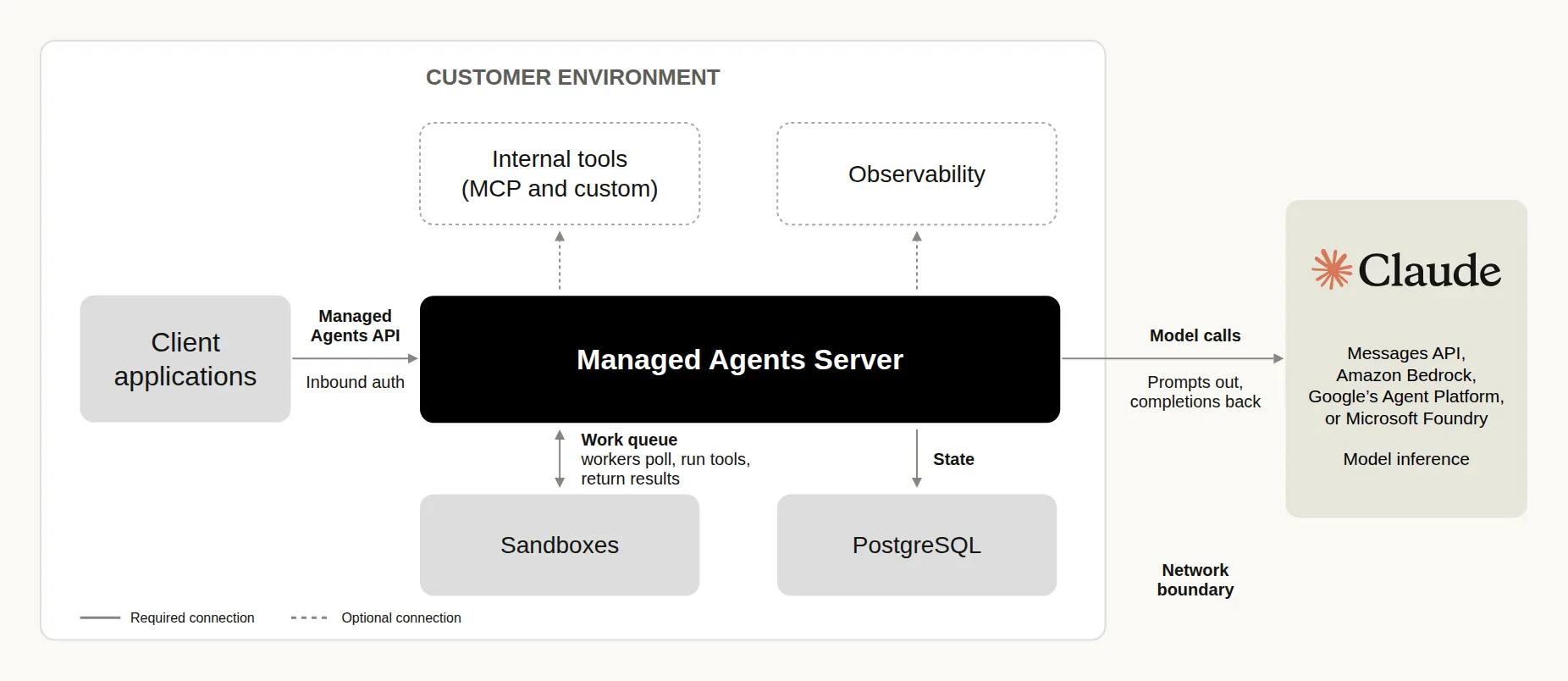
You will end with a development stack running on one machine and one agent session that ran a shell command inside its own sandbox container. The stack has three parts you operate. The server, named cma-server, serves the Managed Agents API, runs the agent loop and stores agents, sessions and session history. Workers take work from the server and run shell and file tools inside your sandboxes. The server itself never runs those tools.
You will also learn where the boundary really sits. For each model call, the server sends the conversation so far, tool inputs and tool results included, to your inference provider. Anthropic says it has no remote access to your server or its logs. The record and the keys stay home. The prompts still travel, and Step 9 is where you decide where they travel to.
Before You Begin
Read the gaps first, because they are the sort that end projects politely in week two. Nothing copies over from the hosted service, session history included. You recreate agents, skills, vault credentials and memory stores on your own server. Only self_hosted environments exist, and a request for a cloud environment returns a 400 error. The server does not serve the Messages API or the Models API, and calls to /v1/messages and /v1/models return 404.
The missing list runs longer. File session resources and the Files API do not exist, though memory_store resources work. The server rejects mcp_oauth vault credentials, because it has no OAuth flow to refresh a token, so you store tokens as static_bearer credentials and rotate them yourself. It rejects agents that declare the prebuilt docx, pdf, pptx and xlsx skills, so you upload those skills as custom skills instead. Scheduled deployments, dreams and webhooks have no routes at all. Web search and web fetch start switched off, and what you can switch on depends on the provider you pick in Step 9.
One scope note on honesty. Access to this beta is gated, so this tutorial was verified line by line against the Anthropic docs and was not run on a test machine. Every command below comes from the quickstart, the inference provider page or the differences page, all named in Sources. Where the docs show a secret value, this tutorial shows a placeholder.
Three credentials run the whole setup, and mixing them up causes most early confusion:
| Credential | Who holds it | What it does |
|---|---|---|
| Server API key | Your apps, the ant CLI and the admin CLI | Authenticates requests to your server. Setup generates it. It plays the role a Claude API key plays with the hosted service |
| Inference credential | The server only | Authenticates the server model calls to your provider, such as a Claude API key or a cloud credential |
| Environment key | Your workers | Lets a worker poll one environment work queue and reach that environment sessions |
Step 1: Get the Archive and Unpack It
Action: contact your Anthropic account team and request access to self hosted Claude Managed Agents. There is no public download and no self serve signup in the docs. When the team sends the release archive, unpack it and work from its compose directory. Replace <archive> with the archive name, without .tar.gz.
tar -xzf <archive>.tar.gz && cd <archive>/compose
Expected result: you are inside the compose directory, beside docker-compose.yml. If your umask is stricter than 022, the binaries lose execute permission for other users and the server container cannot start them. In that case, set the umask to 022 and unpack the archive again. Each release archive also ships an operator-guide.md file. The docs suggest having Claude read that file, so Claude can help you configure the server for that exact release.
Step 2: Create the .env File
Action: create the .env file beside docker-compose.yml, using the block from the quickstart. Compose reads the stack secrets from this file. The block sets four values. Two are generated passwords and keys for the stack itself, one is the key that encrypts the server stored secrets, and one is your Claude API key, which you add by hand.
CMA_PG_PASSWORD=<generated value from the quickstart block>
ANTHROPIC_API_KEY=sk-ant-...
CMA_SERVER__API_KEY=<generated value from the quickstart block>
CMA_STORE__CREDENTIALS_ENCRYPTION_KEY=$(openssl rand -base64 32)
chmod 600 .env
Expected result: the file exists with tight permissions, the placeholder sk-ant-... now holds your real Claude API key, and the other three values hold the generated values from the quickstart block. Open the file in an editor to make that one replacement, and do not print the file to a shared terminal log afterwards.
Step 3: Start the Stack
Action: build and start the stack, then follow the server log. Stay in this terminal for every docker compose command in the whole tutorial. The reason for that discipline arrives in Step 5.
docker compose up --build -d
docker compose logs -f cma-server
Expected result: the log shows a line with msg="cma-server listening". Press Ctrl+C to stop following the log. The stack is now running the server, its PostgreSQL database and a set of workers, with one sandbox container per session once sessions start.
Step 4: Check That the Server Is Ready
Action: ask the server for its readiness status.
curl -s http://127.0.0.1:8400/cma-server/readyz
Expected result: a ready server answers with "status":"ready". Right after a start, it can answer "status":"degraded" for a few seconds while its first checks run. If it stays degraded, or answers "status":"not_ready", go to Troubleshooting before you create anything.
Step 5: Point the CLI at Your Server
Action: open a second terminal in the same directory and keep it for ant work. Set the base URL to your server, and set the API key to your server API key from the .env file. That value is not your Claude API key, and the docs devote a whole page to that distinction.
export ANTHROPIC_BASE_URL=http://127.0.0.1:8400
export ANTHROPIC_API_KEY=<your server API key from .env>
Expected result: ant commands in this terminal now talk to your server instead of the hosted service. Keep them here. If you run docker compose up in this terminal, Compose passes these variables to the server, and the server calls itself instead of the Claude API. That one mix up explains a large share of failed first runs.
Step 6: Create an Agent
Action: save a file named quickstart-agent.md with the content below, then apply it. The file gives the agent the built in toolset and lets it run those tools without asking you first. The model name is a Claude API ID, and it stays valid even if you change providers in Step 9, because the server translates the ID for the provider that serves that model.
---
name: Quickstart agent
model: claude-opus-5-5
tools:
  - type: agent_toolset_20260401
---

You are a helpful assistant.
ant apply --yes quickstart-agent.md
Expected result: the command first prints a warning that it could not determine the organization and workspace, with a 404 error, and then creates the agent. The docs say that warning is expected on your own server. Do not chase it.
Step 7: Start a Session
Action: find the agent and the stack environment, then start a session and keep its ID. The Compose stack names its environment compose-sandbox.
AGENT_ID=$(ant beta:agents list --format raw --transform 'data.#(name=="Quickstart agent").id' --raw-output)
ENVIRONMENT_ID=$(ant beta:environments list --format raw --transform 'data.#(name=="compose-sandbox").id' --raw-output)
SESSION_ID=$(ant beta:sessions create --agent "$AGENT_ID" --environment-id "$ENVIRONMENT_ID" --transform id --raw-output)
Expected result: SESSION_ID holds a value, and the session exists on your server, in your database, with no copy on the hosted service. A session takes a free worker when you create it, and the stack starts ten workers. A session that never gets a message can hold its worker for up to an hour, a fact that matters in Troubleshooting.
Step 8: Ask the Agent to Run a Command
Action: connect your terminal to the session, then send the exact message below.
ant beta:sessions connect "$SESSION_ID"
Run `hostname` with the bash tool and tell me the output.
Expected result: the agent replies with a hostname that starts with cma-sandbox-. That name is the sandbox container that ran the command, which confirms the tool ran inside a sandbox and not on your machine. Leave the chat open, go back to terminal one, and list the sandbox containers to see the same name in Docker output.
docker ps --filter label=cma-server.sandbox
The container exits about a minute after a turn ends, and the next message starts a new one. If the list is empty, ask the agent to run hostname again and list the containers while it replies. To leave the chat, press Ctrl+C in its terminal. The session keeps running without you.
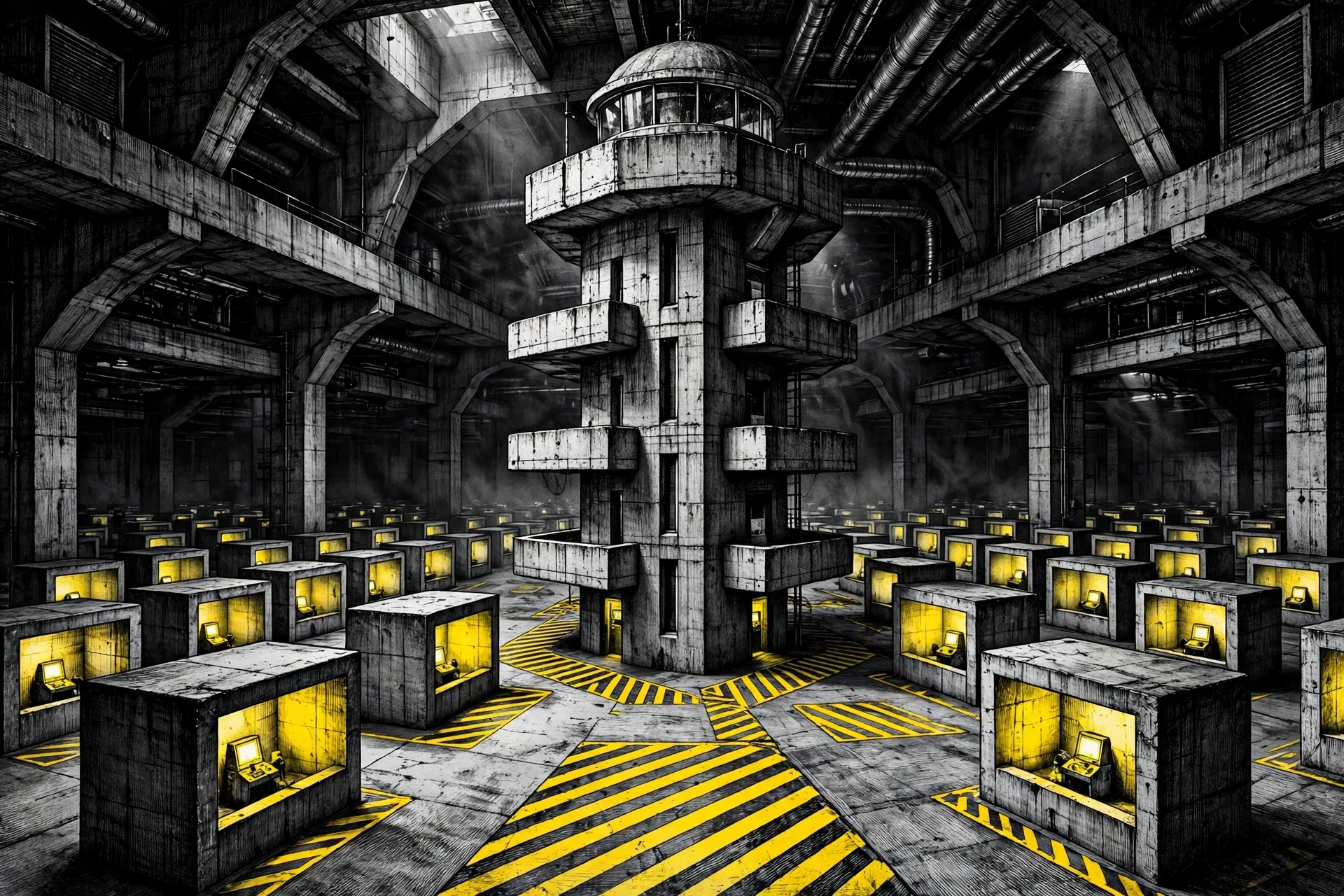 One chamber per session, one tower over all of them. The server directs the work, and the workers run the tools. Illustration: Dirty Static
Step 9: Choose Where Model Calls Go
Action: decide the inference provider now, while the setup is still small. The inference.provider setting in the server settings file takes five values. anthropic is the default and sends calls to the Claude API. bedrock sends them to Amazon Bedrock. vertex sends them to Claude Models on Google Cloud. foundry sends them to Microsoft Foundry. gateway sends them to a model gateway you run yourself. Under every value except anthropic, the server needs no Claude API key.
This sample routes calls to Bedrock. Put it in the server settings file, give the server the provider credential as the inference provider page describes for your install, and restart the server. On Compose, if you changed .env or docker-compose.yml to pass that credential, run docker compose up -d instead, because a plain restart does not reread those files.
inference:
  provider: bedrock
  region: us-east-1
  #model_id_prefix: global.anthropic.
  #model_id_overrides:
  #  claude-opus-5-5: us.anthropic.claude-opus-5-5
Expected result: the server signs its calls with whatever the AWS SDK default credential chain finds on the host, and it prefixes each model ID with us.anthropic. by default, which names a cross region inference profile. The AWS identity the server signs with needs bedrock:InvokeModel and bedrock:InvokeModelWithResponseStream on the models and profiles you use, plus bedrock:ListFoundationModels and bedrock:ListInferenceProfiles on resource *. Start a new session after the restart and confirm the agent still answers. Our research review of the beta weighs this provider choice in full, because it is the decision that decides what the word private means in your deployment.
Verification
Run these checks before you call the setup done:
- The readiness call in Step 4 answers
"status":"ready". - The agent in Step 8 reports a hostname that starts with
cma-sandbox-, anddocker psin terminal one shows that container while the turn runs. - The session and its history live on your server. Stop the stack from terminal one with the command below, start it again, and confirm the session record survived, because the database holds it.
docker compose down --remove-orphans
docker compose up -d
That stop command deletes the containers and keeps the database. Add -v to it only when you want the database, with every agent, session and session history in it, deleted as well. That is a destructive choice, so treat it as one.
- If you changed the provider in Step 9, a new session answers after the restart, and your provider console or gateway log shows the model call arriving on the route you chose.
Before You Call It Production
The Compose stack proves the shape. It does not harden it. For production, Anthropic recommends the two Helm charts in the release archive, named cma-server and cma-sandboxes, on a Kubernetes cluster at version 1.30 or later. That route needs the Agent Sandbox controller, nodes that run gVisor, a network plugin that enforces NetworkPolicy, a PostgreSQL 16 or later database outside both charts, a registry the cluster can pull from, and cluster admin rights for the install.
The server speaks plain HTTP on port 8400 on that route too, so TLS belongs in front of it before any client outside the cluster connects. The Kubernetes page sets the terms for that front door. Paths pass through unchanged, request bodies up to 32 MiB pass, responses pass unbuffered, and the proxy never resends a POST and never caches a response. Read that page in full before you install anything, and treat one deployment per trust level as the rule. The docs are blunt on that point, because the server API key reaches every environment in a deployment.
Troubleshooting
| Problem | Likely cause | Fix |
|---|---|---|
Your archive has no compose directory | The archive holds an earlier release, and the quickstart commands do not match it | Ask your Anthropic account team for the current release. For a running deployment, follow the upgrade page in the docs |
| The server never comes up | The one time migrate container failed, so the database tables were never created | Run docker compose logs migrate. It must exit with status 0 before the server starts |
Readiness stays degraded, or every turn fails | You ran docker compose up in the terminal where ANTHROPIC_BASE_URL points at your own server, so the server calls itself | Run docker compose up -d again in terminal one, where that variable is not set. Then read the server log with docker compose logs -f cma-server |
Readiness answers not_ready and the failed check is upstream | The Claude API rejected your Claude API key | Correct ANTHROPIC_API_KEY in .env, run unset ANTHROPIC_API_KEY in the shell if it sets its own value, then run docker compose up -d again in terminal one |
Readiness answers not_ready and the failed check is database | The database rejected the server login, or a connection to the database broke | Read the server log with docker compose logs -f cma-server to see which of the two it was, then fix the password or the connection |
| The agent replies, but its tool call never finishes | No worker is polling the environment, or a worker cannot reach the Docker daemon socket | Check the workers with docker compose logs sandbox. If the log names CMA_DOCKER_SOCKET, set that variable in .env to your daemon socket path, then run docker compose up -d again in terminal one |
| Workers run, but a tool call still waits | All ten workers are taken by sessions that never got a message, and each holds its worker for up to an hour | List the sessions behind the containers with docker ps --filter label=cma-server.sandbox --format '{{.Label "cma-server.session"}}', leave the chat with Ctrl+C, and archive each unused session with ant beta:sessions archive --session-id <session-id> in terminal two. Then connect to your session again |
| An agent that worked on the hosted service fails here | It uses a feature the self hosted server does not have, such as a cloud environment, a file resource or a prebuilt document skill | Read the differences page in Sources and rebuild that part the self hosted way. Nothing migrates, so expect rebuild work, not import work |
Next Steps
Take the production read next. Work through the Deploy on Kubernetes page in the docs with your platform team, and price the real cost of ownership while you read. You install each release yourself, you back up a database that holds every conversation, and the server licence, in launch coverage of its text, gives you eight hours to roll back after a safety notice and one working day to apply a safety update. Control is the product here, and operations are its price.
Then run one bounded real job before you widen anything. Pick a backlog task with a result you can check by hand, watch the session record it leaves behind, and test the failure modes on purpose. Restart the server and confirm the history survived. Revoke a credential and confirm the agent fails in a safe way. Point the agent at a host you never listed and confirm the sandbox cannot reach it. An agent you have watched fail well is one you can start to trust with work that matters.
Facts, commands and settings checked against Anthropic documentation on November 13, 2026. Availability is private beta and can change. This procedure was verified against those documents and was not presented as a personal test run, because release access runs through an Anthropic account team.
Sources
- Anthropic Docs, Self hosted Claude Managed Agents, overview, credentials and what runs where: https://platform.claude.com/docs/en/managed-agents/self-hosted
- Anthropic Docs, Get started with self hosted Claude Managed Agents, the Compose quickstart this tutorial follows: https://platform.claude.com/docs/en/managed-agents/self-hosted/quickstart
- Anthropic Docs, Differences from the hosted service: https://platform.claude.com/docs/en/managed-agents/self-hosted/differences
- Anthropic Docs, Inference provider: https://platform.claude.com/docs/en/managed-agents/self-hosted/inference-provider
- Anthropic Docs, Deploy on Kubernetes: https://platform.claude.com/docs/en/managed-agents/self-hosted/kubernetes
- Anthropic, Claude Platform release notes, November 12, 2026 launch entry: https://platform.claude.com/docs/en/release-notes/overview
- Anthropic, Operate Claude Managed Agents inside your security perimeter, November 12, 2026: https://claude.com/resources/articles/self-hosted-claude-managed-agents
- Diagram: Anthropic, from the self hosted announcement and docs
- Hero and sandbox chamber illustrations: Dirty Static
END OF TRANSMISSION
Stay curious. Question everything.