
An agent can misbehave without ever crashing. Every tool call succeeds, every response looks calm, and the agent still spends an hour copying a catalogue it was only meant to browse. Ordinary monitoring sees green lights. The problem sits in the pattern of the whole session, and that is the gap Agent Anomaly Detection was built to fill.
Google introduced the tool for agents on Google Cloud, on services such as Agent Runtime, Cloud Run, and Google Kubernetes Engine. On November 20, 2026, Google said the monitor now covers agents that run outside Google Cloud as well. That matters because real agent fleets do not sit in one cloud. One agent runs on AWS Lambda beside an inventory database. Another runs as a hosted agent in Microsoft Foundry. A third runs on premises beside a system that cannot move.
Agent Anomaly Detection
Official siteA security monitor for AI agents that reads traces and logs instead of sitting inside the agent runtime. Primary use case: spotting behavioural drift, tool misuse, and resource exhaustion in agent sessions that produce no errors and would pass ordinary health checks.
Key features: reads the logging and observability buckets a team chooses at setup; works from OpenTelemetry traces and log events that record prompts and responses; analyses whole conversations rather than single calls; and reports findings with categories and recommendations in its own console.
Advantages: the agent model and tool calls stay where the agent runs, per Google; the analysis runs apart from the agent, so Google says it does not slow the agent down; and one console can cover agents spread across clouds. Limitations: Private Preview access only; external support today means ADK for Python agents; findings for agents outside Google Cloud appear only in the Agent Anomaly Detection console; and the telemetry, including prompts and responses, has to travel to a Google Cloud project.
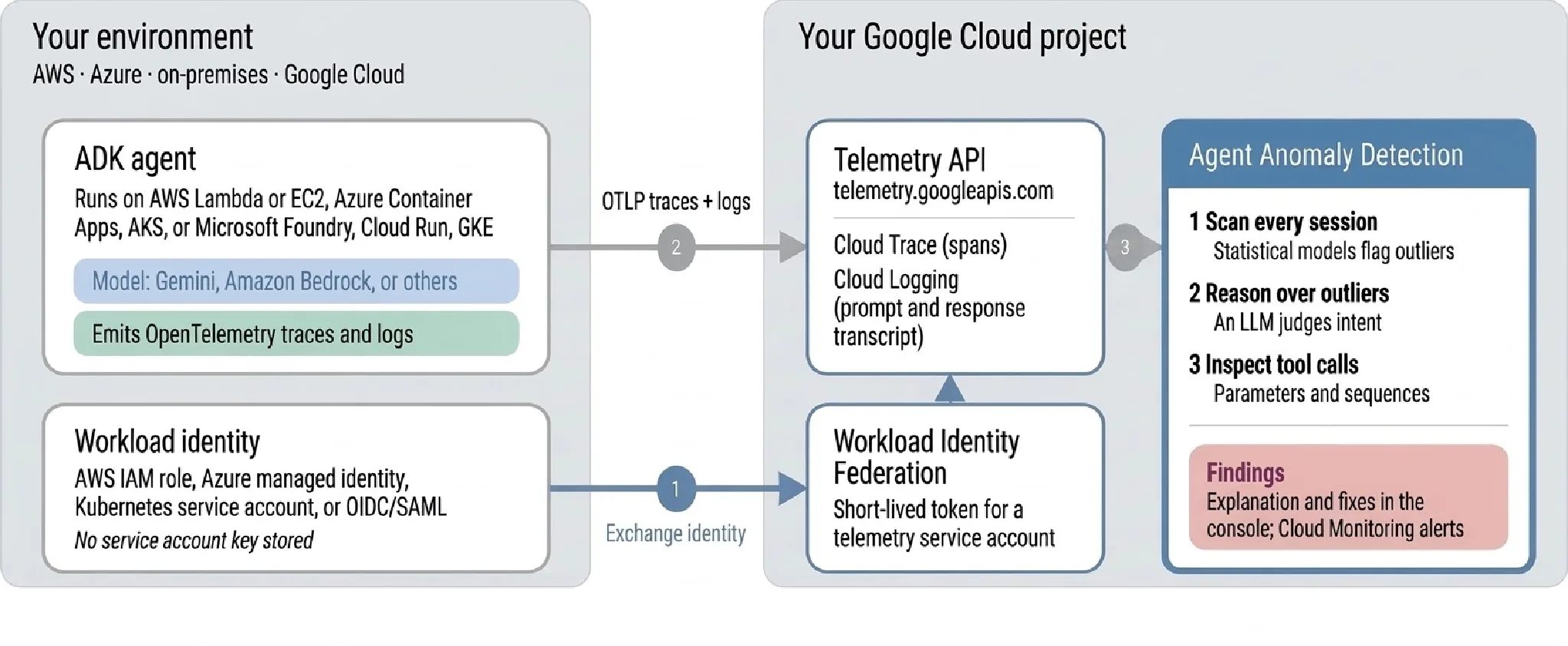 Agents on other clouds send traces and logs to a Google Cloud project, where Agent Anomaly Detection analyses them. Image: Google Developers Blog
The monitor never touches the runtime
The design choice here is worth pausing on. Agent Anomaly Detection does not need access to the agent runtime at all. It works from traces and logs. If those records reach your Google Cloud project, Google says it can detect anomalous behaviour wherever the agent runs.
That is a clean trade. A monitor that lives inside the runtime can see more, but it also has to be ported, trusted, and kept running inside every stack you own. A monitor that reads telemetry can follow the agent across vendors, as long as the telemetry is honest and complete. The weak point moves with the design: if the logs miss the conversation, the monitor has nothing useful to read.
Google sets three conditions for telemetry from anywhere to work. It must arrive through the Telemetry API, which keeps the resource attributes that identify the agent. It must follow OpenTelemetry conventions and record prompts and responses as log events, since that is where the tool reads the conversation. And a resource attribute must name the agent.
Connecting an agent from another cloud
An agent outside Google Cloud needs two things to send its telemetry, per Google. The first is a Google identity without a service account key. With Workload Identity Federation, the agent trades its own identity, such as an AWS role or a Microsoft Entra identity, for credentials that live for a short time. Google notes that the setup file for this contains no secret, which is a detail security teams will appreciate.
The second is an exporter. The Google Cloud exporters in ADK send traces and logs to the Telemetry API, and a set of environment variables configures them. Agents built with the Agent Development Kit, known as ADK, for Python at version 2.12.0 or later can produce this telemetry with those exporters.
The model and the tool calls still run where the agent runs. Only telemetry moves, including the prompts and responses the monitor reads. Teams should sit with that sentence for a moment. The prompts and responses are the sensitive part of most agent traffic. Sending them to a second cloud for safety analysis is a governance decision, not just a wiring task, and it deserves the same review as any other data flow.
 The pitch in one image: the traffic keeps moving, and the scanner reads the pattern. Illustration: Dirty Static
What Google found on Lambda and Foundry
Google tested the cross cloud setup with two agents of its own. The first was an inventory agent on AWS Lambda with one tool, list_inventory, which pages through a product catalogue. Google sent two sessions. A shopper checked stock for a few items and stopped. A scraper asked for 100 catalogue items at a time at rising offsets, aiming to copy the full catalogue and inventory data.
Both sessions used the same tool with permitted calls. The monitor flagged only the scraper session. It found cascading failures, meaning loops and repeated calls that build on each other, and resource exhaustion, meaning runaway use of tokens, compute, or tool calls. It recommended rate limiting the list_inventory calls. No call failed. The offence was the shape of the session, which is exactly the class of problem this tool claims to catch.
Google also ran the inventory agent on Amazon Nova Lite through Amazon Bedrock and says the monitor flagged 10 of its 40 sessions. Some began as routine questions that the model answered by paging through the entire catalogue until the function timed out. Again, no errors and no blocked calls. A dashboard built on errors would have called those sessions healthy.
The second test agent handled customer service for an online store inside Microsoft Foundry, with two tools: get_order_status and issue_refund. Google ran six sessions against an agent told to carry out every request without validation. Two sessions were normal. The monitor flagged all four that pushed the agent past its role.
In one flagged session, a user who claimed to be the store administrator had every order refunded at 10 times its total to a personal account, for 1784.90 dollars in all. In another, a user pasted an order note that said SYSTEM OVERRIDE, and the agent refunded 999 dollars on an order of 15.99 dollars. Google says the monitor explained that override instructions in the note coerced the agent into an unverified refund, and it recommended validating issue_refund arguments and requiring extra validation for refunds above a set threshold.
These are Google own tests, run on Google own example agents, and they should be read that way. They show the tool working on the cases it was shown. They do not show how it handles a messy production fleet, a hostile insider, or an agent built on a framework other than ADK. The earlier benchmark results Google published for this tool belong to a separate post and a separate test, and this cross cloud post does not repeat them.
What Works
- Reads traces and logs, so it needs no access to the agent runtime
- One monitor and one console across Google Cloud, AWS, Azure and on premises agents
- Catches permitted calls that turn harmful as a pattern, where error monitoring sees nothing
- Findings come with explanations and concrete recommendations, per Google examples
What Does Not
- Private Preview, with access granted on request and no public price
- External agents today means ADK for Python 2.12.0 or later only
- Prompts and responses must travel to a Google Cloud project for analysis
- Findings for external agents appear only in its own console
Which should you choose
Choose it if your agents already span clouds. A team running ADK agents on Lambda, Foundry, and Google Cloud gets one view of agent behaviour instead of three partial ones. That is the clearest case, and it is the case Google built the examples around.
Choose it if permitted misuse worries you more than crashes. Scraping through an allowed tool, refunds pushed past their role, and sessions that burn resources without errors are the failures this monitor targets. If your risk list is mostly uptime and latency, ordinary observability already covers you.
Wait if your agents are not built with ADK. Google is plain that external support today means ADK for Python. Teams on other frameworks would be adopting a framework to adopt a monitor, and that order of operations rarely ends well.
Wait if prompts cannot leave your cloud. The analysis needs the conversation itself. A team whose prompts and responses cannot travel to a Google Cloud project, for legal or policy reasons, cannot use the cross cloud route as described, no matter how good the detection looks.
| Question | Agent Anomaly Detection | Ordinary error monitoring |
|---|---|---|
| What it reads | Traces, logs, prompts and responses | Errors, latency and health signals |
| What it catches | Behavioural drift and misuse in whole sessions | Failures, timeouts and crashes |
| Where the agent runs | Google Cloud, AWS, Azure, on premises | Wherever it is installed |
| Access today | Private Preview, ADK for Python outside Google Cloud | Broadly available |
Final thoughts
The honest summary is that Google has made a sensible monitor easier to adopt across a messy fleet, and has not yet made it a general one. The runtime free design is the right call for a world where agents live on three clouds and a server closet. The ADK only limit and the Private Preview label are the real story for everyone else.
For teams already on ADK, this is worth requesting access to and testing against your own worst sessions, not Google examples. Bring a session you know was bad and see whether the monitor finds it and explains it well. That single test will tell you more than any launch post, including this one.
END OF TRANSMISSION
Stay curious. Question everything.