
Dirty Static // The Verdict
A faster and cheaper way to build verified lists from the live web, worth trying on your own hard search before you trust the headline gains.
Best forResearch, sales, and product teams that need structured lists of companies, people, products, or papers that match several conditions at once
What works
- Exa says jobs run four times faster, with accuracy and recall both up 20 percent and 20 percent more matches on average
- The monthly subscription is gone, usage draws from existing Exa credits, and the API is open to all users on the usage plan
- Every row carries sources and reasoning, so a match can be checked instead of trusted blindly
- Published pricing examples show easy searches costing far less per match than the old fixed Pro rate
What does not
- All headline gains and both benchmarks come from Exa itself, on sets of only 20 queries each, with no outside check
- Usage pricing charges for the work a search does, so a hard search that finds few matches can cost about the same per match as before
- Leaving a legacy Starter or Pro plan for usage pricing cannot be undone, per Exa
- A variable bill is harder to budget than a flat subscription, especially for large recurring jobs
Research review: based on published testing, specifications, and documentation, not hands on testing.
Some datasets do not exist until someone builds them. There is no ready made list of every climate tech startup in the United States whose founder published a paper since 2023, or of every university lab working on solid state batteries with the faculty names attached. Websets is Exa and its tool for that exact job. You describe what you want in plain language, and it goes hunting through the live web and returns a table where each row had to earn its place.
V2, released on 17 November 2026, is a speed and price release. Exa says datasets now build four times faster and cost about half as much per result, and that the monthly subscription is gone. Those are the claims worth testing, because the product underneath them was already unusual.
What It Is
Websets builds lists. You set the conditions, and it searches the web, reads what it finds, and checks each candidate against every condition before the candidate becomes a row. Exa says the pool it draws on covers more than 1 billion people, 70 million companies, 1.2 billion products, and 500 million research papers, alongside live web data.
Each match becomes a row in a dataset. You can add enrichment columns for extra details you want compared, such as a link to the code repo behind a paper, the research focus of a lab, or the recent work of a company. You can review the source behind each result and export the dataset for further work.
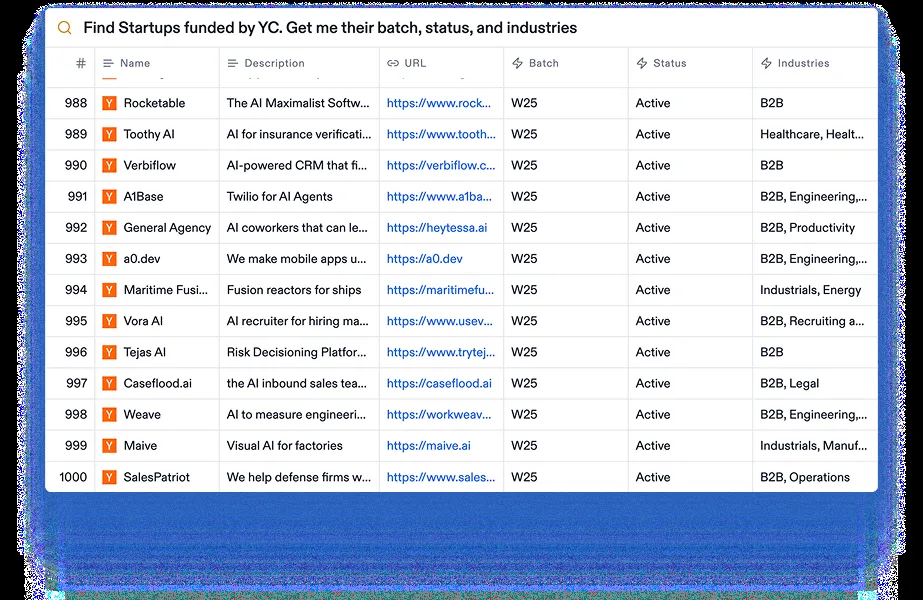
An example 1,000 row dataset in Websets, in a screenshot from Exa. The columns are the product: the list is built to be compared, not just read.
Features and Specifications
| Item | Websets V2 detail, per Exa |
|---|---|
| Input | A plain language description of the set you want |
| Sources | Live web data plus an index of 1B+ people, 70M+ companies, 1.2B+ products, and 500M+ research papers |
| Output | Structured rows, each with sources and reasoning for the match |
| Enrichment | Extra columns you define, filled per row |
| Speed claim | Four times faster than V1 |
| Quality claim | Accuracy and recall both up 20 percent; 20 percent more matches on average |
| Access | Web dashboard and API, with API access open to all users on the usage plan |
| Billing | Exa credits, shared with the rest of the Exa account |
The important design choice is verification. A normal search engine ranks pages that look relevant. Websets has to decide, candidate by candidate, whether the evidence meets all of your conditions, and then show its reasoning. That is slower and more expensive than ranking, and it is also the whole point. A list you cannot audit is just a guess with good formatting.
Real World Experience
This is a research review. We did not run Websets jobs for this article, so what follows is drawn from the Exa announcement, its published pricing examples, and outside coverage of the launch, and it is labelled that way on purpose.
The published examples show the shape of the work. Exa points readers to example datasets covering healthcare companies that mention AI in their 10-K filings, publications in the United Kingdom on AI in ecommerce, and 1,000 Y Combinator startups with batch and industry data. Those are good demonstrations because none of them is a list you could simply download. Each one needs searching, reading, and judgement across many sources.
The speed claim matters for a practical reason. A verified search can run for a long time, because the service is reading and reasoning about candidates one by one. Cutting that time to a quarter changes how people work. You can afford to rewrite your criteria and run the job again, instead of accepting the first list because the second one would take too long.
What Works
The pricing change is the most concrete improvement, because it can be checked against published numbers instead of adjectives. Legacy Pro pricing charged a fixed rate that works out to $0.045 per match. Under usage pricing, Exa and its examples put an easy search, investment professionals at Vanguard, at $0.001 per match for 100 matches, and independent search engines at $0.006 per match. Even the mid range example, semiconductor equity analysts at major investment firms, lands at $0.012 per match.
Removing the subscription also removes a bad incentive. A team that needs one serious dataset a month no longer has to buy a monthly plan to get it, and API access being open to all users on the usage plan means a workflow can be automated without first upgrading a tier.
The audit trail still sets Websets apart. Sources and reasoning on every row mean a sales team, a researcher, or a journalist can spot check the list before acting on it. In a market full of tools that hand you a spreadsheet and ask for faith, showing the work is a real feature.
What Does Not
The evidence problem is plain. Exa designed the benchmarks, ran the benchmarks, and published the benchmarks. Company FindAll and People FindAll each use 20 queries, which is a small sample for claims as broad as 20 percent better accuracy and recall. The comparison names in those charts, Claude Code, Gemini 3.1 Pro, and Parallel FindAll, were also chosen and run by Exa. None of that makes the numbers false. It does make them a starting point, not a verdict.
The switch itself deserves care. Existing Starter and Pro users get the speed and quality gains on their own, but they only get the new pricing by moving to the usage plan, and Exa says staying on an existing plan keeps existing pricing. Outside coverage of the launch notes the move cannot be undone. Read the billing page before you click anything.
Finally, a metered bill cuts both ways. Enrichment columns and broad criteria burn compute and searches, and the cost per match depends on how hard your matches are to find. A team running large jobs every week will need its own tracking, because the invoice will not be a flat line anymore.
Competition
| Option | What it gives you | The trade |
|---|---|---|
| Exa Websets V2 | Verified datasets from a plain language brief, with sources and reasoning per row | Usage pricing that varies with search difficulty; gains so far measured only by Exa |
| A general agent harness, such as Claude Code or Gemini 3.1 Pro | Flexible research loops you control, using tools you already have | In Exa and its own benchmarks both returned fewer verified matches at a higher cost per match; you also build and maintain the loop yourself |
| Parallel FindAll | A rival set finding product aimed at the same kind of query | Priced and positioned differently; in Exa and its charts it cost more per verified match, which is Exa grading a rival and should be read that way |
| Manual research with a search API | Full control over sources, criteria, and spend | The slowest route by far, and the verification work lands on your team |
The honest reading of this table is that Websets competes mostly against doing the work yourself, by hand or with an agent you supervise. Its pitch is that the loop, the verification, and the table are already built. That pitch is strong even if you discount the benchmark charts entirely.
Cost per verified match in Exa benchmarks, USD
From the Exa V2 announcement: average cost per match in Company FindAll and People FindAll, 20 queries each, run by Exa. Company and People figures shown side by side as published averages.
Final Verdict
Try Websets V2 if your work needs lists that do not exist yet and you need to defend how each row got there. The product design is sound, the subscription removal is welcome, and the published pricing examples show real savings on searches that are not brutally hard. Run one of your own hard searches first and price the result. That single test tells you more than any vendor chart, including the ones in this article.
Hold off on switching a legacy plan until you have done that test, because the move is one way. And treat the 20 percent quality claims as unproven until someone outside Exa runs a larger set of queries. The speed and price story is enough to justify a trial on its own. It did not need the extra shine.
Facts checked 28 November 2026.
Sources
- Exa, Websets V2 announcement, 17 November 2026: https://exa.ai/blog/websets-v2
- Product Hunt, Exa Websets V2 launch page, 21 November 2026: https://www.producthunt.com/products/exa-ai/launches/exa-websets-v2
- AlphaSignal, coverage of the Websets V2 launch and pricing: https://alphasignal.ai/news/exa-s-websets-v2-runs-4x-faster-at-half-the-cost-for-web-research
- Image credit: dataset screenshot from Exa, via the V2 announcement.
END OF TRANSMISSION
Stay curious. Question everything.