
Hermes Agent ships lean and grows through plugins. The official catalog now lists more than 900 of them, each one reviewed by a human and pinned to an exact commit. This roundup checks ten standouts against the catalog and their GitHub repos: an email inbox, a Spotify remote, a bot factory, a 3D printing pipeline, a memory wiki, and the bridge that lets other agents read your Hermes chats.
A stock Hermes Agent is a strong engine with no attachments. It can reason, browse, run code, and remember, but it cannot check an inbox it does not own, play a song, print a bracket, or lend its conversations to the other agents on your machine. Plugins close those gaps, and there are suddenly a lot of them. The official Plugin Catalog, the curated directory maintained inside the NousResearch hermes-agent project, listed 909 entries when we pulled it on October 31, 2026: 879 community plugins, 20 official ones, and 9 verified ones.
That number matters because a slideshow now doing the rounds on TikTok claims Hermes has “860 free plugins” and flashes ten plugin cards at speed. The slideshow itself carries an AI generated label, so we treated every card as a rumour and checked all ten against the catalog and GitHub. The good news: all ten are real, all ten are MIT licensed, and the catalog has already outgrown the slideshow’s count. The corrections are in the details, and they are noted in each section below. If you are new to Hermes itself, start with our setup tutorial and come back here once the agent runs.
How catalog installs work
Every catalog entry arrives through a pull request reviewed by a maintainer, and every install is pinned to the exact commit that was reviewed. When an author ships new code, what the catalog installs does not change until the entry is reviewed and pinned again. One command does the work, and a second one switches the plugin on:
hermes plugins install <name>
hermes plugins enable <name>
Before anything is cloned, the install prompt shows the entry’s capability summary: the tools it declares, the hooks it registers, and the environment variables it needs. Plugins install per profile, so a plugin added to your default profile does not leak into your work profile. Read the summary. It is the cheapest security review you will ever do.
1. print3d
print3d
Official siteprint3d is the most theatrical plugin in the catalog. You describe a part, show it a photo of a knob, or paste the listing of a bracket you would rather not buy. The agent writes a Blender script that builds the part, print3d runs the mesh through its checks (overhangs, thin walls, fits between parts, and likeness to your photo), slices it in Bambu Studio, and reports what to fix. The loop repeats until the part prints clean, and each run writes a 3D view you can turn around in the Hermes Desktop preview pane.
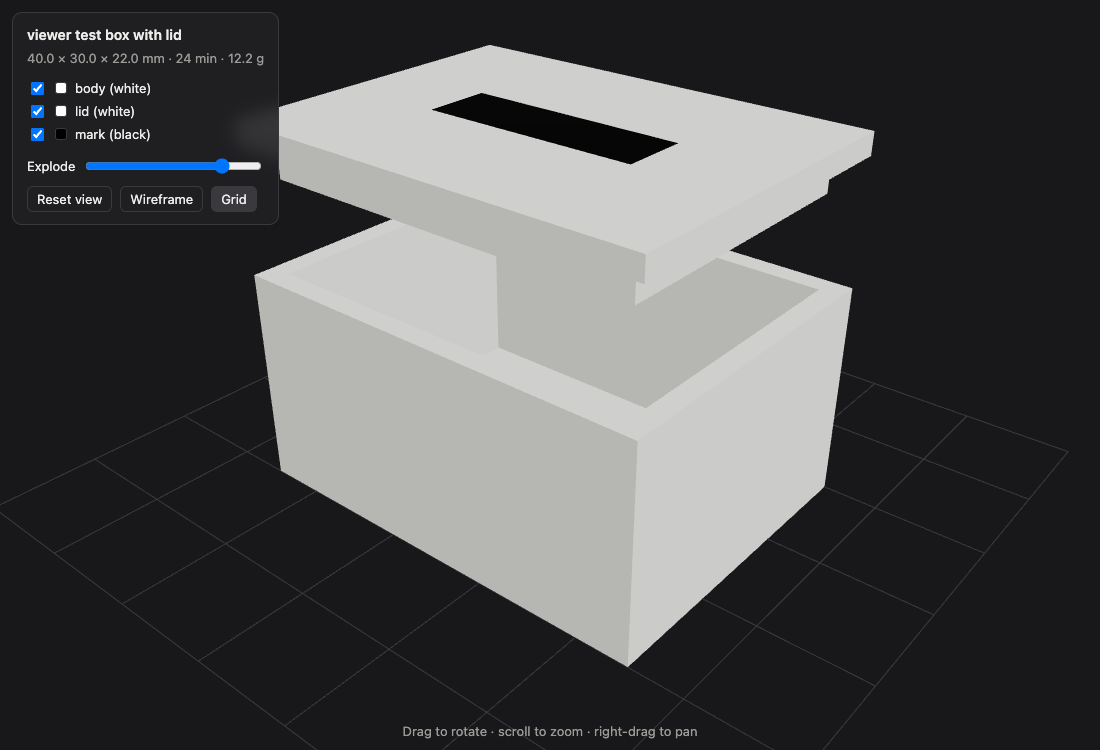 The print3d 3D view from the project README: a lidded box pulled apart so the fit can be inspected before printing.
hermes plugins install print3d
The catch is the toolchain and the target. You need Blender 4.2 or later, Bambu Studio, and uv on the same machine as Hermes, and the profiles are built for a Bambu Lab X2D or P2S with a 0.4 mm nozzle. Nothing talks to the printer: you get a .3mf file, open it in Studio, and print it yourself. Version 0.1.0 is early, and the slideshow’s “472 stars” card was already stale when it posted; the repo sits at 519 today.
2. bot-forge
bot-forge
Official siteWhere most plugins add a tool, bot-forge adds staff. Say “make me a social media manager” and it spawns a complete bot: name, face, SOUL.md persona, memory, tools, skills, routines, and gateway, tested before it reports for duty, with rollback when a build fails. One call can hire a whole crew, and the check_agents tool leads with whatever is waiting on you, then runs a health check over routine costs, paused routines, stopped gateways, and bots nobody uses.
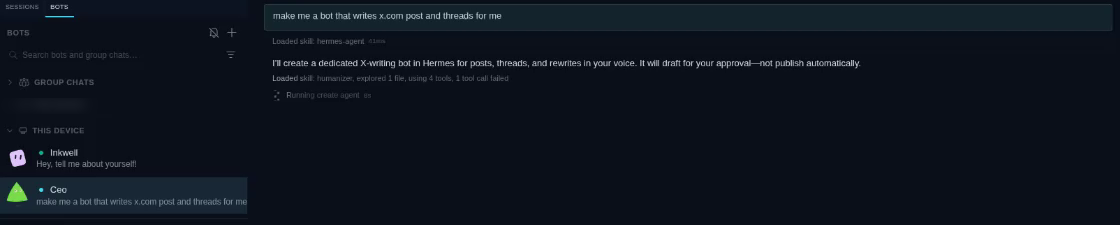 Bot Forge at work in the project README: one request in, one named and introduced bot out.
hermes plugins install bot-forge
The disclosures are printed on the catalog card and worth reading twice. Bot Forge spawns the hermes CLI to create and run bot profiles under your Hermes home, and it installs a small companion hook plugin into every bot profile it manages. Each bot is a real profile with its own sign ins and its own routine schedule, so the power is genuine and so is the sprawl. Start with one bot, not a department.
3. openmail
openmail
Official siteEmail is the oldest interface every client, boss, and relative already has, and openmail hands it to your agent. Mail to the agent’s address wakes it with no public URL and no webhook; the agent reads the thread, works, and replies in thread. Three modes shape the behaviour: channel mode answers as email, notify mode starts a turn but delivers the summary to your home channel and never replies to the sender, and tool mode ignores inbound mail and keeps the nine send, read, and inbox tools on request.
 OpenMail’s banner, from the project’s GitHub organisation. The plugin repo itself ships no screenshots.
hermes plugins install openmail --enable
Two gates decide who may write to the agent: OpenMail’s own sender rules run first, then Hermes checks its allowed users list, and unknown senders are dropped in silence. That gate is the whole ballgame. An agent that answers email is an agent that can be written to by anyone who learns the address, so set the allowed list before you run the gateway, and keep the API key (OPENMAIL_API_KEY) scoped the way the setup tool suggests.
4. workflow-record
workflow-record
Official sitehermes record, and one skill that turns a recording into a replayable browser workflow through /learn.Everyone has a browser task they have explained to an agent eleven times. workflow-record lets you show it once instead. The recorder attaches to a Chromium family browser (Chrome, Chromium, Brave, or Edge) over the DevTools protocol, watches the active tab, and saves the demonstration as a JSON recording: clicks with their selectors and labels, field values captured when you leave the field, Enter presses, and navigations. In a Hermes chat, /learn reads the recording and writes a skill that replays the flow with the browser tools.
 The Hermes Labs repo card. workflow-record ships no screenshots of its own, which suits a tool that watches you instead.
hermes plugins install workflow-record
The secret handling is the reason to trust it. Password, one time code, and card fields are masked inside the page before anything crosses the wire, masked again before the file is saved, and recordings stay on your machine. The limits are equally plain: one tab at a time, no Firefox or Safari, flows that open popups stop being captured, and a secret typed into an ordinary text field is recorded as typed, so read the JSON before you share it. Labs means Nous built it and does not maintain it; the repo says so on the door.
5. hermes-teammates
hermes-teammates
Official site/teammates command give Hermes a roster of named sub agents, each with its own instructions, tools, and model, which it assigns work to and steers while tasks run.bot-forge builds whole bots that live their own lives. hermes-teammates is the tighter tool: a crew inside one agent. You define the roster in config (a reviewer, a scout, a test writer are the README’s example trio), give each teammate its own instructions, tools, and model, and Hermes delegates with teammate_assign, follows up with teammate_check and teammate_wait, steers mid task with teammate_message, and stops work with teammate_stop. Follow ups carry digests of earlier results, so the crew builds on its own work instead of starting cold each time.
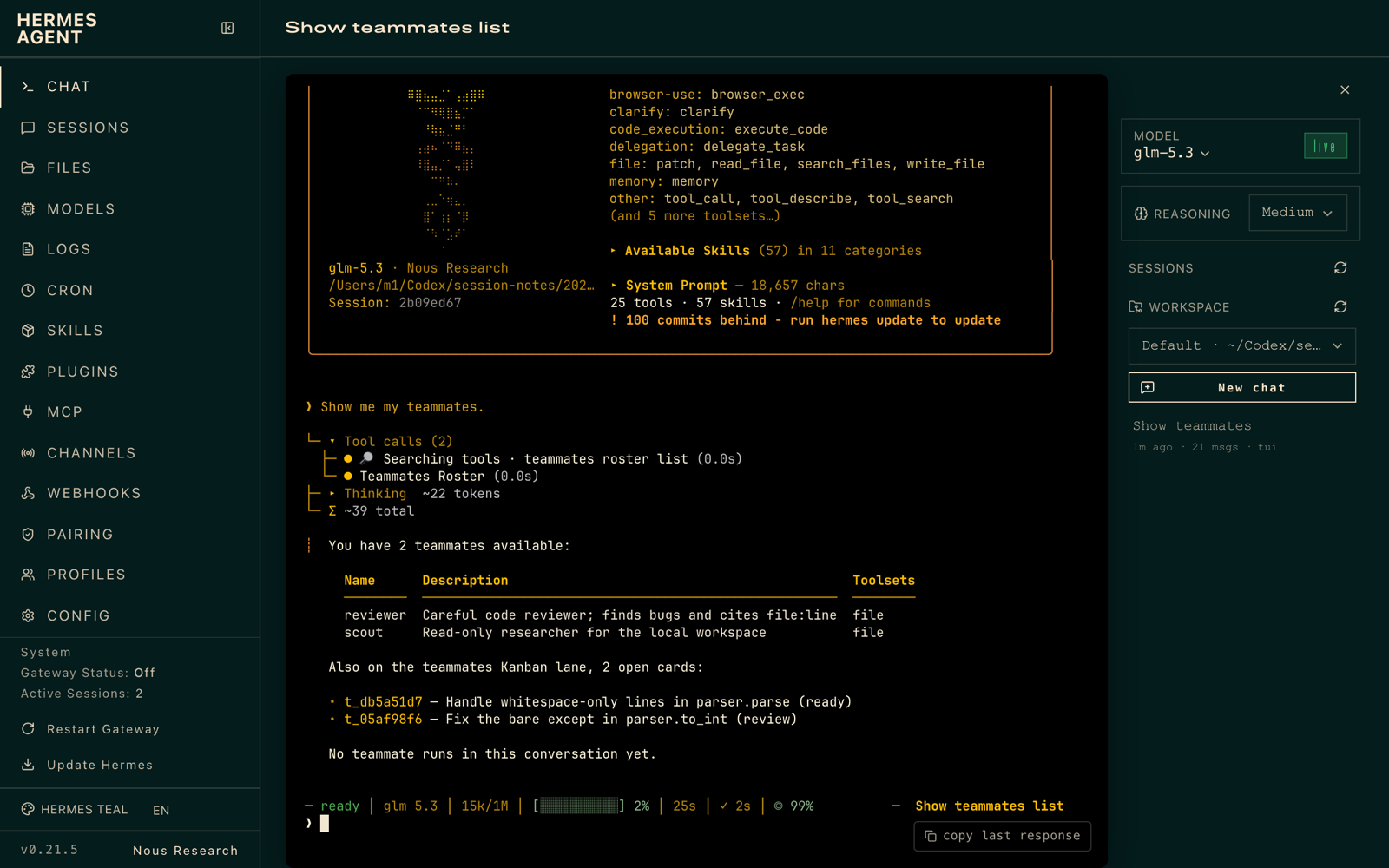 The roster from the project README. The operator writes the roster; the agent works it.
hermes plugins install hermes-teammates
It runs on stock Hermes through the public subagent lifecycle API, with no patched core, and it can work a Kanban lane whose cards end in a review handoff. The tradeoff is design work up front: the roster is yours to write and maintain, summaries are clipped to a fixed budget in the ledger, and a badly briefed teammate fails exactly the way a badly briefed human does, only faster. One spelling correction to the slideshow: the author is 100yenadmin, digits first.
6. claude-subscription-directsdk
claude-subscription-directsdk
Official siteIf you already pay for Claude Pro or Max, this plugin puts that plan to work as the brain of Hermes. It drives the unmodified Claude Code executable as a request scoped model client: Hermes keeps its own agent loop, tools, approvals, and compaction, while the model calls ride your subscription. There is no API key to buy or guard, because there is no API key at all. The plugin checks that the claude CLI exists and is logged in at load, in the model picker, and before every request, and refuses cleanly with the install hint when it is missing.
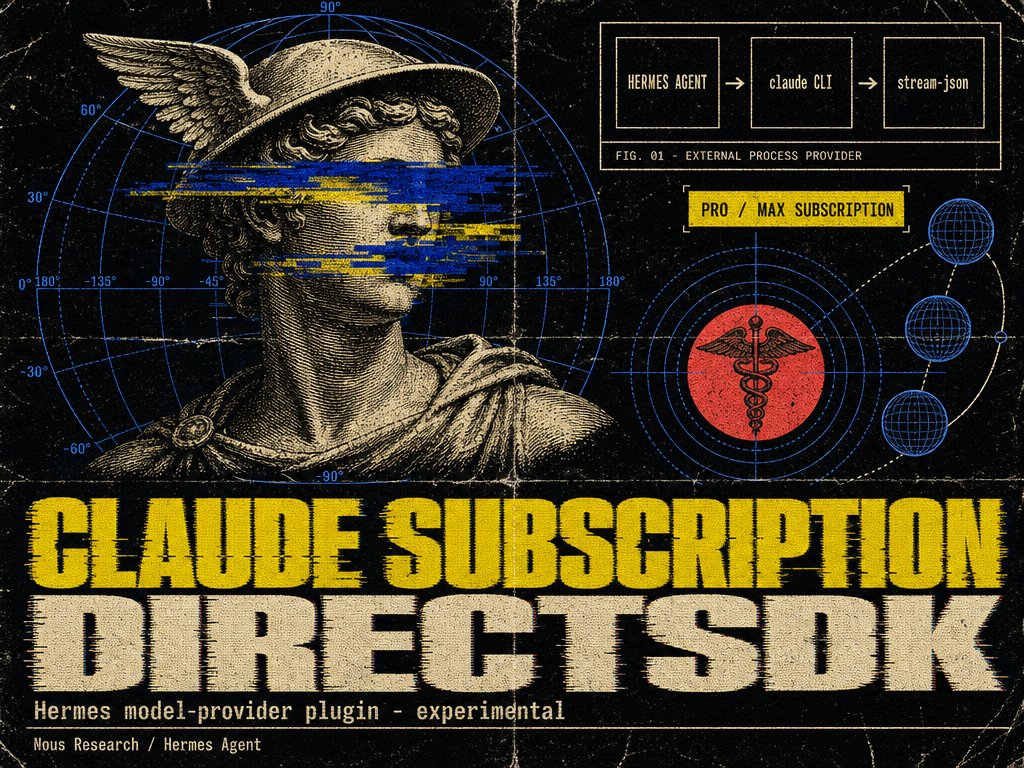 From the plugin folder in the official plugins repo: the request path, Hermes to CLI to subscription.
hermes plugins install claude-subscription-directsdk
Read the metering line before you celebrate. Every turn bills against your subscription’s Agent SDK allowance, metered the same way as claude -p, and plan rules still apply: on Pro, some models draw pay as you go usage credits from the first request, while Max includes them up to a share of weekly limits. The README is honest that this is a review build rather than a full parity claim, with unsupported surfaces listed in print (assistant prefill, forced tool choice, parallel call switches, and remote image downloads among them). The slideshow said version 0.3.1; the catalog now pins 0.3.3.
7. spotify
spotify
Official sitehermes spotify login command.The friendliest plugin on the list is the one that lets your agent run the music. Ask for a playlist while you cook, move playback to the speaker in the room you just walked into, or queue the album you half remember; the seven tools cover playback state, Connect devices, the queue, search across tracks, albums, artists, and shows, playlist editing, and your saved library. This used to be built into Hermes core, and existing users are migrated automatically with their logins intact.
 The plugin’s banner in the official plugins repo on GitHub.
hermes plugins install spotify
hermes tools enable spotify
hermes spotify login
Two honest frictions. Spotify requires every user to register their own small developer app, because a shared public client is not allowed; the login wizard walks you through creating one and pasting its client ID. And playback control (play, pause, skip, seek, volume, queue adds, transfers) needs Spotify Premium plus an active Connect device, while search, playlists, albums, and library work on a free account. Neither friction is the plugin’s fault, and both are disclosed before you install.
8. hermes-memory-wiki
hermes-memory-wiki
Official siteHermes remembers more than you can see, and this plugin is the window. It opens your local session database read only and derives the wiki deterministically (no model calls, no writes): subject pages built from session titles, file paths, tool names, and commands; a log for each day; the ten most recent sessions; and a Persistent Memory panel that renders your MEMORY.md and USER.md entries exactly as the memory tool parses them, so you can audit what the agent believes about you and your projects.
 The plugin’s banner in the official plugins repo on GitHub.
hermes plugins install hermes-memory-wiki --enable
The slideshow’s route names check out, with one qualifier: the HTTP routes (GET /overview, /subjects, and /days, plus one subject and one day lookups) live under the dashboard’s own plugin path and behind its normal sign in gate, so this is a local dashboard surface, not a public web page. It needs Hermes 0.21 or later. What it will not do is improve the memory itself; it shows you the state of the brain so you can decide what to fix with the memory tool.
9. job-search
job-search
Official siteJob boards reward keywords and punish judgement. job-search inverts the work: you write a paragraph about the role you want, the scope, the autonomy, the background you bring, and the things you refuse, and the agent judges every new posting against that prose. Matches arrive as strong, moderate, or weak, each with the reason attached; the plugin deliberately assigns no scores. Postings come from LinkedIn Jobs, Ashby, Greenhouse, and Lever, pulled through the agent-data command line tool, and everything the search produces (preferences, run records, digests) stays on your machine.
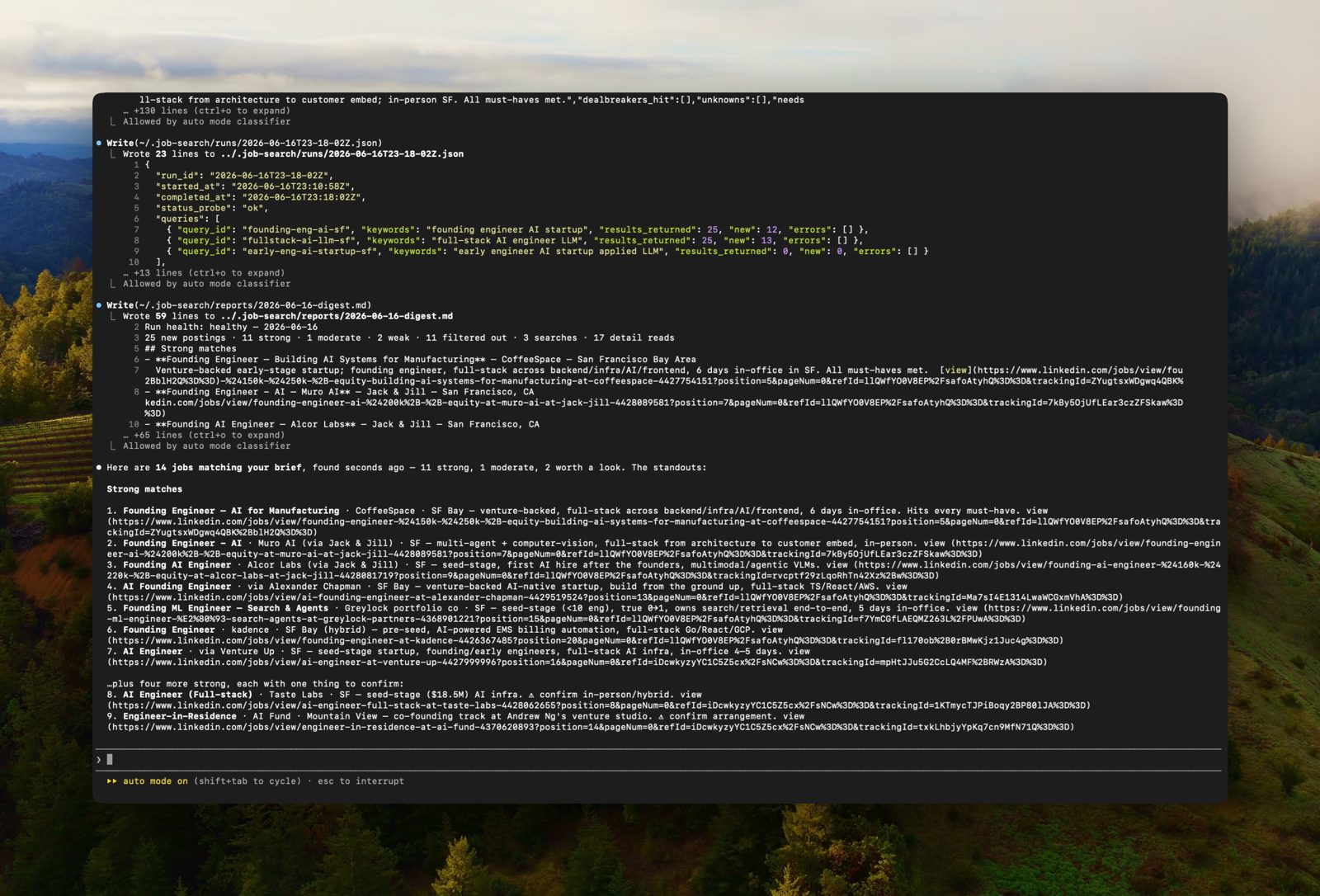 The digest view from the project README: matches with the reasoning shown, not just links.
hermes plugins install job-search
The meter to watch is the data pipe. agent-data gives a free tier of 100 calls a month with no card required, and the README estimates a typical run at roughly 10 to 30 calls, so a daily scheduled search can drain the free tier inside a week. Coverage is the second limit: four sources, however good, are not the whole market. Within those lines, this is the rare job tool that reads the posting instead of counting its keywords.
10. mcp-serve
mcp-serve
Official siteEvery agent tool on your machine wants its own inbox, and mcp-serve ends the duplication. Point an MCP client at hermes mcp-serve and it sees the conversations Hermes already runs across Telegram, Discord, Slack, WhatsApp, Signal, and Matrix: ten bridge tools to list conversations, read messages, fetch attachments, poll or wait on live events, send through Hermes’ own delivery path, and respond to approval requests. An optional --tools flag also exposes Hermes’ web, browser, vision, image generation, skills, and speech tools to the client.
 The plugin’s banner in the official plugins repo on GitHub.
hermes plugins install mcp-serve
The safety boundary is drawn in the right place and stated in print: terminal, file, code execution, and delegation tools are never exposed, whatever your profile enables, because they would hand the client a shell outside Hermes’ approval prompts. The disclosure on the other side deserves equal attention: the connecting client reads the active profile’s conversation history and can send messages as you. Formerly this lived in Hermes core as hermes mcp serve; the plugin renames the client arguments to ["mcp-serve"], and sending needs the gateway running, though reading does not.
The ten, side by side
| Plugin | Type | What it does | Needs |
|---|---|---|---|
| print3d | Community | Photo or idea to a sliced Bambu print file | Blender 4.2+, Bambu Studio, uv |
| bot-forge | Community | Builds whole named bots from one prompt | Hermes profiles; a model per bot |
| openmail | Community | A real email address that wakes the agent | OpenMail account and API key |
| workflow-record | Labs | Records a browser task into a replayable skill | Chromium browser over CDP |
| hermes-teammates | Community | Named sub agents with their own models | A roster you define in config |
| claude-subscription-directsdk | Official | Runs Hermes on a Claude Pro or Max plan | Claude Code CLI, logged in |
| spotify | Official | Seven Spotify tools over the Web API | Spotify account; Premium for playback |
| hermes-memory-wiki | Official | Browsable wiki of sessions and stored memory | Hermes 0.21+ and the dashboard |
| job-search | Community | Reads postings, sends a filtered digest | agent-data CLI; free tier caps calls |
| mcp-serve | Official | Hermes as an MCP server for other agents | An MCP client such as Cursor or Codex |
Which should you choose
Install hermes-memory-wiki first if you are new to plugins. It asks for nothing, risks nothing, and teaches you how the catalog, the enable step, and the dashboard fit together, while showing you the state of your agent’s memory as a bonus.
Choose openmail and mcp-serve if your agent work lives in conversations. openmail gives Hermes an address the outside world can reach under a sender gate you control. mcp-serve gives your other agents the inbox Hermes already has. Together they cover both directions of the messaging problem.
Choose bot-forge or hermes-teammates when one agent is no longer enough. bot-forge suits standing roles that run on schedules of their own. hermes-teammates suits a single hard job that benefits from a reviewer and a scout inside the same session. Do not install both on day one; learn one delegation model at a time.
Choose print3d, spotify, and job-search for the life you actually live. A printer in the corner, music in every room, a job hunt that reads postings while you sleep: these three are the plugins a non developer will feel within the week. workflow-record belongs in the same drawer for anyone whose work repeats inside a browser.
Choose claude-subscription-directsdk if you already pay for Claude. It is experimental and metered against your plan’s agent allowance, so read the usage page before a long run, but for a Max subscriber it turns a sunk subscription into the engine of a self hosted agent.
Final thoughts
The catalog is the story underneath the list. A human reviewed directory, pinned commits, capability summaries before install, and 909 entries eight weeks after a 100 entry launch: that is what a plugin ecosystem looks like when somebody minds the door. The ten here were chosen because each one changes what Hermes is, not just what it can open. Install the wiki first, read every capability summary after that, and let the agent earn each new sense one at a time.
Sources
- The Plugin Catalog, its review model, and every entry cited: Plugin Catalog, Hermes Agent docs
- Catalog entry data and the 909 entry count, pulled October 31, 2026: plugin-catalog.json
- print3d source, requirements, and viewer image: mfranzon/print3d on GitHub
- bot-forge source, tool list, and demo image: BkashJEE/hermes-bot-forge on GitHub
- openmail source and setup: openmailsh/hermes-plugin on GitHub; banner image from the openmailsh GitHub organisation
- workflow-record source, masking rules, and limits: NousResearch/hermes-labs-plugins on GitHub
- hermes-teammates source and roster image: 100yenadmin/hermes-teammates on GitHub
- The four official plugins, their READMEs, and their banner images: NousResearch/hermes-official-plugins on GitHub
- job-search source, sources list, and digest image: agent-data/job-search on GitHub
- Hermes Agent itself: NousResearch/hermes-agent on GitHub
END OF TRANSMISSION
Stay curious. Question everything.