
Running an agent on a laptop is the easy part. Running one in production means the work must survive a crash, keep its secrets out of code, pause for a person when an action is sensitive, and leave a record a team can audit later. Most teams end up building that plumbing themselves, and the plumbing becomes the project.
Mistral Studio now sells the plumbing as the product. On November 5, 2026, Mistral expanded its enterprise platform with managed agents and apps, plus new work on workflows, context, observability and evaluations. Managed Agents is the headline piece, and it sits in public preview, which means you can use it now while its API, behaviour and limits can still change.
Mistral Studio
Official siteAn enterprise platform for building agents, workflows and apps, now with a managed runtime for agents. Primary use case: long running agent work that must keep going after your app exits, resume after a crash, wait for approvals, and run with company tools and data under set boundaries.
Key features: an agent defined once as a model plus a harness, with tools, connectors, MCP servers, skills, secrets, guardrails and custom hooks; per session sandboxes where an agent can run code; subagents that split a job across child agents; tracing in Studio with one span per model call and tool call; and a wider release that adds a workflow builder, an apps CLI, webhooks and triggers, and evaluations built from production traces.
Advantages: one codebase moves from a laptop to a managed deployment without a rewrite, per the docs; Mistral stores deployed sessions, so you host no session database; and the platform pitch pairs the runtime with deployment choice, including Mistral cloud, your own cloud or VPC, and on premises for Studio as a platform. Limitations: Managed Agents and the SDK are in public preview and an update can require code changes; no per run price for the managed runtime was published in the sources checked; and the Studio overview limits traces and evaluations to Enterprise tier organisations.
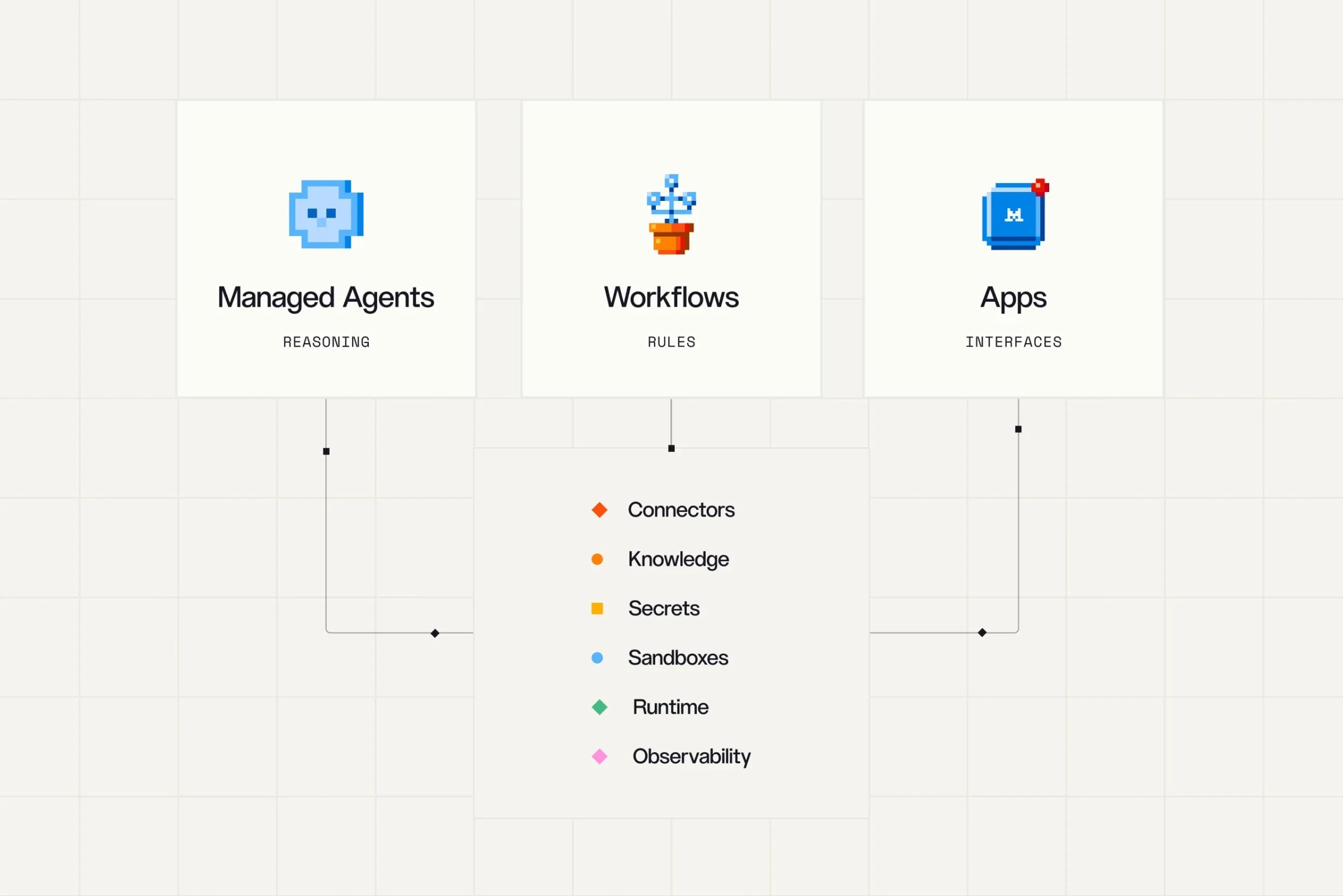 Agents reason, workflows follow rules, and apps give people an interface. The three share one base in Studio. Diagram: Mistral
What an agent is here, in plain terms
Mistral defines an agent as a model plus a harness. The model decides the next step, to answer or to call a tool. The harness runs the loop, calls the model, runs the tools the model picks, and records each step in a session.
A session is the record of what happened, with one entry per message, tool call and result, grouped in turns. The environment is the computer the agent works on, by default none, and with a sandbox it can run shell commands and edit files in its own container. You also decide which tool calls need approval, and that approval can come from your code or from a person.
That vocabulary matters because it tells you where Studio stops and your work starts. Studio runs the loop and stores the record. You still write the instructions, pick the tools, set the boundaries, and own the judgement about what an agent may touch. Our profile of Tinker made a similar split one layer down: the provider runs the heavy work, and the part that cannot be rented stays yours.
One codebase, three places to run
The strongest claim in this release is portability of effort. You define the model, the instructions, the tools and the environment once. Then you choose where the harness runs, and the docs say the agent code does not change when the choice does.
| Run mode | How you start it | Who runs the harness | What happens to the session |
|---|---|---|---|
| In your process | agents.Agent(...) in your code, or agents chat | Your program | It lives in your process and ends with it |
| Self hosted | agents serve | You, on your own servers | Mistral stores it; it survives a crash |
| Mistral managed | agents deploy | Mistral | Mistral stores it; it survives a crash |
Read the middle row with care. Self hosted here does not mean fully apart from Mistral. The harness and your tools run on your servers, which suits tools that must stay inside your network, while Mistral still stores the session. That is a reasonable trade for many teams, but it is a trade, and the docs state it plainly.
 One agent, three lanes. The code stays the same while the place it runs changes. Illustration: Dirty Static
The scaffold helps the first hour. The release notes say agents init scaffolds a working project, and the Studio docs require Python 3.12, 3.13 or 3.14 for the Agents SDK and the Workflows SDK. Authentication runs through an API key from your Studio workspace, stored as MISTRAL_API_KEY where the SDKs read it.
Durable work, with published limits
A demo agent can afford to die when your laptop sleeps. A production agent cannot. Once you deploy, in either hosted mode, execution is durable and runs in the background. A task can run for hours or days, your app can exit and come back for the result, and if the machine running the work crashes, the turn continues from its last finished model call or tool call.
The docs publish the default limits, and they deserve a table because they shape what you can promise users.
| Limit | Default in the docs |
|---|---|
| Session end | After 24 hours |
| Idle end | After 4 hours with no turn running, or a turn only waiting for you |
| Approval wait | 1 hour, even while your app is closed |
Both session limits can be raised, per the docs. Still, the default shape is clear: a task that runs for days does so because someone raised a limit on purpose, not because the platform forgot to end it. That is good design, and it is also a setting your team must own before a long job starts, not after it stops.
The rest of the November 5 release
Managed Agents did not ship alone, and the company around it explains the strategy. Studio wants the agent, the process around it, and the screen people use to live in one place.
Workflows cover the parts of a process that follow fixed rules, with Studio keeping state and retrying steps that fail, and a workflow can include agent steps. The new workflow builder turns a plain language description into a workflow that Vibe writes, tests and deploys, with code you can inspect and edit. Apps give people a place to review results and approve actions, with their own backend, authentication and access controls, and the new mistral apps commands scaffold, run and deploy them. Webhooks and triggers start workflows and agents when something happens in your tools, and HTTP API connectors, in private preview, let agents call a web API without anyone building an MCP server for it.
The model paired with the launch is Mistral Large 4, which Mistral calls Le Chonk. The announcement presents it as the flagship for coding, defensive cybersecurity work, and reasoning over complex documents and business tasks, on open weights. Treat the quality claims as Mistral claims. This desk has not run the model or the agent runtime, and no claim in this piece comes from a test of ours.
Mistral also names customers and partners it says already use Studio in production, including ABANCA, BNP Paribas and CMA CGM, with Accenture, Capgemini and Tata Consultancy Services among the partners. Its own examples claim large time savings, such as hundreds of hours a month from an incident investigation agent. Those figures come from Mistral, with no baseline stated in the announcement, so read them as vendor examples and not as measured results.
There is a quiet tension in the hosting labels. The announcement speaks of deployment in the cloud, in your own VPC, on premises, or across a mix, and that pitch is central to the sovereignty story Studio tells to banks and other careful buyers. The release notes, though, label the November 5 additions as Mistral hosted. A team that needs the new agent runtime inside its own perimeter should confirm, in writing, which pieces can run there today and which arrive later, before it designs around the full pitch. Our coverage of WordPress Studio hit a cousin of this point: the best path in a release often points back at the maker own hosting, whatever the wider menu says.
What it costs, and what is not priced
Here the record gets thin, and thin in a way a buyer should notice. No price for the Managed Agents runtime, per run or per hour, appears in the announcement, the release notes or the Studio docs checked on November 10, 2026. That does not mean the runtime is free. It means the meter you can read today is the model meter.
On the API pricing page checked the same day, Mistral Large 4 is listed at $0.70 per million input tokens, $0.07 per million cached input tokens, and $2.10 per million output tokens. An agent that thinks for hours will spend through tool calls and turns, so token spend is real spend, and it will vary with the work in a way a flat seat price never would. Budget from a small pilot, with traces on, before you scale a fleet of sessions.
Two gates sit beside the token meter. The Studio overview says traces and evaluations are available to Enterprise tier organisations only, which puts the tools for watching and improving agents behind the top tier. And the wider plan picture on Mistral pricing pages, as reported in coverage checked for this piece, includes a Free plan with Studio access, Pro at $14.99 a month, and Team at $24.99 per user a month, with Enterprise by contact. Those seat plans are not a runtime price for managed agents, and no reader should treat them as one.
What Works
- One Python definition runs in your process, self hosted, or managed by Mistral
- Durable sessions survive a crash and outlive your app, with published default limits
- Approvals, sandboxes, skills, secrets and guardrails sit inside the harness, not bolted on
- Tracing needs no setup, with one span per model call and tool call
What Does Not
- Public preview, with an API that can change and updates that can require code changes
- No published price for the managed runtime when checked on November 10, 2026
- Traces and evaluations are Enterprise tier only in the Studio overview
- The older Agents API is deprecated, so the platform has already moved its users once
Which should you choose
Choose Managed Agents if your agents must run for a long time and your team writes Python. Investigations, reviews and other work where the next step depends on what the agent finds are the shape this tool was built for. Start in your own process, prove the instructions and the tool boundaries, then deploy the same code when the work earns a durable home.
Choose the self hosted mode if your tools must stay inside your network. Payment systems, internal code and private data often cannot leave the perimeter for a tool call. With agents serve the harness and tools run on your servers, while Mistral stores the session. Check that split against your own rules before you commit, because stored sessions still leave your building.
Choose the Mistral managed mode if you want no runtime to run. Small teams with a real agent and no platform staff get the full promise here: durable work, sandboxes hosted by Mistral, and no session database to host. The price of that ease is trust in a preview service with no published runtime rate, so keep the first deployment small and measured.
Look elsewhere, or wait, if you need stable contracts and a known bill today. A preview API, a deprecated predecessor, and a missing runtime price are three good reasons for a careful enterprise to pilot in a corner and sign nothing broad yet. Look elsewhere, too, if your process is fully fixed in advance: the docs themselves point that work at Workflows, where your code decides each step and retries handle failure.
Final thoughts
Studio gets one big thing right. It treats the agent as the small part and the runtime, the record, the approvals and the controls as the real work, which matches how production agent projects actually fail. The three run modes are a clean answer to the oldest lock in fear in this market, because the code you write on a laptop is the code that ships.
What keeps this from an easy recommendation is not the idea. It is the stage and the silence around money. Public preview means the ground can move, the deprecated API behind it proves the ground has moved before, and a managed runtime with no published price asks buyers to start spending before they can model the bill. Pilot it where a failed run costs little, watch the traces if your tier allows them, and let Mistral earn the larger deployment by publishing the two things this release lacks: a stable API and a price.
Sources
- Announcement, managed agents, workflows, apps, deployment pitch and named customers: Build Enterprise Agents, Workflows and Apps in Mistral Studio, Mistral, November 5, 2026
- Studio overview, SDK versions, API keys, shared components and the Enterprise gate: Studio, Mistral Docs
- Managed Agents concepts, run modes, durable execution, session and approval limits: Managed Agents, Mistral Docs
- Release status, workflow builder, apps CLI, connectors, triggers and evaluations: Release notes, Mistral Docs
- Model token pricing for Mistral Large 4: API pricing, Mistral Docs
- Mistral Large 4 open weight release and its listed token prices: Mistral Large 4 (Le Chonk) is now open weight, Mistral
- Diagram: Mistral, from the November 5, 2026 announcement
- Other illustrations: Dirty Static, generated in house style
END OF TRANSMISSION
Stay curious. Question everything.